


 Google学术搜索按钮
可让您在浏览网页时查询学术文章。
Firefox

Lexia Reader
Oziku Technologies LLC · Firefox
阅读和学习速度提高 2-3 倍:用于阅读障碍的 OpenDyslexic 字体、用于集中阅读的线尺、用于眼睛疲劳的屏幕着色器。
4.5/5
19 人评分
231用户
v0.9.1.1当前版本
权限提示
该扩展申请访问所有网站(
<all_urls>),意味着它可以读取你在任意站点的页面内容,包括已登录的页面。这是许多扩展正常工作的必要条件,但也值得你确认来源可信。
截图
简介
📖📖📖 Pixie Accessibility & Productivity Reader main features summary:
✅ TTS: A text to speech voice reader (screen reader)
✅ Text Configurations: Change webpage styling for better readability includes dyslexia friendly fonts such as OpenDyslexic
✅ Screen Shader: Take care of your eyes and decrease eye-strain
✅ Reading Ruler: Focused reading mode
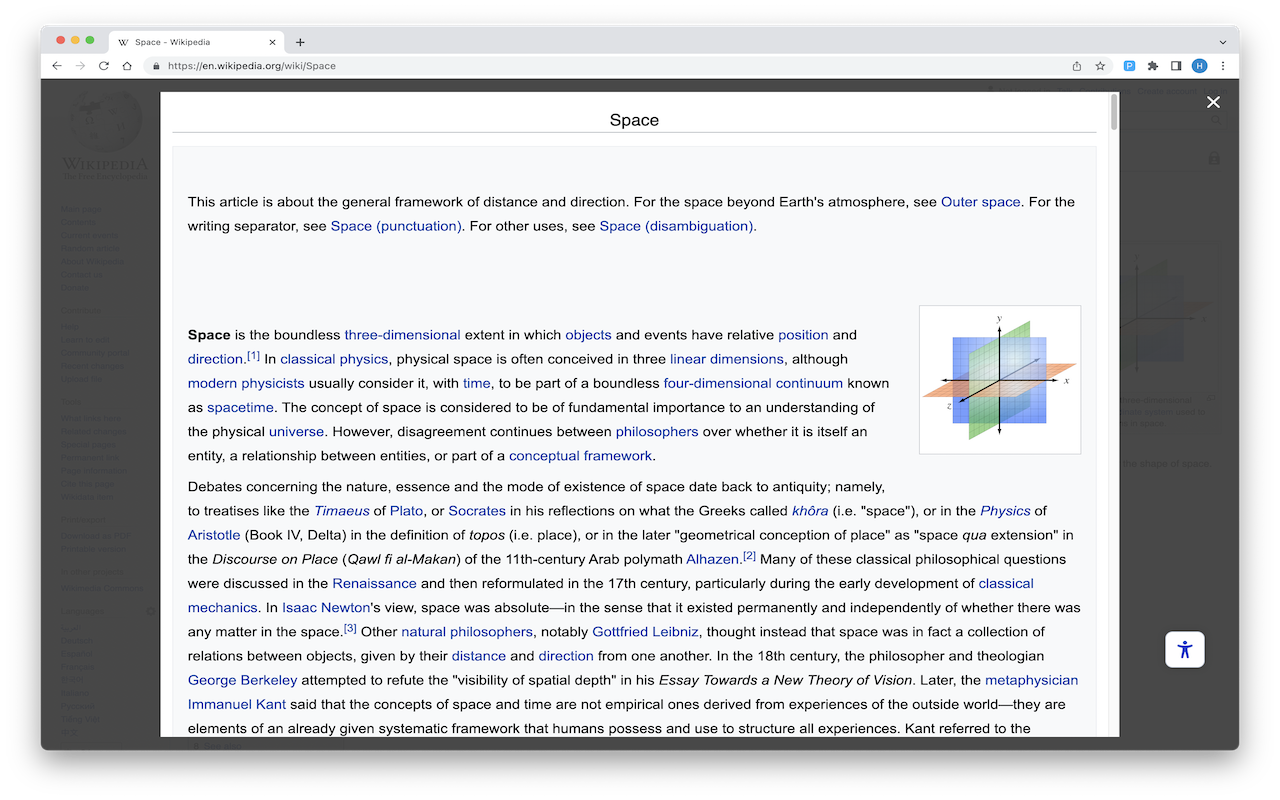
✅ Reader View: Read articles/blogs without distractions and ads
✅ Dictionary: View selected word definition (English only)
✅ ePub Reader: Read ePUB files right in your browser
✅ Color Schemes: Change contrast and saturation for better readability
🎨🎨🎨 Pixie Reader version 0.9.1 Web Browser extension/add-on Features:
📖📖📖 Pixie Sidebar Widget (Floating Icon):
✅ The widget will give you quick access to Pixie important features by hovering over the icon only
✅ Features include: Reader View, Dictionary, Mute, and Text to Speech voice reader
✅ You can open Pixie Reader sidebar by clicking Pixie widget accessibility floating icon
📝📝📝 TTS: Text to Speech Voice Reader (Screen Reader)
✅ Read aloud the current web-page
✅ This is an experimental feature in this version (Beta Version)
✅ Read This Page: This button will start the TTS by reading the current page
✅ Speed: How fast the TTS read the page. Comes with 3 options: Slow, Normal, and Fast
✅ Text Highlight: Highlight the text the is being read by TTS for better focus
✅ Next/Previous: Read next/previous paragraph. Accessible from the widget icon
✅ Pause/Stop: Pause or stop reading the current page. Accessible from widget icon
📝📝📝 Text Configuration
✅ Readable Fonts (Dyslexia Friendly): We provide a large set of specialized fonts (Dyslexia Friendly) that improve/enhance readability and focus:
🎨 Arial 🎨 Calibri 🎨 Century Gothic 🎨 Comic Sans 🎨 Courier
🎨 Helvetica 🎨 OpenSans 🎨 OpenDyslexic 🎨 Tahoma 🎨 Verdana
✅ Font Size: Control the font size of the text on the web page
✅ Font Bold: Bold the whole text on the web page
✅ Font Italic: Italicize the whole font on the web page
✅ Font Color: Change the color of the text on the web page
✅ Align Text: align the whole text with left, right, center, or justify alignment
📝📝📝 Text Spacing
✅ Between Lines: Increase the space between the text lines
✅ Between Words: Increase the space between the text words
✅ Between Letters: Increase the space between the text letters
🖥️🖥️🖥️ Screen Shader (Eyes Protection)
✅ This option allows you to shade/tint the screen to reduce the lighting and protect your eyes
✅ Adjust Tint Color: To enable/disable and to set the color to use to tint/shade the screen
✅ Tint Brightness: To control the screen shading level where you can set it to your preference lighting level
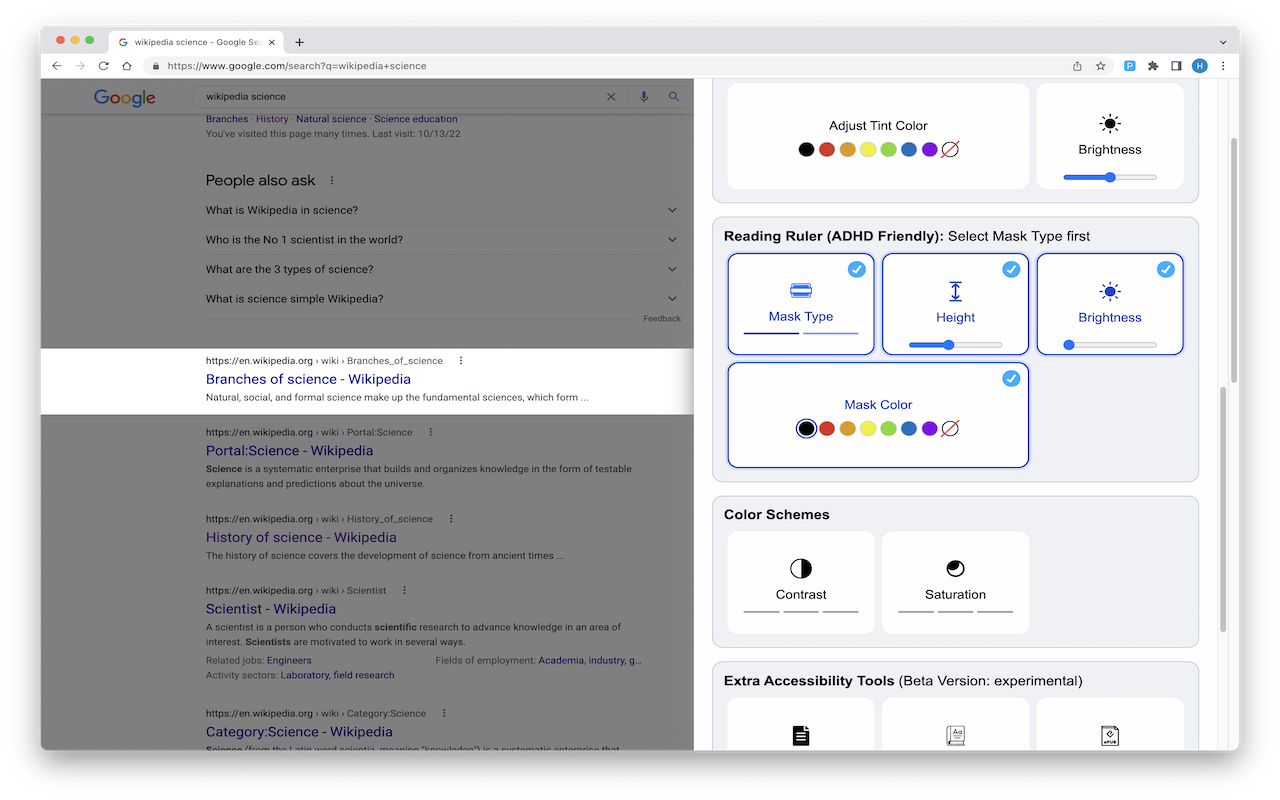
📝📝📝 Reading Ruler (ADHD Friendly)
✅ This option allows you to highlight the line where you hover the mouse on the screen
✅ Mask Type: Two types of reading ruler are provided in the extension
✅ Ruler Height: To control the size of the line highlight ruler to what is suitable for your need
✅ Ruler Brightness: Allows you to control how dim the area inside/outside the ruler. The inside/outside depends on the ruler type selected
✅ Ruler Color: To enable you to set the Reading Ruler color based on your preference
🖥️🖥️🖥️ Color Schemes
✅ Contrast: Control the colors separation level. Comes with Light Contrast, Dark Contrast, and Invert Colors
✅ Saturation: Control the intensity of colors. Comes with Low Saturation, High Saturation, and Desaturate
🖥️🖥️🖥️ Extra Tools
✅ Reader View: Remove all the distractions/ads from the current page and only keep the main text
✅ Dictionary: Get the meaning of the words by highlighting them. Works on English Language only
✅ Read ePub File: Read ePub files right in your browser
✅ Bigger Cursor: Change the cursor size to a bigger one with the option of white and black color
✅ Mute Sounds: This option will mute all sounds playing from any open tab. For example, a youtube or ad playing in the background. This option will disable the TTS in case it is reading a page
✅ Stop Animation: Stop all the moving parts (animated elements) of a webpage
✅ Highlight Links: Highlight all hyperlinks on a webpage for easier readability
✅ Hide Images: Hide all the images in the current page
✅ Sidebar Widget: to show/hide the sidebar icon
🎨🎨🎨 Upcoming Version Features
✅ Bionic Reading: Allows for Automatic Bionic Reading on any webpage
✅ Speech to Text (STT): Speedup your writing by using speech to text to type instead of the typing on the keyboard
✅ Google Apps: Provide support for Google Docs, Google Slides, and Google Sheets
✅ Hover Highlight: Highlight the text when hovering mouse cursor over
ℹ️ℹ️ℹ️ Support Email: support@oziku.tech
✅ All translations are done with a translator. For any wrong translation please reach out to us
✅ For any bugs found or feature request please do not hesitate to send us an email
Lexia Reader 是做什么的
Lexia Reader 是一款面向 Firefox 的外观主题类扩展,主要用来更换浏览器配色、给网页加深色模式、调整界面观感。官方对它的介绍是:阅读和学习速度提高 2-3 倍:用于阅读障碍的 OpenDyslexic 字体、用于集中阅读的线尺、用于眼睛疲劳的屏幕着色器。在Firefox 附加组件商店(AMO)上,它当前版本 0.9.1.1,评分 4.47(19 人评价),约 231 名用户。
适合什么人用
从功能定位看,Lexia Reader 更适合长时间对着屏幕、希望降低眼睛负担的用户。如果你平时只是偶尔遇到相关需求,用浏览器自带功能也能凑合;但如果这件事每天都发生,装一个专门处理它的扩展通常比手动操作省事得多。需要注意的是它作用于所有网站,装上后建议先观察一两天,确认不影响常用站点的正常使用。
怎么安装 Lexia Reader
- 打开Firefox 附加组件商店(AMO)上的官方页面;
- 点「添加到浏览器」并确认权限提示;
- 装好后在扩展列表里固定图标,方便随时开关。
本站只做索引与介绍,安装包来自官方商店。如果商店页面提示当前地区不可用,说明该扩展未在你所在区域上架。
常见问题
Lexia Reader 是免费的吗?
Lexia Reader 在Firefox 附加组件商店(AMO)免费提供下载。它是浏览器扩展,装上就能直接用,不需要注册账号。
Lexia Reader 安全吗?
它只申请了 0 项权限,范围比较克制,没有申请「读取所有网站数据」这种大权限。
Lexia Reader 支持哪些浏览器?
当前收录的版本来自Firefox 附加组件商店(AMO),适用于 Firefox。同一个扩展在其他商店可能有对应版本,但功能与版本号不一定相同。
怎么卸载 Lexia Reader?
在扩展管理页找到 Lexia Reader,点移除即可。它在本地保存的设置会一起清掉,不会残留数据。
权限清单 来自 manifest.json 原文
站点访问 1
<all_urls>
接口权限 2
contextMenusstorage
标签 点标签看同类扩展
Google学术搜索按钮
可让您在浏览网页时查询学术文章。
Firefox
 Unpaywall
Get free text of research pape…
Firefox
 Web Archives
View archived and cached versi…
Firefox
 PrintFriendly - Print, PDF & Full Page Screenshot
Make web pages printer-friendl…
Firefox
 Pix Companion
Browser extension for Pix
Firefox
 LibKey Nomad
One-click access to millions o…
Firefox
 Linguist - web pages translator
翻译网页,选中文本并翻译,Netflix字幕,私人信息,朗读…
Firefox
 Notefox: websites notes
Take notes on every website in…
Firefox