
 DuckDuckGo Privacy Essentials
⚡保护您的数据。支持可选 AI 的私密搜索、私密浏览和广告拦…
Firefox

SelectionSK EN
Andrey Shemetov · Firefox
We all know that you can't do good work without first having good tools - now with SelectionSK you can assemble the best tools for helping you browse the Web, and they'll even appear right when you need them without any extra clicks!
4.6/5
39 人评分
95用户
v6.0当前版本
权限提示
该扩展申请访问所有网站(
<all_urls>),意味着它可以读取你在任意站点的页面内容,包括已登录的页面。这是许多扩展正常工作的必要条件,但也值得你确认来源可信。
截图
简介
Description:
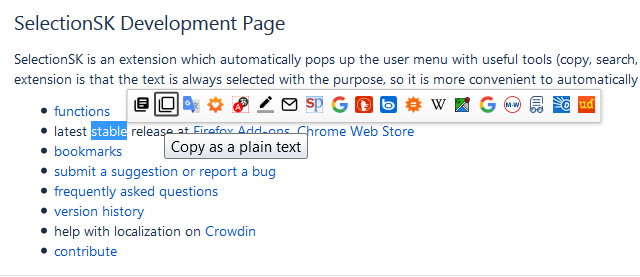
SelectionSK is an extension which automatically pops up the user menu with useful tools (copy, search, translation, highlight, etc.) when the text is selected with the mouse.
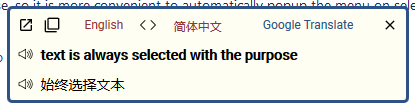
The idea beyond the extension is that the text is always selected with the purpose, so it is more convenient to automatically popup the menu on selection rather than do it in two steps (select and right mouse click).
It's easy, extremely convenient and highly configurable. Give it a try!
Let me know if you want other functions added.
Note: During initialization the extension will create a 'SelectionSK' bookmark folder under 'Other Bookmarks' and populate it with search and translation URLs. Please modify this folder according to your needs, there are plenty of pre-configured URLs on the support site. Occasionally, on first installation, extension may receive doubled notifications from browser and show doubled items. In that case please restart a browser.
Functions:
- Copy selected text to the clipboard in various ways (standard copy, copy as plain text, copy as html). In addition, the selected text can be copied to clipboard automatically.
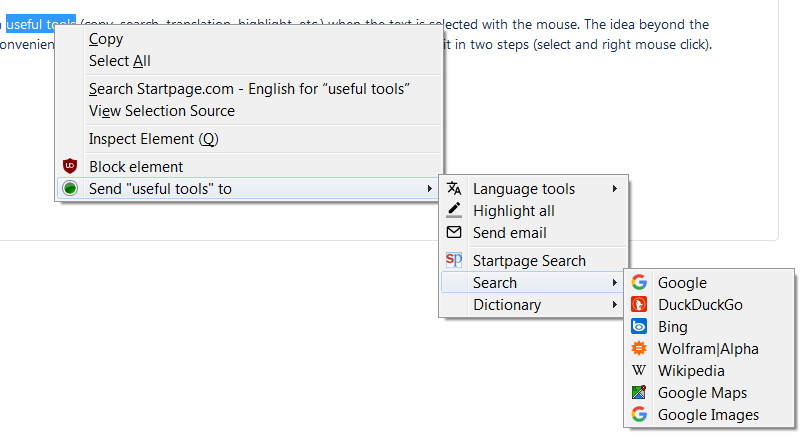
- Send selected text to pre-configured bookmarks. There are default search\translate\dictionary bookmarks (StartPage, Google, DuckDuckGo, Bing, Wolfram|Alpha, Wikipedia, Google Maps, Google Images), in addition you can create your own. A lot of pre-configured bookmarks are available on the support site. It is extremely power tool and you can fully adopt it to your own needs - use it for everything from image search to currency convertor.
- Alternatively, send selected text to installed search engines (Firefox 63 or newer only). Enable this option in the preferences.
- Right mouse button click opens bookmark with quoted selected text aka 'phrase search'
- Middle mouse button click opens bookmark and highlight all occurrences of selected text.
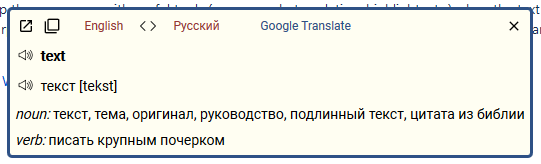
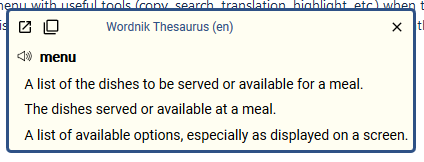
- Translate selected text using Google Translate, Wordnik Thesaurus, Urban Dictionary, Yandex Dictionary or Microsoft Translator. Translation can be copied to the clipboard. Text-to-speech is available for both, original text and translation. In addition, translation window has a link onto page where full definition of translated text (for instance, pronunciation or usage examples) can be obtained.
- Open the text as a URL. Text will be validating for the URL in a smart way – in addition to well-formed URLs, the extension will check broken URLs (for instance, without http prefix) and href attribute. Obfuscated URLs and email addresses like "hxxp://website(dot)name(dot)com" or "mail(at)provider(dot)com" will be detected and de-obfuscated.
- Open or copy to clipboard multiple URLs at the same time instead of having to do them all individually.
- Highlight all occurrences of the selected text. More than one word or phrase can be highlighted with different color. Move forward\backward in between highlighted phrases using 'W' and 'S'. Remove highlighting by pressing 'Esc'.
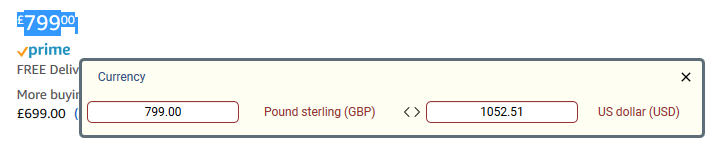
- Select currency with its symbol or abbreviation and convert it into desired currency.
- Panel mode: a small panel with icons only will appear instead of a popup menu.
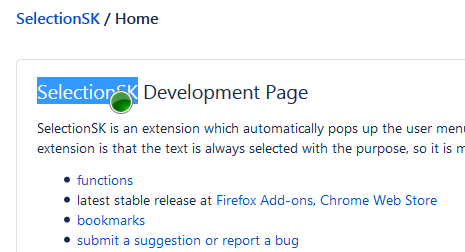
- Unobtrusive mode: small, unobtrusive button will appear instead of popup menu. Popup menu will be activated if user clicks on the button or if user holds mouse cursor on the button for a second.
- Context menu: send selected text to pre-configured bookmarks using traditional context menu.
- Send the selection to the mail recipient. A new email window will be opened using mailto: protocol, selected text will be added as email body. In addition, selection will be copied to the clipboard, which allows to insert it to the email from the clipboard (useful if selection has images or rich html).
- Toolbar icon provides a shortcuts to enable\disable extension on certain site (left mouse click) or to preferences and page translation (right mouse click). Whole page can be also translated by pressing Ctrl+Shift+0.
- Translate on demand, type 't <your word or phrase>' in the address bar.
- Search on demand, add keyword to the bookmark and type '<keyword> <your word or phrase>' in the address bar.
The extension is also available for Chrome.
SelectionSK will send selected text to online translators in order to get it translated. Please read their privacy policies.
Thank you for being interested in SelectionSK. Please submit your suggestions and report issues on support site.
You can contribute by helping translate SelectionSK on Crowdin.
SelectionSK 是做什么的
SelectionSK 是一款面向 Firefox 的搜索增强类扩展,主要用来补充搜索结果、切换搜索引擎、过滤无效结果。官方对它的介绍是:We all know that you can't do good work without first having good tools - now with SelectionSK you can assemble the best tools for helping you browse the Web, and they'll even appear right when you need them without any extra clicks!在Firefox 附加组件商店(AMO)上,它当前版本 6.0,评分 4.64(39 人评价),约 95 名用户。
适合什么人用
从功能定位看,SelectionSK 更适合每天大量搜索、希望结果更干净准确的用户。如果你平时只是偶尔遇到相关需求,用浏览器自带功能也能凑合;但如果这件事每天都发生,装一个专门处理它的扩展通常比手动操作省事得多。需要注意的是它作用于所有网站,装上后建议先观察一两天,确认不影响常用站点的正常使用。
怎么安装 SelectionSK
- 打开Firefox 附加组件商店(AMO)上的官方页面;
- 点「添加到浏览器」并确认权限提示;
- 装好后在扩展列表里固定图标,方便随时开关。
本站只做索引与介绍,安装包来自官方商店。如果商店页面提示当前地区不可用,说明该扩展未在你所在区域上架。
常见问题
SelectionSK 是免费的吗?
SelectionSK 在Firefox 附加组件商店(AMO)免费提供下载。它是浏览器扩展,装上就能直接用,不需要注册账号。
SelectionSK 安全吗?
它只申请了 0 项权限,范围比较克制,没有申请「读取所有网站数据」这种大权限。
SelectionSK 支持哪些浏览器?
当前收录的版本来自Firefox 附加组件商店(AMO),适用于 Firefox。同一个扩展在其他商店可能有对应版本,但功能与版本号不一定相同。
怎么卸载 SelectionSK?
在扩展管理页找到 SelectionSK,点移除即可。它在本地保存的设置会一起清掉,不会残留数据。
权限清单 来自 manifest.json 原文
站点访问 1
<all_urls>
接口权限 12
alarmsbookmarksclipboardReadclipboardWritecontextMenuscookiesnotificationssearchstoragetabswebRequestwebRequestBlocking
标签 点标签看同类扩展
DuckDuckGo Privacy Essentials
⚡保护您的数据。支持可选 AI 的私密搜索、私密浏览和广告拦…
Firefox
 Search by Image
A powerful reverse image searc…
Firefox
 Instagram Downloader
Help users download images and…
Firefox
 TinEye Reverse Image Search
Click on any image on the web …
Firefox
 DuckDuckGo No-AI Search
Search privately by default, w…
Firefox
 Image Search Options
A customizable reverse image s…
Firefox
 Startpage Privacy Protection
By installing the free Startpa…
Firefox
 Reverse Image Search
Adds an option to the context …
Firefox