 Video Download Helper
Download videos from the web. …
Firefox

YouTube Comment Reader EN
Andreas (Andy) Reichelt · Firefox
Search, Sort, Filter, Translate, Read YouTube Comments in spreadsheet format. Navigate through Comments & Responses with arrow keys.
4.7/5
18 人评分
353用户
v1.0.33当前版本
截图
简介
<b>Features:</b>
+++ New Export functionality in version 1.0.28 +++
All loaded comments now exportable optionally in XML for Excel, JSON, or CSV (comma, tab or semicolon separated) format. The export complies with the current filter and order settings (i.e. you can easily export a filtered part of the comments in a desired order). If you are in dark mode, then the Excel sheet is created in dark mode as well.
+++ New in version 1.0.20 +++
translate buttons in the comment popups (listening to Alt+Y) ..translating every foreign language comment into your language (back and forth).
+++ New in version 1.0.17 +++
+ Shortcut key now is Ctrl+Shift+Y (for extension popup) ..which can be changed in the add-on's settings (btw the add-on's popup can be controlled with tab and return keys as well).
+ Any short video can be opened quickly in a regular video player (where timeline, speed, volume etc. can be adjusted) by clicking the video title in the extension's popup.
+++ New in version 1.0.16 +++
Comments now also visible and sortable ascending by <b>timestamps</b> appearing in comments
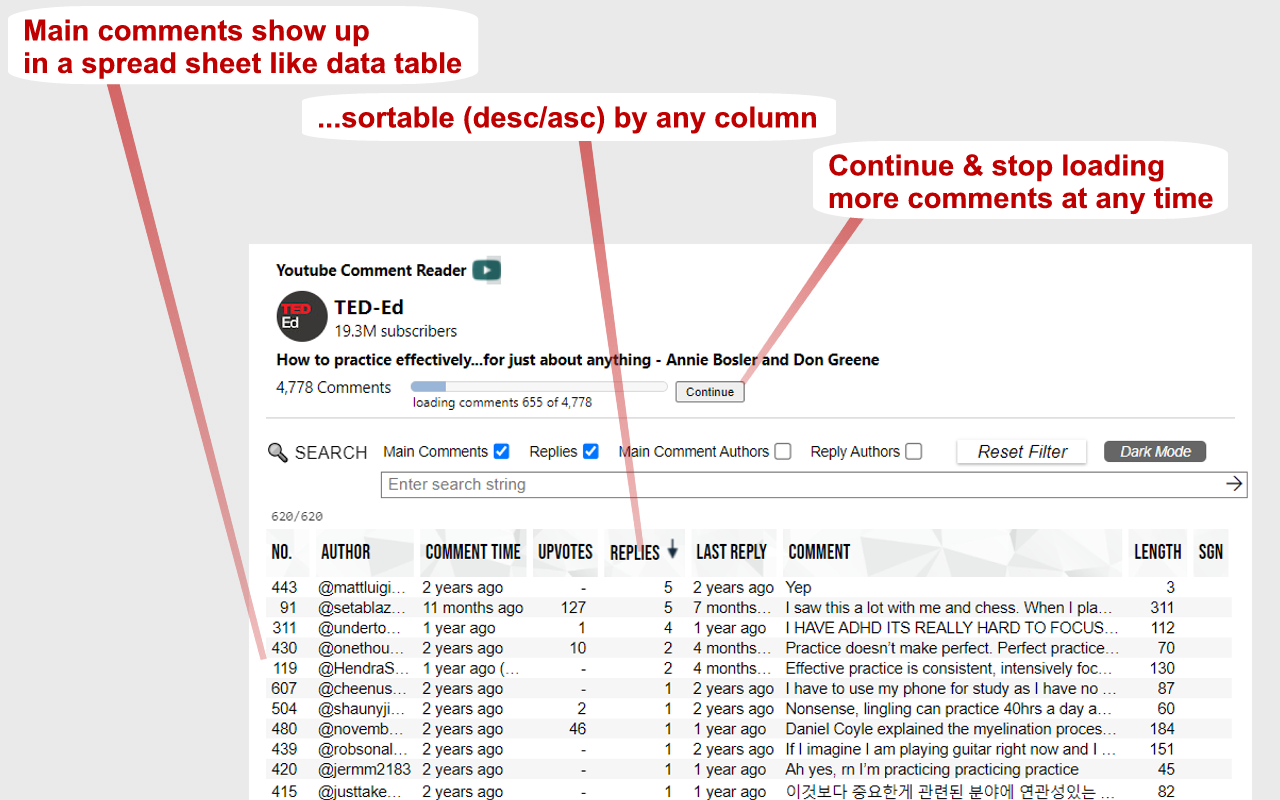
➤ Youtube comments presented in multi-functional spreadsheet format
➤ Sort comments (by table header click) ascending or descending by author, comment time, upvotes count, replies count, last reply time, timestamps appearing in comments, comment length, or channel owner's upvotes (heart symbol)
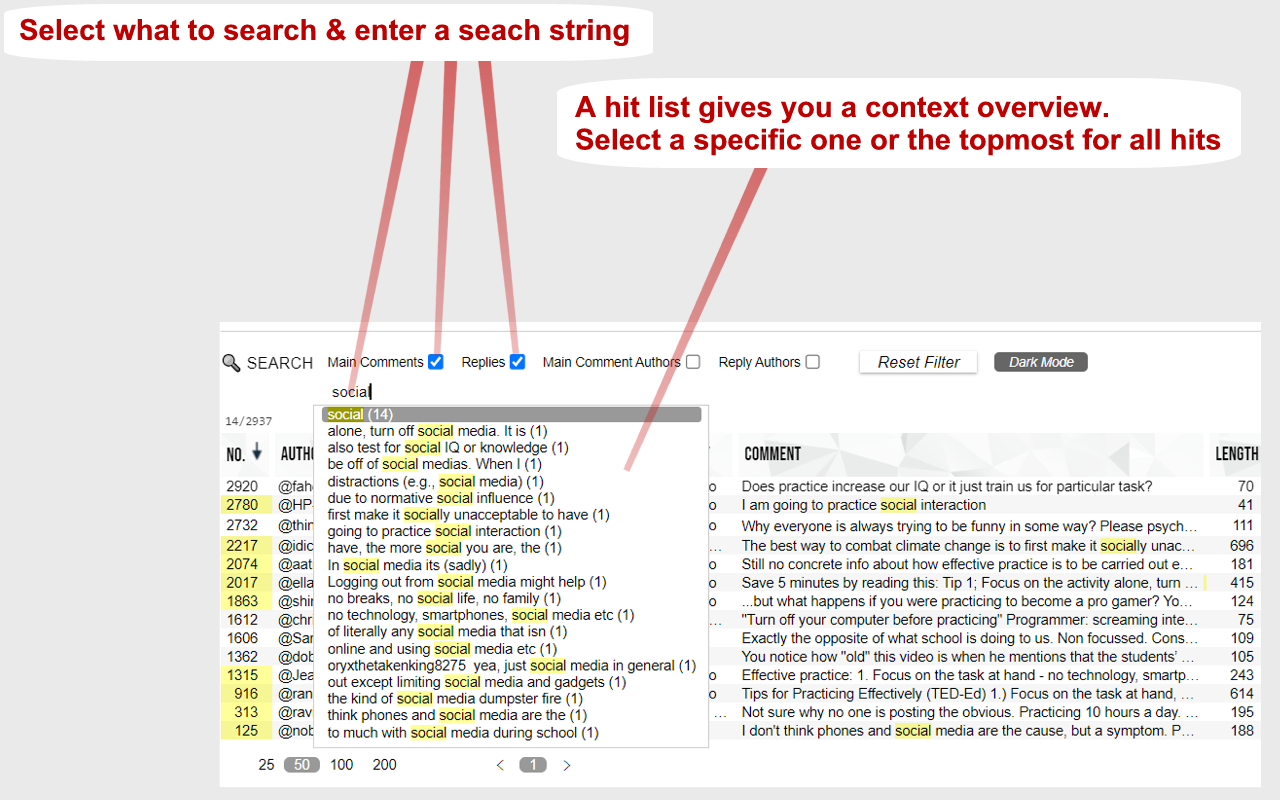
➤ Search main comments and/or replies by author and/or text content
...e.g. filter for an author's main comments and/or responses
...e.g. filter for comments and/or responses containing a specific text phrase
➤ Works in every language
➤ Works with YouTube Shorts as well
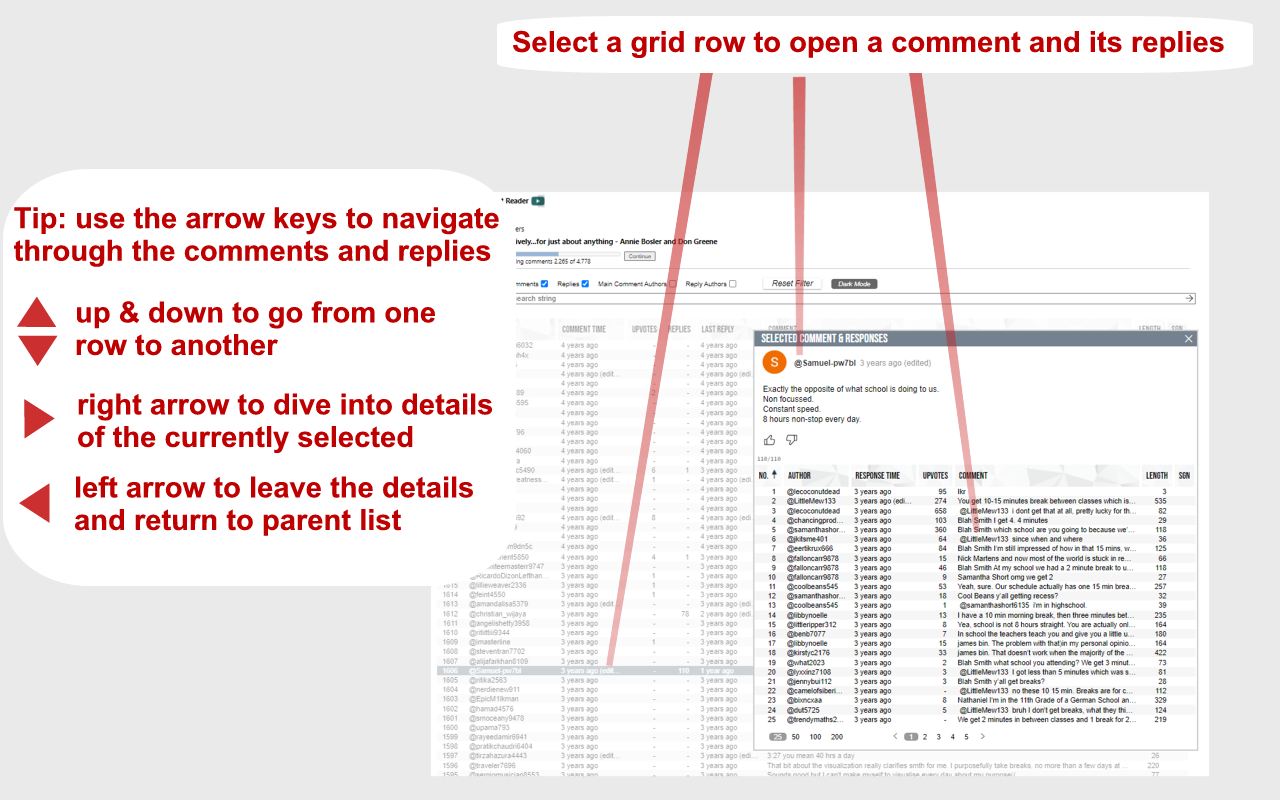
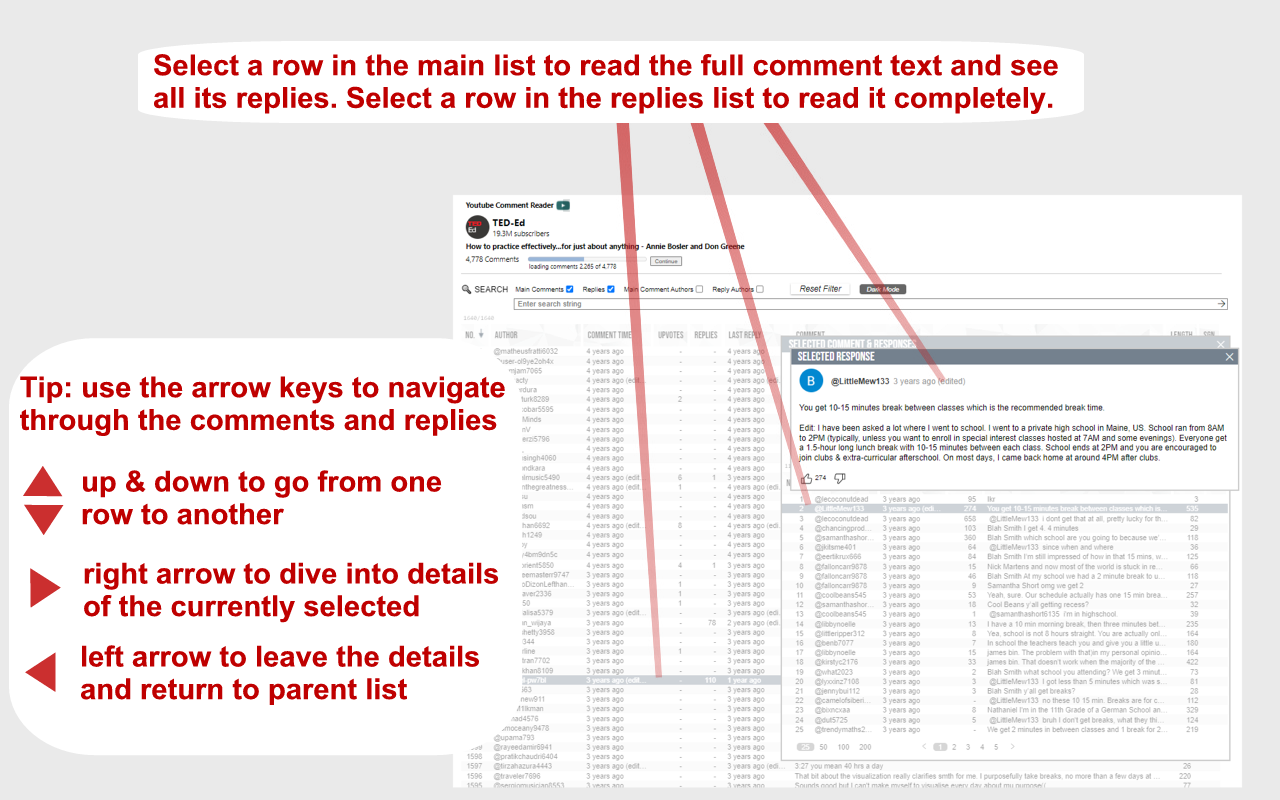
➤ Quickly navigate through comments and responses by (left, right, up, down) arrow keys
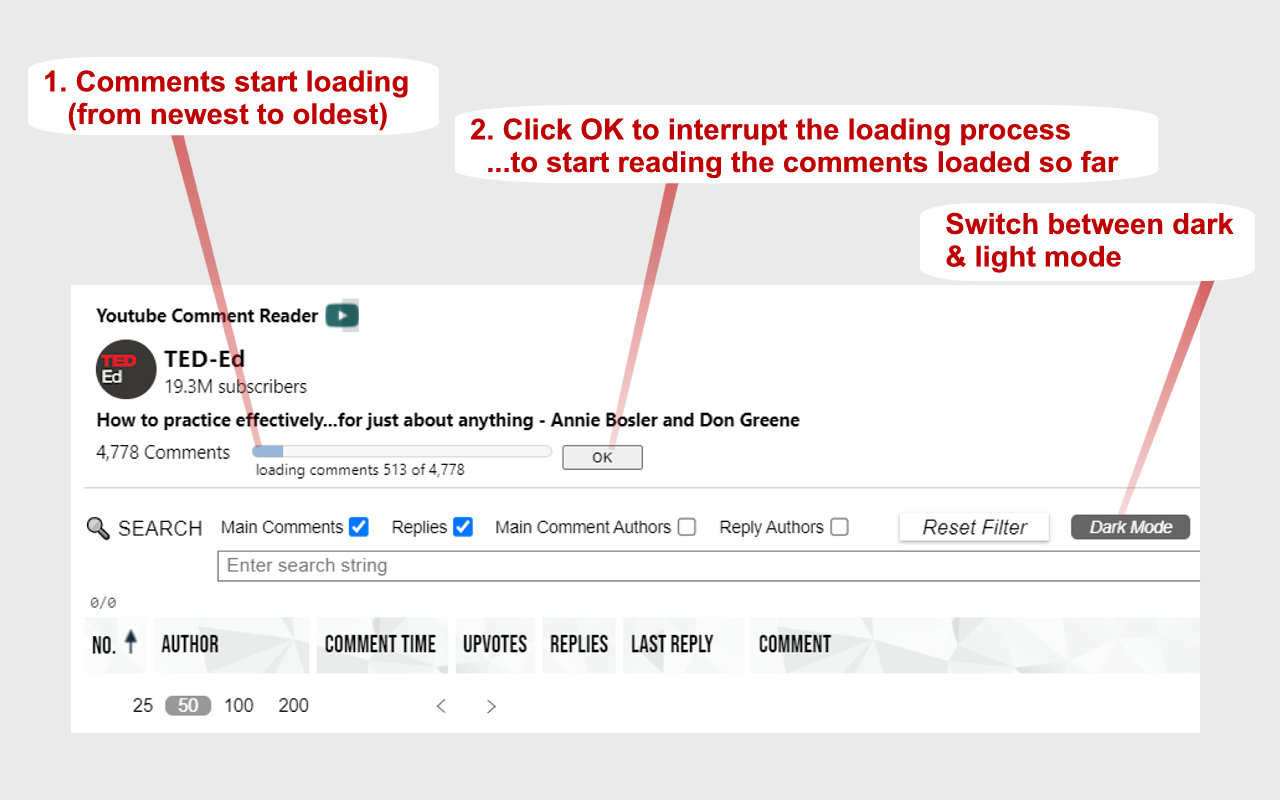
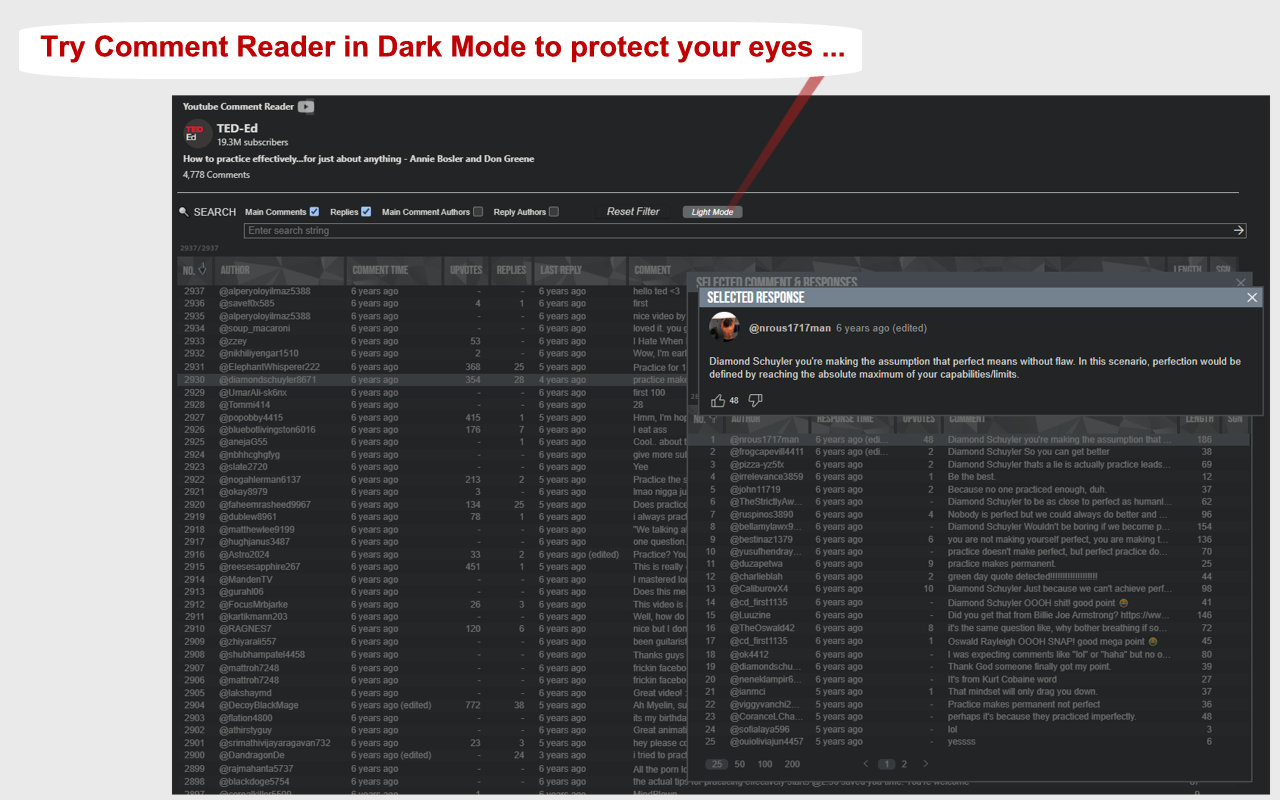
➤ Easily switch between light and dark mode
<b>Instructions:</b>
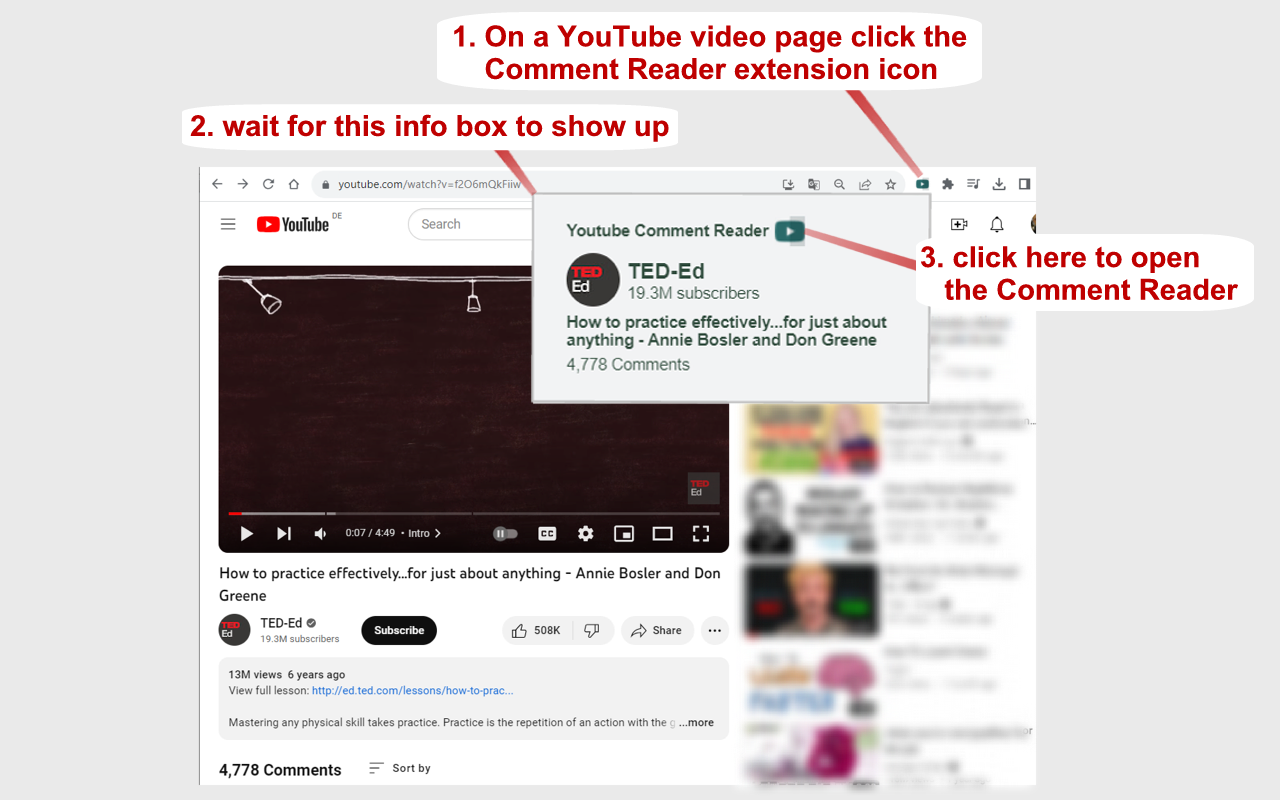
<b>1.</b> Open a YouTube video.
<b>2.</b> Click on the extension icon (in the chrome extensions toolbar, to the right of the address bar).
<b>3.</b> Wait for the extension popup to load a brief overview containing the YouTube channel, video title, total comments count etc.
<b>4.</b> In the info popup click on the Comment Reader icon. The Comment Reader opens in a new tab and starts loading comments (from newest to oldest).
<b>5.</b> Watch the progress while comments are loading.
<b>6.</b> Click OK to interrupt the loading process at any time to start reading the comments that has been loaded till then. When all comments are loaded, the progress view and interrupt button will disappear.
<b>7.</b> An interrupted loading process can be continued at any time if loading more comments is desired.
<b>Tips:</b>
Use (left, right, up, down) arrow keys to quickly navigate through comments and replies (although, of course, mouse clicks work as well).
➤ use up & down keys to go from one row to another
➤ use the right arrow key to dive into details (of a currently selected row)
➤ use the left arrow key to leave the details and return to parent list
➤ Quickly open any short video in a regular player (..so you can adjust the timeline, speed, volume etc.) by clicking the video description in the add-on's popup
<b>8.</b> If you want to reply to or upvote a comment you may click on the comment time (e.g. "6 hours ago") above the comment text. This will open a new regular YouTube window with the regarding comment as the "Highlighted comment" appearing immediately under the video player. That way you can interact with the regular YouTube user interface to upvote and reply to a comment.
YouTube Comment Reader 是做什么的
YouTube Comment Reader 是一款面向 Firefox 的搜索增强类扩展,主要用来补充搜索结果、切换搜索引擎、过滤无效结果。官方对它的介绍是:Search, Sort, Filter, Translate, Read YouTube Comments in spreadsheet format. Navigate through Comments & Responses with arrow keys.在Firefox 附加组件商店(AMO)上,它当前版本 1.0.33,评分 4.67(18 人评价),约 353 名用户。
适合什么人用
从功能定位看,YouTube Comment Reader 更适合每天大量搜索、希望结果更干净准确的用户。如果你平时只是偶尔遇到相关需求,用浏览器自带功能也能凑合;但如果这件事每天都发生,装一个专门处理它的扩展通常比手动操作省事得多。
怎么安装 YouTube Comment Reader
- 打开Firefox 附加组件商店(AMO)上的官方页面;
- 点「添加到浏览器」并确认权限提示;
- 装好后在扩展列表里固定图标,方便随时开关。
本站只做索引与介绍,安装包来自官方商店。如果商店页面提示当前地区不可用,说明该扩展未在你所在区域上架。
常见问题
YouTube Comment Reader 是免费的吗?
YouTube Comment Reader 在Firefox 附加组件商店(AMO)免费提供下载。它是浏览器扩展,装上就能直接用,不需要注册账号。
YouTube Comment Reader 安全吗?
它只申请了 0 项权限,范围比较克制,没有申请「读取所有网站数据」这种大权限。
YouTube Comment Reader 支持哪些浏览器?
当前收录的版本来自Firefox 附加组件商店(AMO),适用于 Firefox。同一个扩展在其他商店可能有对应版本,但功能与版本号不一定相同。
怎么卸载 YouTube Comment Reader?
在扩展管理页找到 YouTube Comment Reader,点移除即可。它在本地保存的设置会一起清掉,不会残留数据。
权限清单 来自 manifest.json 原文
接口权限 1
activeTab
标签 点标签看同类扩展
Video Download Helper
Download videos from the web. …
Firefox
 Ghostery – 隐私广告拦截工具
Ghostery 是强大的隐私保护扩展程序。拦截广告,停止跟…
Firefox
 Return YouTube Dislike
Returns ability to see dislike…
Firefox
 SponsorBlock - Skip Sponsorships on YouTube
Easily skip YouTube video spon…
Firefox
 Enhancer for YouTube™
控制并提升您的 YouTube 用户体验!
Firefox
 BetterTTV
Enhances Twitch and YouTube wi…
Firefox
 Easy Youtube Video Downloader Express
A simple extension for superfa…
Firefox
 YouTube NonStop
Tired of getting that "Video p…
Firefox