

 BetterTTV
Enhances Twitch and YouTube wi…
Firefox

Improve YouTube! (Open-Source for YouTube) EN
code-for-charity · Firefox
Make YouTube tidy & powerful! YouTube Player Size Theme Quality Auto HD Colors Playback Speed Style ad block Playlist Channel H.264
4.3/5
907 人评分
10.1万用户
v4.2402当前版本
截图
简介
Set your YouTube Video Player; YouTube Content Categories & Filter-rules; Tweaks; Layout, Theme & Style
all at once today & enjoy that for years to come! With our enhancer you have 175+ useful / unique features🧰🔧. To make your video experience & content discovery a whole lot better & save you a lot of clicks & time.
✔️ Open-source
✔️ Applies most settings with no reload⌛ (unlike other YouTube-Extensions; draggable icon on YT)
🍃 lightweight: You can expect everything to work as expected.
✓ Non-profit & no income since 2012. (Bear with us when YouTube changes. it's been an uphill race and only gets better.)
✓ Video playback features for embedded videos (+ preparing mobile m.youtube, Facebook, Netflix, Twitch, Vimeo too)
(Offline / privacy🔒: We can't care about what video you watch, just that you have a better time).
🏅Press Reviews: We are Recommended by FireFox!🦊(🏆Only 98 extensions)
"Enhances YouTube in meaningful ways" - (5/5⭐ gHacks.net/2021/03/26/improved-youtube-enhances-youtube-in-meaningful-ways)
"Might be the best YouTube Extension Ever" - (https://LifeHacker.com/this-might-be-the-only-youtube-browser-extension-youll-1846575110)
⋮⚙️175+ features⋮ (many can only be found here /we pioneered)
💡 Expand always: Video Description, Transcript, Chapters
🛩️ "Virtual Travel" (Switch your content-country)
✨ Dim pages until hovered ("Zen mode" )
🤖 Auto-Pause Tabs ➕ Auto-fullscreen ➕ Pip Picture
📈 Analyse your activity 🚫 Block Videos, Channels, Tags, Category
➕ Video tabs volume Mixer🎛️🔊
🗑️ Remove Related Videos 🗑️ Remove Shorts Reel
🗑️ Hide distraction declutter attention (teaching / screenshare / presentation)
➕ "Up Next": Off (Reset YT's "Autoplay" after every video )
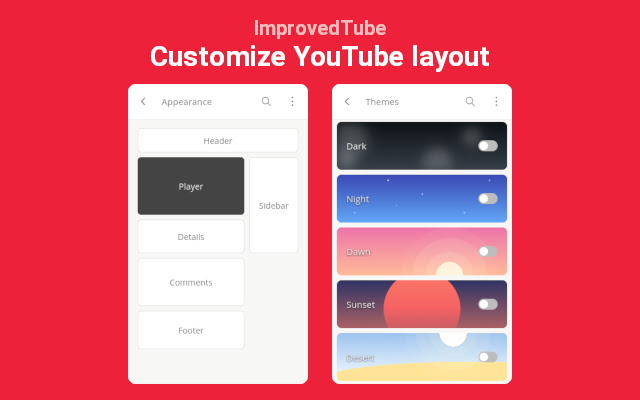
♻️ Undo the new Sidebar (Description, details, comments)
🚫 adblocker (adblock & adskip or white-list ads your channel subscriptions)
➕ Channel: don't play trailer
🎨☕ Themes
🌈🌄🌇 Disable Ambient lightning (cinematics)
📅 Dark mode Schedule (also Black theme for oLed) ✓ Display dim ✓ Blue-light filter (Preserve sleepiness. Relax eyes)
📺 Video Player & Playback Features:
📷 Screenshot (save copy download any video Frame)
⏯️🔁🔀 Extra Player Buttons (optional): ➰Loop / Repeat (looper / repeater) ➕ Rotate Video
💡 Subtitles, captions & transcript Options
🔍 watch videos frame by frame.
🔄 reverse Playlist, Shuffle Playlist
🎞️ Expand videos to your full window (expander)
🎞️ theater mode 🎞️ cinema mode (turn off the lights)
🎞️ Resize videos (player Size)
➕ Default/fixed Video Quality to match your Display 720p 1080p 4k 8k or bandwidth 480p 240p 144p, auto hd, automatic 4K ➕ avoid 60 frames vs. 30 fps ➕ HDR vs. SDR
➕ Player Auto-Play: Off
💨 "Speed-watching" (Fixed Default Playback Speed) (smart video speed controller excluding music or education)
🔊 Fixed Volume or Loudness normalization
➕ Popup Player ➕ Custom Mini-Player
➕ Pop-out Player ( "always-on-top (floating popout) needs OS setting / app)
➕ Deny AV1 codec to speed up Player /save CPU electricity⚡🔌. [Old] GPUs can do [H.264] VP8 VP9 encoding (fast) (H264 h264ify Flash)
🧩⌘+⇧ Youtube Shortcuts: Set any Shortcuts / Hotkeys (mouse scroll for volume, etc. ) 🗑️ Overwrite YT's Shortcuts
🧹🧽🧼
🗑️ Hide YT Comments / fold / collapse 🗑️ Transparent Header 🗑️ Hide Annotations
🗑️ Hide live stream chat 🗑️Hide video's details
➕Toggle YT Player Controls ➕ set YT language ➕Tweak YT's "Scroll for details"
✓ Mimic retro classic Theme Style Layout
✓ Mini Player scrolling ✓ Search inside ✓ Legacy List style
➕ Channel Video counter
➕ Thumbnails .gif animation: OFF, Thumbnails: HD
ⓘ https://github.com/code-charity/youtub (Twitter @ImprovedTube)
(🌱👪 Community / 140+ Volunteers)
🌎 translated to 40+ languages
We'd like to team with Developers for Web-Video & YT Extensions and listed some unique, friendly, cool, smart work on:
https://github.com/code-charity/youtub/discussions/1881 & https://improvedtube.com )
🔎Found a bug❓🐞🐛
- If you notice any issue, need help or wish for a new feature🌟🧚, please post on Github: https://github.com/code-charity/youtub/issues
We work hard 🏋️👩💻 to make your experience a 5/5 Stars experience.
(We might even read mail & "Support", next to "Reviews". Please don't complain in the Reviews immediately!)
( bugs@improvedtube.com 📧 ideas@improvedtube.com 📧 )
Compatiblity: While you might not lack features for YT with our extension (and some others copy our code),
You can usually just run all else you need, i.e. sponsorblock, pockettube or extra adblocker / adskipper.
(ⓘ YT Extensions work with one permission to access YT, you dont need to accept 'alerts', 'change privacy settings', 'browser history')
ⓘ Not affiliated with YT.
Independently developed.
Improve YouTube! (Open-Source for YouTube) 是做什么的
Improve YouTube! (Open-Source for YouTube) 是一款面向 Firefox 的外观主题类扩展,主要用来更换浏览器配色、给网页加深色模式、调整界面观感。官方对它的介绍是:Make YouTube tidy & powerful! YouTube Player Size Theme Quality Auto HD Colors Playback Speed Style ad block Playlist Channel H.264在Firefox 附加组件商店(AMO)上,它当前版本 4.2402,评分 4.29(907 人评价),约 101,466 名用户。
适合什么人用
从功能定位看,Improve YouTube! (Open-Source for YouTube) 更适合长时间对着屏幕、希望降低眼睛负担的用户。如果你平时只是偶尔遇到相关需求,用浏览器自带功能也能凑合;但如果这件事每天都发生,装一个专门处理它的扩展通常比手动操作省事得多。
怎么安装 Improve YouTube! (Open-Source for YouTube)
- 打开Firefox 附加组件商店(AMO)上的官方页面;
- 点「添加到浏览器」并确认权限提示;
- 装好后在扩展列表里固定图标,方便随时开关。
本站只做索引与介绍,安装包来自官方商店。如果商店页面提示当前地区不可用,说明该扩展未在你所在区域上架。
常见问题
Improve YouTube! (Open-Source for YouTube) 是免费的吗?
Improve YouTube! (Open-Source for YouTube) 在Firefox 附加组件商店(AMO)免费提供下载。它是浏览器扩展,装上就能直接用,不需要注册账号。
Improve YouTube! (Open-Source for YouTube) 安全吗?
它只申请了 0 项权限,范围比较克制,没有申请「读取所有网站数据」这种大权限。
Improve YouTube! (Open-Source for YouTube) 支持哪些浏览器?
当前收录的版本来自Firefox 附加组件商店(AMO),适用于 Firefox。同一个扩展在其他商店可能有对应版本,但功能与版本号不一定相同。
怎么卸载 Improve YouTube! (Open-Source for YouTube)?
在扩展管理页找到 Improve YouTube! (Open-Source for YouTube),点移除即可。它在本地保存的设置会一起清掉,不会残留数据。
权限清单 来自 manifest.json 原文
接口权限 3
contextMenusstorageunlimitedStorage
接口权限(可选) 1
downloads
标签 点标签看同类扩展
BetterTTV
Enhances Twitch and YouTube wi…
Firefox
 7TV
Improve your viewing experienc…
Firefox
 FrankerFaceZ
The Twitch Enhancement Suite -…
Firefox
 关灯看视频
观看视频时调暗页面,仿佛置身电影院
Firefox
 Watch2Gether
With Watch2Gether you can watc…
Firefox
 Librezam
使用Shazam API的开源音乐识别扩展(也支持Audd、…
Firefox
 Netflix Party is now Teleparty
Watch Netflix, Youtube, Disney…
Firefox
 Alternate Player for Twitch.tv
Alternate player of live broad…
Firefox