

 Video Download Helper
Download videos from the web. …
Firefox

xIFr EN
Stig Nygaard · Firefox
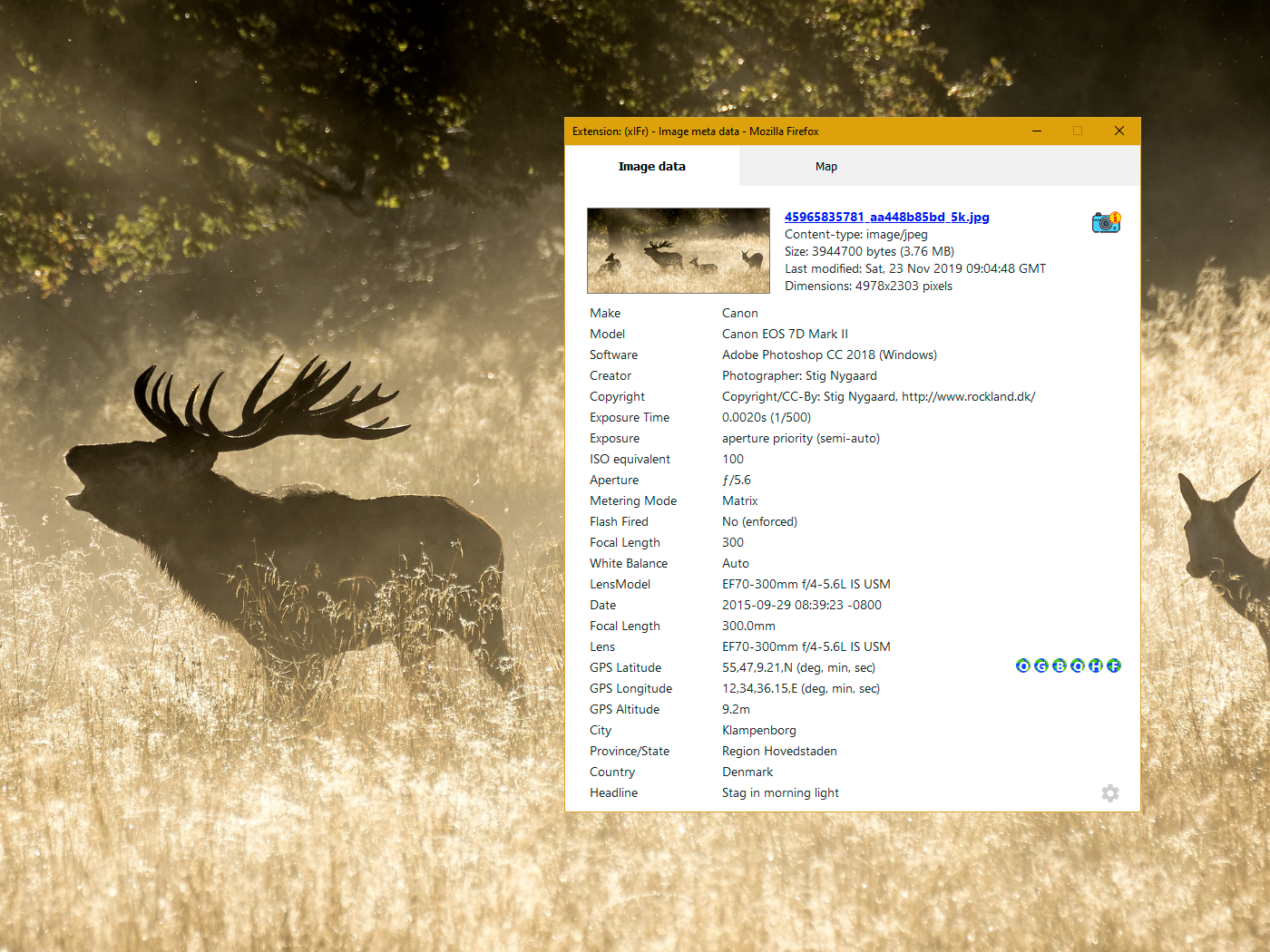
EXIF viewer. Powerful tool to see EXIF, IPTC and XMP metadata in images. Including geo-coordinates ("GPS location"), and map-view of location. xIFr uses "deep search" to find images that normally can't be selected just by rightclicking.
4.8/5
31 人评分
2.3千用户
v3.2.1当前版本
截图
简介
xIFr is a viewer for EXIF, IPTC and XMP metadata in image files. Launch it from the browser's right-click context menu.
Note: If you ain't using a recent version of Firefox supported by latest version of xIFr, there's probably an older version of xIFr supporting your browser.
Why another Exif viewer?
Because I felt other Exif readers annoyed me or I felt they were missing something. It is probably a matter of personal preferences, but you should really check the "deep search" feature. It works sooo well - in my own very humble opinion :-)
"Deep Search" feature?
Most other Exif viewers for Firefox only works if you can right-click directly on an html img element. But with "Deep Search" xIFr finds the image you want to see details about, no matter if it is below a layer or is defined as a background-image of another element. In 95% of the times, it just works as you expect. You won't even know if you actually were right-clicking directly on an img element or not. This is in my opinion the most important feature distinguishing xIFr from other Exif-viewers.
"Access your data for all web sites"?
This permission is required for xIFr to be able to read meta-data in images, no matter which domain they are embedded from. But don't worry, there's no hidden agendas. See the Privacy Policy.
Getting started...
I have created a little introduction page to quickly get started with xIFr and see what the "Deep Search" is all about: www.rockland.dk/xIFr/start/.
But if you choose to skip this introduction, let me at least give you a quick little browser tip:
A handy browser tip!
Some websites overrides the browser's default right-click context menu. But you can usually just hold down the shift key while right-clicking, to get Firefox's native context menu back - and thus launch xIFr...
Open source
xIFr is open source, the repository is on GitHub.
xIFr is a fork of wxIF which again is a WebExtension fork/port of the older "legacy type extension" FxIF.
Flickr Fixr
Love photos? Flickr user? Also try my Flickr Fixr !
xIFr 是做什么的
xIFr 是一款面向 Firefox 的搜索增强类扩展,主要用来补充搜索结果、切换搜索引擎、过滤无效结果。官方对它的介绍是:EXIF viewer. Powerful tool to see EXIF, IPTC and XMP metadata in images. Including geo-coordinates ("GPS location"), and map-view of location. xIFr uses "deep search" to find images that normally can't be selected just by rightclicking.在Firefox 附加组件商店(AMO)上,它当前版本 3.2.1,评分 4.84(31 人评价),约 2,321 名用户。
适合什么人用
从功能定位看,xIFr 更适合每天大量搜索、希望结果更干净准确的用户。如果你平时只是偶尔遇到相关需求,用浏览器自带功能也能凑合;但如果这件事每天都发生,装一个专门处理它的扩展通常比手动操作省事得多。
怎么安装 xIFr
- 打开Firefox 附加组件商店(AMO)上的官方页面;
- 点「添加到浏览器」并确认权限提示;
- 装好后在扩展列表里固定图标,方便随时开关。
本站只做索引与介绍,安装包来自官方商店。如果商店页面提示当前地区不可用,说明该扩展未在你所在区域上架。
常见问题
xIFr 是免费的吗?
xIFr 在Firefox 附加组件商店(AMO)免费提供下载。它是浏览器扩展,装上就能直接用,不需要注册账号。
xIFr 安全吗?
它只申请了 0 项权限,范围比较克制,没有申请「读取所有网站数据」这种大权限。
xIFr 支持哪些浏览器?
当前收录的版本来自Firefox 附加组件商店(AMO),适用于 Firefox。同一个扩展在其他商店可能有对应版本,但功能与版本号不一定相同。
怎么卸载 xIFr?
在扩展管理页找到 xIFr,点移除即可。它在本地保存的设置会一起清掉,不会残留数据。
权限清单 来自 manifest.json 原文
接口权限 4
contextMenusmenusscriptingstorage
标签 点标签看同类扩展
Video Download Helper
Download videos from the web. …
Firefox
 IDM Integration Module
Download files with Internet D…
Firefox
 Easy Youtube Video Downloader Express
A simple extension for superfa…
Firefox
 Download All Images
Easily save images with a wide…
Firefox
 SingleFile | 将完整的页面保存到一个 HTML 文件中
SingleFile 网页保存(Save Page)扩展,离…
Firefox
 Popup Blocker (strict)
Strictly block all popup reque…
Firefox
 Obsidian Web Clipper
Save and highlight web pages i…
Firefox
 Turbo Download Manager
A download manager with the ab…
Firefox