
Ultrawidify EN
Tamius Han · Firefox
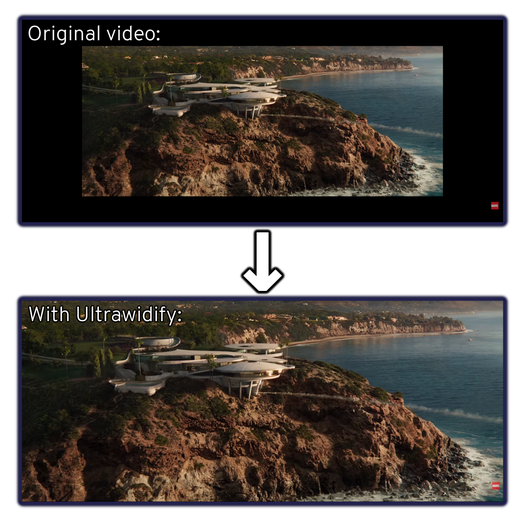
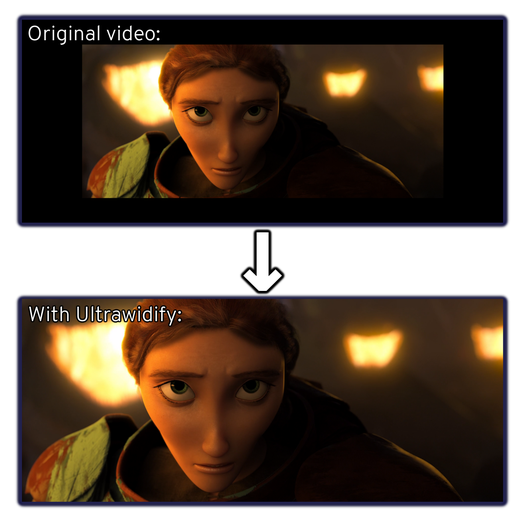
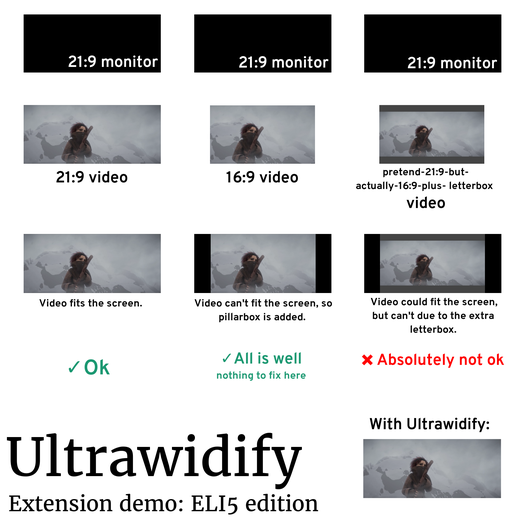
Aspect ratio fixer for Youtube. Allows improperly encoded videos to properly fit ultrawide and superwide displays (e.g. 21:9) — and it attempts to do so automatically.
<all_urls>),意味着它可以读取你在任意站点的页面内容,包括已登录的页面。这是许多扩展正常工作的必要条件,但也值得你确认来源可信。
截图
简介
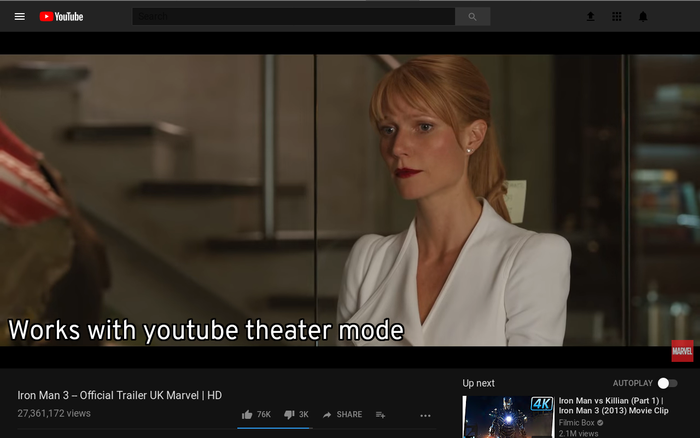
Need to remove unnecessary black bars from this youtube video you're watching? Ultrawidify is here for you. It should work on Youtube, Netflix, Twitch, Vimeo, Streamable (and on embedded videos that are hosted on these sites). It may work elsewhere as well, but no guarantees.
Important note: This addon is only tested and intended to work with Google Chrome specifically. If you're using a different browser, you're on your own. No, Edge is not Google Chrome (and neither is any other chromium-based browser).
FEATURES
1. AUTOMATIC ASPECT RATIO DETECTION
Ensures that video will be cropped without you having to lift a finger. It even re-adjusts crop if aspect ratio changes mid-video. Autodetection is not 100% accurate and has some limitations, but it's accurate enough for most cases.
Autodetection is not supported on all sites. Some sites (e.g. Netflix, Disney+, Hulu) use DRM in order to prevent video piracy, and such protection measures interfere with automatic aspect ratio detection.
2. MANUAL ASPECT RATIO CORRECTION
For sites that do not support automatic aspect ratio detection, Ultrawidify allows you to manually crop the video. The extension allows you to crop to these aspect ratios by default:
- Fit Width (shortcut: W)
- Fit Height (shortcut: E)
- 21:9 (shortcut: D)
- 18:9 (or 2:1; shortcut: X)
- 16:9 (shortcut: S)
You can also reset the aspect ratio back to the initial aspect ratio (shortcut: R).
Note that some sites may define keyboard shortcuts that interfere with the shortcuts defined by this extension. In such cases, the shortcuts defined by this extension may not work.
3. STRETCH VIDEO
You paid for the entire monitor, so you're gonna use all the monitor — even if it means stretching the video into complete garbage? Ultrawidify's got you covered with a bunch of different options:
- Don't: for men of culture
- Basic: for people who just don't care, at all. (This option does not remove the black bars
- Hybrid: crops the video first and then stretches the video to fill the remaining space
- Thin borders: only stretch the video if the black borders are _really_ thin
- 4:3 (src): not all people are men of culture. Some people torture others by posting 4:3 content stretched to 16:9. This option makes the video 4:3 again.
- 16:9 (src): ensures that the video is stretched (or squeezed) to 16:9.
4. ALIGN VIDEO TO SOMETHING OTHER THAN CENTER
There's a few people who aren't bothered by the vertical bars you get when watching 16:9 content on a 21:9 monitor. However, they would much prefer if instead of having two thinner black bars on either side of the video, they'd have just one bigger black bar on one side.
That way, they can watch their 16:9 video on full screen while also having a bigger space to put their League of Legends chat¹ in while waiting for their match to start.
---
¹or something like that.IDK I'm more of a CSGO guy, so I'll take the guy who asked for this at face value.
5. MANUAL OVERRIDE FOR PLAYER DETECTION
Ultrawidify not working on a site? It's possibe that Ultrawidify can detect the video, but not the video player. If that happens, you can head over to 'Advanced settings' tab in the popup and specify the player element. You can do that by specifying the player node index (gradually increase the number from 1 to ~10) or — if you know how HTML and CSS work — providing the query selector.
Sometimes, Ultrawidify won't work because of the quirks in site's CSS. If you know how to fix that kind of issues, 'advanced settings' section of the popup allows you to do so.
Remember: sharing is caring. If you manage to fix a website using these tools, consider sharing the solution via email or github.
FREQUENTLY ASKED QUESTIONS
1. WHY DOESN'T AUTODETECTION WORK ON <website>?
Because the site utilizes DRM/anti-piracy measures, which prevent autodetection from working.
2. WHY DOESN'T AUTODETECTION DETECT ASPECT RATIO CHANGES INSTANTANEOUSLY?
Due to performance reasons, Ultrawidify only checks for aspect ratio changes about three times per second. That means that aspect ratio detection may "lag" by about 300 milliseconds.
While the frequency of aspect ratio checks can be increased, Ultrawidify can only check the currently displayed frame. As such, it will always lag by at least one frame.
Note that increasing the frequency of aspect ratio checks may result in Chrome becoming laggy and, in extreme cases, even memory leaks as browser's garbage collection is unable to keep up with the scripts.
3. AUTODETECTION HAS [INSERT A PROBLEM WITH MOVIE CREDITS OR BAKED-IN SUBTITLES]
Aspect ratio detection requires a little bit of math to be done. Because doing too much maths can result in your browser not responding properly or even crashing, autodetection must find a compromise between accuracy and doing as little math as possible in order to establish the aspect ratio.
Issues with text are result of these tradeoffs. If it bothers you that much, you can disable autodetection (either temporarily, by manually setting aspect ratio, or forever).
If you know what you're doing, you can go to extension option and tweak aspect ratio detection parameters.
4. CAN I ADD A CUSTOM ASPECT RATIO/CUSTOM KEYBOARD SHORTCUT?
Yes, but it requires some effort as the UI is currently mildly to majorly broken.
5. THE EXTENSION BROKE A SITE / DOESN'T WORK FOR A GIVEN SITE
You can submit a bug report via email or github. Please include all the details the email/issue template asks for.
If the site requires a subscription or is geo-locked, you can also save the page with "Save Page WE" extension and attach the file to the email (if submitting a github issue, you need to put the html file in a zip archive). This will make my life a b…
Ultrawidify 是做什么的
Ultrawidify 是一款面向 Firefox 的外观主题类扩展,主要用来更换浏览器配色、给网页加深色模式、调整界面观感。官方对它的介绍是:Aspect ratio fixer for Youtube. Allows improperly encoded videos to properly fit ultrawide and superwide displays (e.g. 21:9) — and it attempts to do so automatically.在Firefox 附加组件商店(AMO)上,它当前版本 5.1.7,评分 4.17(126 人评价),约 7,421 名用户。
适合什么人用
从功能定位看,Ultrawidify 更适合长时间对着屏幕、希望降低眼睛负担的用户。如果你平时只是偶尔遇到相关需求,用浏览器自带功能也能凑合;但如果这件事每天都发生,装一个专门处理它的扩展通常比手动操作省事得多。需要注意的是它作用于所有网站,装上后建议先观察一两天,确认不影响常用站点的正常使用。
怎么安装 Ultrawidify
- 打开Firefox 附加组件商店(AMO)上的官方页面;
- 点「添加到浏览器」并确认权限提示;
- 装好后在扩展列表里固定图标,方便随时开关。
本站只做索引与介绍,安装包来自官方商店。如果商店页面提示当前地区不可用,说明该扩展未在你所在区域上架。
常见问题
Ultrawidify 是免费的吗?
Ultrawidify 在Firefox 附加组件商店(AMO)免费提供下载。它是浏览器扩展,装上就能直接用,不需要注册账号。
Ultrawidify 安全吗?
它只申请了 0 项权限,范围比较克制,没有申请「读取所有网站数据」这种大权限。
Ultrawidify 支持哪些浏览器?
当前收录的版本来自Firefox 附加组件商店(AMO),适用于 Firefox。同一个扩展在其他商店可能有对应版本,但功能与版本号不一定相同。
怎么卸载 Ultrawidify?
在扩展管理页找到 Ultrawidify,点移除即可。它在本地保存的设置会一起清掉,不会残留数据。
权限清单 来自 manifest.json 原文
站点访问 2
*://*/*<all_urls>
接口权限 2
activeTabstorage
接口权限(可选) 1
downloads