
Tree Style Tab
Piro (piro_or) · Firefox
以树的形式显示标签。
<all_urls>),意味着它可以读取你在任意站点的页面内容,包括已登录的页面。这是许多扩展正常工作的必要条件,但也值得你确认来源可信。
截图
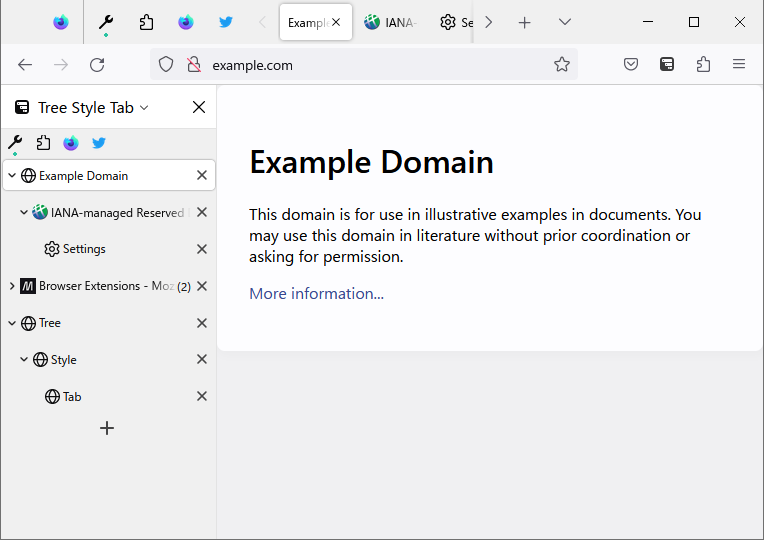


简介
This extension provides the ability to work with tabs as "trees".
New tabs opened from the current tab are automatically organized as "children" of the current tab.
Such "branches" are easily folded (collapsed) by clicking on the arrow shown in the "parent" tab, so you no longer need to suffer from too many visible tabs.
If you want, you can restructure the tree via drag and drop.
- Such a tree of tabs will behave like a visual browsing history for you.
- For example, if you see a list of search results for a topic, each search result link will open in new child tab.
- New tabs opened from these "child" tabs will appear as descendants of their originating tabs.
- You'll easily dig and dig deeply, without losing your browsing trail - if you want to go back to the original search result, you just have to switch to the "root" tab.
- Moreover, each tree will reflect a group of tabs on a similar topic.
Please enjoy as you like!
Tips:
- "F1" key toggles the TST sidebar.
- "Tree Style Tab" toolbar button also toggles the sidebar. If it's unnecessary, you can remove it from the toolbar.
Permissions:
This extension needs following permissions to work as expected:
- Required:
- Access browser tabs: to list both active and non-active tabs in the UI.
- Access recently closed tabs (access to the session information): to save tree information of tabs (structure, collapsed/expanded state, etc.) to tabs' session information and ask to Firefox to manage them as bundled.
- Display notifications to you: to present information and navigate users without blocking.
- Read and modify browser settings: to know the activation status of the native vertical tabs and apply suitable color matching to the browser's theme to the toolbar icon placed on the navigation toolbar.
- Optional:
- Read and modify bookmarks: to simulate bookmark related commands in the tab context menu. / to detect tabs whether they were opened from bookmarks or not.
- Get data from the clipboard: to simulate commands like "Share > Copy Links" in the tab context menu and others. / to simulate opening a new tab with the URL in the clipboard with middle click on the tab bar.
- Access your data for all websites (run scripts on webpages) / Access local files on your computer: to detect the Ctrl key is pressed/released and prevent needless expansion of collapsed trees while tab switching with Ctrl-Tab/Ctrl-Shift-Tab. / to render simulated preview panel and tab groups context menu on the content area.
- Hide and show browser tabs: just for automated tests, not required on regular use.
Extensions extend TST:
TST provides APIs for other extensions.
Some extensions extend the behavior of TST's sidebar panel:
- Multiple Tab Handler allows you to select multiple tabs with long-press on tabs. It also allows you to close multiple tabs with long-press on the closebox on tabs.
- TST Active Tab in Collapsed Tree shows a small tab on a collapsed tree as an alias for the last active tab under the tree.
- TST Auto Group Tabs provides ability to group newly opened tabs automatically in various conditions.
- TST Auto Sticky Tabs provides ability to stick some state tabs to tab bar edges automatically.
- TST Bookmarks Subpanel allows you to show a small "Bookmarks" sidebar panel below tabs in the TST's sidebar.
- TST Indent Line provides indent lines like Visual Studio Code's one.
- TST Lock Tree Collapsed allows you to lock arbitrary trees as collapsed. (This was a built-in feature on TST 3.3.0-3.3.6, and now separated.)
Tree Style Tab 是做什么的
Tree Style Tab 是一款面向 Firefox 的外观主题类扩展,主要用来更换浏览器配色、给网页加深色模式、调整界面观感。官方对它的介绍是:以树的形式显示标签。在Firefox 附加组件商店(AMO)上,它当前版本 4.4.9,评分 4.52(2276 人评价),约 139,570 名用户。
适合什么人用
从功能定位看,Tree Style Tab 更适合长时间对着屏幕、希望降低眼睛负担的用户。如果你平时只是偶尔遇到相关需求,用浏览器自带功能也能凑合;但如果这件事每天都发生,装一个专门处理它的扩展通常比手动操作省事得多。需要注意的是它作用于所有网站,装上后建议先观察一两天,确认不影响常用站点的正常使用。
怎么安装 Tree Style Tab
- 打开Firefox 附加组件商店(AMO)上的官方页面;
- 点「添加到浏览器」并确认权限提示;
- 装好后在扩展列表里固定图标,方便随时开关。
本站只做索引与介绍,安装包来自官方商店。如果商店页面提示当前地区不可用,说明该扩展未在你所在区域上架。
常见问题
Tree Style Tab 是免费的吗?
Tree Style Tab 在Firefox 附加组件商店(AMO)免费提供下载。它是浏览器扩展,装上就能直接用,不需要注册账号。
Tree Style Tab 安全吗?
它只申请了 0 项权限,范围比较克制,没有申请「读取所有网站数据」这种大权限。
Tree Style Tab 支持哪些浏览器?
当前收录的版本来自Firefox 附加组件商店(AMO),适用于 Firefox。同一个扩展在其他商店可能有对应版本,但功能与版本号不一定相同。
怎么卸载 Tree Style Tab?
在扩展管理页找到 Tree Style Tab,点移除即可。它在本地保存的设置会一起清掉,不会残留数据。
权限清单 来自 manifest.json 原文
站点访问(可选) 1
<all_urls>
接口权限 12
activeTabcontextualIdentitiescookiesmenusmenus.overrideContextnotificationssearchsessionsstoragetabGroupstabstheme
接口权限(可选) 4
bookmarksbrowserSettingsclipboardReadtabHide