
Textmarker EN
underflyingbirches · Firefox
Permanent web text highlighter
<all_urls>),意味着它可以读取你在任意站点的页面内容,包括已登录的页面。这是许多扩展正常工作的必要条件,但也值得你确认来源可信。
截图
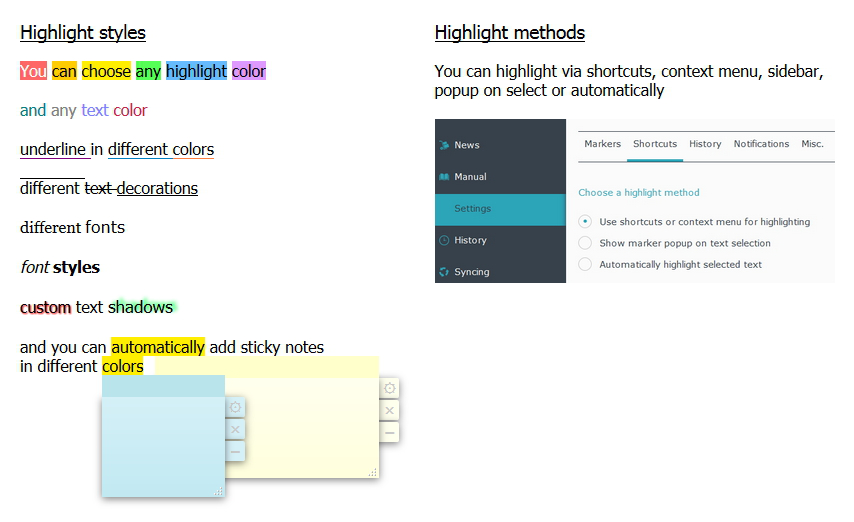


简介
Stopped working?
Some users reported Textmarker stopped working after a Firefox update.
Unforntunately neither do we know yet what is causing the issue nor can we reproduce it.
For some users it helped to uninstall Textmarker, restart FF, re-install Textmarker - and eventually restart FF again. But other users had to refresh the whole FF profile.
If you need to backup your Textmarker data before the uninstall -> here you find how to do that:
https://github.com/ufb/Textmarker/issues/84#issuecomment-557044749
Backup your data
Please save a backup of your highlights and settings occasionally (you can do so on Textmarker's "Export & Import" page).
In the rare case you lost your data due to re-installation just import your backup file
Bug reports, problems, suggestions or feature requests via e-mail at undflybir@gmx.de or on https://github.com/ufb/Textmarker/issues
Feature requests in reviews (especially ones that lower the average rating) will be ignored.
Donations are very welcome - Thank you :)
Donate via Ko-Fi
Once having Textmarker installed you can open the manual (see screenshot 5) to learn how to use the addon.
Attention: Restoration of saved highlights can fail - especially when the corresp. page's text content changes.
- Mark text:
Select some text (i.e. with mouse), then click key M or 1-5 - Save
your changes and maintain them in the Textmarker history → [Ctrl] + [Alt] + [S] - Undo/Redo
your Textmarker actions using keyboard shortcuts - You can also permanently delete
any highlight via context menu. - Customize Mark Styles:
Define how exactly the selected text will be highlighted - Choose your shortcuts:
You can customize any shortcut. - Syning:
In case you have a Firefox sync account and have syncing enabled for addons Textmarker settings and highlights are being synchronized between your devices. If you don't sync your Firefox addons Textmarker will store your data locally. - Export:
Settings and saved highlights can be saved to a local file. - Bookmarks:
You can make text marks serve as bookmarks (→ on your next visit it will be scrolled to the lowermost bookmark automatically). - Wikipedia Look-Up:
Look up selected word on Wikipedia in a seperate tab - [W] - Sticky Notes:
Use context menu (right mouse button) for attaching a note to a highlight
NOTES:
Permissions - what are they used for:
Textmarker does not send any data whatsoever to anyone. All permissions are mandatory in order for Textmarker to work.
necessary permissions:
Access your data for all websites: For insertion of highlights and restoration of stored highlights as well as actions on Textmarker shortcuts the add-on has to read the text content of the page and react on pressing certain keyboard keys
Display notifications to you: For displaying success, failure and error notifications - can be disabled in the settings
Access browser tabs: Textmarker will add URL and page title to stored highlights for being able to restore highlights on page revisit
these permissions are only being used if you want to copy highlights or want Textmarker to work in iFrames:
Input data to the clipboard: For copying highlight text to clipboard
Access browser activity during navigation: Used by Textmarker to get infos about iFrames (url and id) in order to load the content script into iFrames
Looking for translators
Anyone interested in translating Textmarker (right now it's only available in English, German and French)?
Please contact me via e-mail and I will send you the text file.
Note: FF doesn't allow extensions to work in built-in PDF-viewer anymore. Also not in Reader Mode.
Textmarker 是做什么的
Textmarker 是一款面向 Firefox 的外观主题类扩展,主要用来更换浏览器配色、给网页加深色模式、调整界面观感。官方对它的介绍是:Permanent web text highlighter在Firefox 附加组件商店(AMO)上,它当前版本 5.3.3,评分 4.3(172 人评价),约 2,609 名用户。
适合什么人用
从功能定位看,Textmarker 更适合长时间对着屏幕、希望降低眼睛负担的用户。如果你平时只是偶尔遇到相关需求,用浏览器自带功能也能凑合;但如果这件事每天都发生,装一个专门处理它的扩展通常比手动操作省事得多。需要注意的是它作用于所有网站,装上后建议先观察一两天,确认不影响常用站点的正常使用。
怎么安装 Textmarker
- 打开Firefox 附加组件商店(AMO)上的官方页面;
- 点「添加到浏览器」并确认权限提示;
- 装好后在扩展列表里固定图标,方便随时开关。
本站只做索引与介绍,安装包来自官方商店。如果商店页面提示当前地区不可用,说明该扩展未在你所在区域上架。
常见问题
Textmarker 是免费的吗?
Textmarker 在Firefox 附加组件商店(AMO)免费提供下载。它是浏览器扩展,装上就能直接用,不需要注册账号。
Textmarker 安全吗?
它只申请了 0 项权限,范围比较克制,没有申请「读取所有网站数据」这种大权限。
Textmarker 支持哪些浏览器?
当前收录的版本来自Firefox 附加组件商店(AMO),适用于 Firefox。同一个扩展在其他商店可能有对应版本,但功能与版本号不一定相同。
怎么卸载 Textmarker?
在扩展管理页找到 Textmarker,点移除即可。它在本地保存的设置会一起清掉,不会残留数据。
权限清单 来自 manifest.json 原文
站点访问 1
<all_urls>
接口权限 7
activeTabclipboardWritemenusnotificationsstoragetabswebNavigation