
Tel Linker EN
Michael · Firefox
Locates telephone numbers on a page and converts them into clickable links.
<all_urls>),意味着它可以读取你在任意站点的页面内容,包括已登录的页面。这是许多扩展正常工作的必要条件,但也值得你确认来源可信。
截图


简介
Locates telephone numbers on a page and converts them into clickable links.
This extension came about because of a desire to be able to click the telephone numbers on my company's intranet website in order to make phone calls. The problem is, in order to make outgoing calls, we have to dial +8 at the start. There simply weren't any existing (not that I could easily find at least) extensions that allowed that level of customization. Given I quite enjoy proving XKCD's automation cartoon correct, the 'Tel Linker' was born!
Keep in mind that in order to use this extension you must have software which can bind on your protocol of choice (see windows default programs, default programs by protocol)! Applications like Cisco Jabber, Skype, VerticalWave Dialer, etc. Either that or you have to have a phone system that supports some kind of http/https dialing, ie: http://callsystem.mycompany/call?number={1}{2}{3}
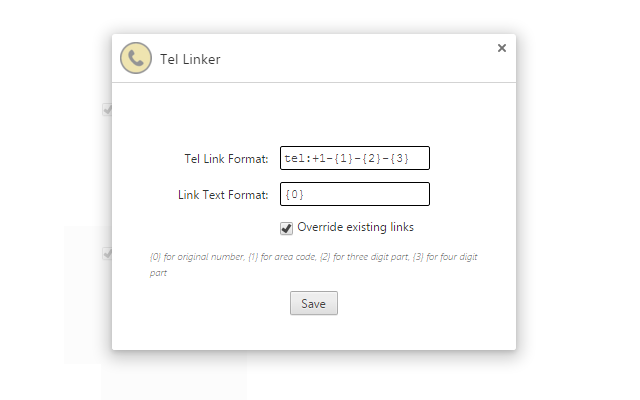
When matching phone numbers, it will provides 4 replacement variables for you to work with. {0} translates to the original number, in its a original state. {1} is the area code, {2} is the 3 digit part, and {3} is the four digit part.
EG: (555)-666 7777
{0} = (555)-666 7777
{1} = 555
{2} = 666
{3} = 7777
The default settings create a tel link, formatted as +1-555-666-7777, without changing the actual displayed text. If you need to use something other than tel, would like a different format, or need another dial out code, just change it in options! I would recommend that you not use the {0} replacement for the actual Tel Link portion, simply because some websites have decided to use 'pretty' formatting on their phone numbers, ie: 555.666.7777. Using periods in a phone number, for most phone clients, is not valid. The standard is to use either dashes to separate the numbers ({1}-{2}-{3}) or to simply have no separation ({1}{2}{3}).
If for some reason the extension misses a phone number, you can also try selecting the phone number and right clicking to use the context menu option. It will still try and apply the matching standards on the number just in case the issue was related to some odd DOM circumstance; if it can't match a phone number, it will simply parse out whatever protocol you've set and stick it in front of whatever you have highlighted.
You can also choose to mark either a single page or an entire domain as 'filtered', meaning Tel Linker will not find and replace phone numbers for that page/domain. To do so, just click the phone icon to the right of your address bar, and choose the option you prefer. To re-enable Tel Linker for the domain/page, just repeat the process, or go to the extension options and remove the domain/page from the filtered list.
If you run into any glitches, or have any suggestions, feel free to comment about it; I like to tinker with things in my spare time!
Update: Added ability to set formatting rules specific to domains. Click tel-linker icon in toolbar while on the domain you'd like to set the rule for.
Tel Linker 是做什么的
Tel Linker 是一款面向 Firefox 的社交通讯类扩展,主要用来增强社交网站功能、管理消息与通知。官方对它的介绍是:Locates telephone numbers on a page and converts them into clickable links.在Firefox 附加组件商店(AMO)上,它当前版本 0.5.4resigned1,评分 3.56(9 人评价),约 59 名用户。
适合什么人用
从功能定位看,Tel Linker 更适合重度使用社交平台的用户。如果你平时只是偶尔遇到相关需求,用浏览器自带功能也能凑合;但如果这件事每天都发生,装一个专门处理它的扩展通常比手动操作省事得多。需要注意的是它作用于所有网站,装上后建议先观察一两天,确认不影响常用站点的正常使用。
怎么安装 Tel Linker
- 打开Firefox 附加组件商店(AMO)上的官方页面;
- 点「添加到浏览器」并确认权限提示;
- 装好后在扩展列表里固定图标,方便随时开关。
本站只做索引与介绍,安装包来自官方商店。如果商店页面提示当前地区不可用,说明该扩展未在你所在区域上架。
常见问题
Tel Linker 是免费的吗?
Tel Linker 在Firefox 附加组件商店(AMO)免费提供下载。它是浏览器扩展,装上就能直接用,不需要注册账号。
Tel Linker 安全吗?
它只申请了 0 项权限,范围比较克制,没有申请「读取所有网站数据」这种大权限。
Tel Linker 支持哪些浏览器?
当前收录的版本来自Firefox 附加组件商店(AMO),适用于 Firefox。同一个扩展在其他商店可能有对应版本,但功能与版本号不一定相同。
怎么卸载 Tel Linker?
在扩展管理页找到 Tel Linker,点移除即可。它在本地保存的设置会一起清掉,不会残留数据。
权限清单 来自 manifest.json 原文
未解析到权限条目。