
Tabiverse EN
Tabiverse · Firefox
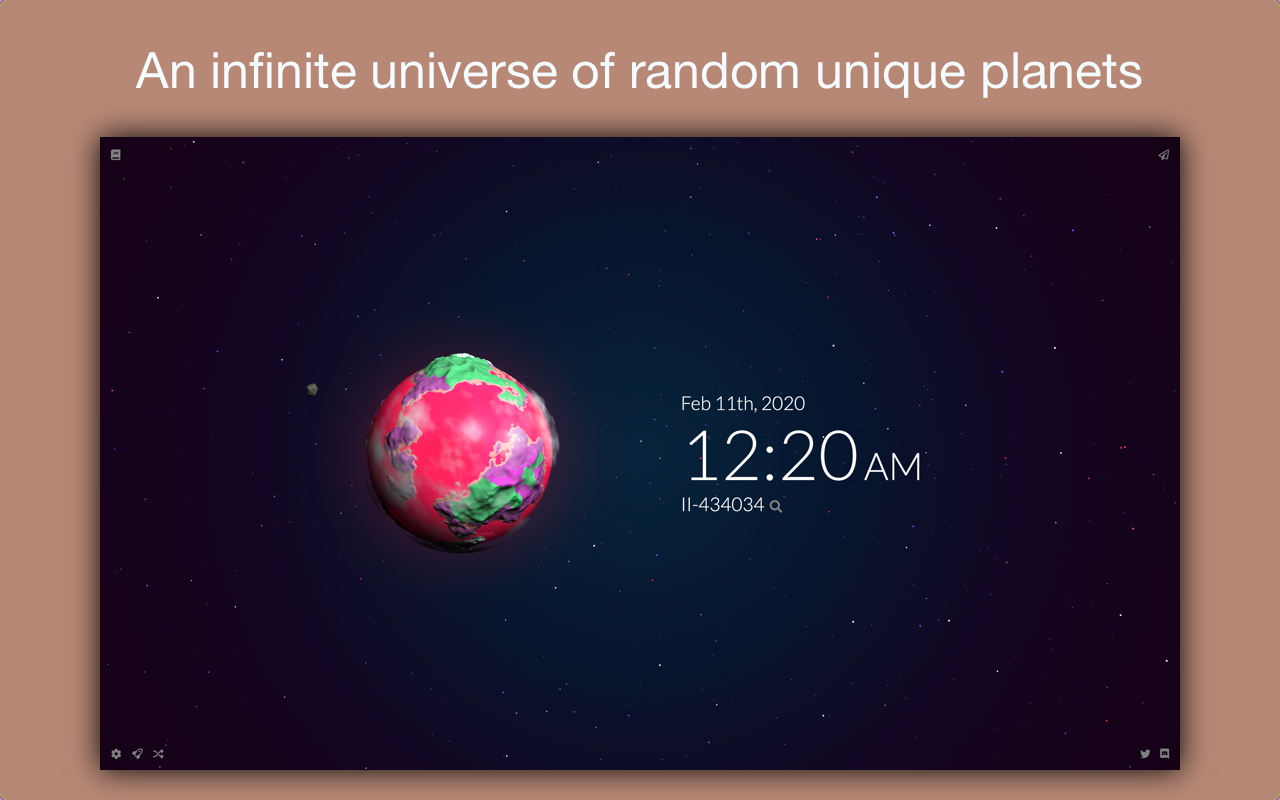
Turn your new tabs into a universe! Explore a random planet/star/asteroid when you open a new tab
截图



简介
Features:
🌍Get a random planet, star, gas giant, or asteroid in every new tab
🌍A hud that shows the current date, time, and planet info
🌍Share your planet coordinates with your friends so that they can explore the same planets.
🌍Explore travel history and save favorite planets
🌍Enter coordinates manually to explore the procedural universe
🌍Shuffle to go to a planet at random coordinates
🌍Infinite random 3D interactive space themed wallpapers!
Tabiverse is a procedurally generated universe in your browser new tab. Every time you open a new tab, you are teleported to a procedural planet in space with random terrains, oceans, atmosphere, and biomes. The random planets, stars, gas giants, and asteroids provide you an infinite number of 3D space themed wallpaper for your new tab. Since every planet is rendered in 3D, the space wallpapers are interactive! You are able to move the camera freely to explore the planets in space. Each planet in space comes with its own unique name and stats such as temperature and habitability.
Currently, there are three types of celestial space object in the Tabiverse: planets, stars, gas giants, and asteroids. Each space object might have a ring or moons. We are adding more space objects such as black holes and space anomalies very soon. You are also able to save and share your planet coordinates with your friends so that they can explore the same planets. More features such as an account system and multiplayer are also in the works.
Follow us on Twitter and join us on Discord to share feedback and get the latest news:
Twitter: https://twitter.com/tabiverse
Discord: https://discord.gg/MUgRGwE
Changelog
Version 0.0.0.16 - Feb 27th, 2020
- Made the gas giant's planet ring align with its planet's axis
- Made planet orbit camera's animation base on time instead of fps
- Animations no longer skip frames when tab is in the background
Version 0.0.0.15 - Feb 23rd, 2020
- Added a brand new type of celestial object: gas giants!
- Added multiverse system to preserve planets in the past versions
- Removed FPS setting. FPS is now as high as possible (synced to your monitor's refresh rate)
- Made "initial zoom animation" default to false
Version 0.0.0.14 - Feb 13th, 2020
- Added uninstall feedback form
- Performance optimizations
Version 0.0.0.13 - Feb 3rd, 2020
- Changed x, y, z coordinates to alpha, beta, gamma symbols in planet info page
- Indicated that the extension should work offline
Version 0.0.0.12 - Jan 27th, 2020
- Limited x, y, z coordinates to from -9999.99 to 9999.99
- Added planet booklet (top left) widget for checking planet history and bookmarks
- You are able to view the past 50 planets you have travelled
- You are able to bookmark up to 50 planets
Version 0.0.0.11 - Dec 30th, 2019
- Added random shuffle button to go to a random planet
- Added planet info scanner (currently shows name, habitability, temperature, type, and coordinates)
- Added seamless planet transitions
- Move camera further if planet has a ring, so the planet isn't too big
- Switches to a brand new font that is smooth and consistent across browsers
- Make ocean ridge planets more ridged
- Fixes seams between planet faces due to inconsistent normals
- Fixes some bugs regarding moons rendering
Version 0.0.0.10 - Dec 8th, 2019
- Added rings! Random ocean planets will have rings generated
- Added moons! Planets and asteroids have a chance to generate orbiting moons
- Added "Native Resolution" option to display HD graphics for retina displays. This setting can be computationally intense
- Changed default FPS to 60
Version 0.0.0.9 - Nov 14th, 2019
- Fix a bug that prevents share link from being copied
Version 0.0.0.8 - Nov 8th, 2019
- Disable camera controls during animation
- Move all stars further away from the planet, so no stars are right beside the planet anymore
- Launch of https://tabiverse.com
- Added a share button on the top right corner. Your friends can view your planets without the extension through the link!
Version 0.0.0.7 - Oct 28th, 2019
- Shorten title to Tabiverse so the URL bar isn't obstructed as much
- Add a small damping effect to the camera rotation
Version 0.0.0.5 - Oct 16th, 2019
- Add initial zoom back as a setting (defaults to true)
Version 0.0.0.4 - Oct. 16th, 2019
- Enabled camera rotation and zoom using mouse
- New celestial object: stars
- Planets should overall look more aesthetic
- Disabled zoom animation on page load to save loading time
- Improved planet transition animation
- More random planet types! (islands and ridged)
Version 0.0.0.2 - Oct. 2nd, 2019
- Initial Release
Tabiverse 是做什么的
Tabiverse 是一款面向 Firefox 的外观主题类扩展,主要用来更换浏览器配色、给网页加深色模式、调整界面观感。官方对它的介绍是:Turn your new tabs into a universe! Explore a random planet/star/asteroid when you open a new tab在Firefox 附加组件商店(AMO)上,它当前版本 0.0.0.17,评分 4.9(21 人评价),约 107 名用户。
适合什么人用
从功能定位看,Tabiverse 更适合长时间对着屏幕、希望降低眼睛负担的用户。如果你平时只是偶尔遇到相关需求,用浏览器自带功能也能凑合;但如果这件事每天都发生,装一个专门处理它的扩展通常比手动操作省事得多。
怎么安装 Tabiverse
- 打开Firefox 附加组件商店(AMO)上的官方页面;
- 点「添加到浏览器」并确认权限提示;
- 装好后在扩展列表里固定图标,方便随时开关。
本站只做索引与介绍,安装包来自官方商店。如果商店页面提示当前地区不可用,说明该扩展未在你所在区域上架。
常见问题
Tabiverse 是免费的吗?
Tabiverse 在Firefox 附加组件商店(AMO)免费提供下载。它是浏览器扩展,装上就能直接用,不需要注册账号。
Tabiverse 安全吗?
它只申请了 0 项权限,范围比较克制,没有申请「读取所有网站数据」这种大权限。
Tabiverse 支持哪些浏览器?
当前收录的版本来自Firefox 附加组件商店(AMO),适用于 Firefox。同一个扩展在其他商店可能有对应版本,但功能与版本号不一定相同。
怎么卸载 Tabiverse?
在扩展管理页找到 Tabiverse,点移除即可。它在本地保存的设置会一起清掉,不会残留数据。
权限清单 来自 manifest.json 原文
未解析到权限条目。