
Link Visitor EN
kinitawowi · Firefox
This add-on provides the ability to add single or multiple links to the browser history, making them appear visited, without having to actually visit them. It also allows them to be removed from the history.
<all_urls>),意味着它可以读取你在任意站点的页面内容,包括已登录的页面。这是许多扩展正常工作的必要条件,但也值得你确认来源可信。
截图

简介
This add-on provides the ability to add single or multiple links to the browser history, making them appear visited, without having to actually visit them. It also allows them to be removed from the history.
Note:
For this extension to work, Firefox's privacy settings must be set a minimum of 'Remember my browsing and download history', and theabout:configoptionlayout.css.visited_links_enabledmust be set to true.
For a single link, right click on a link and select 'Toggle visited status'.
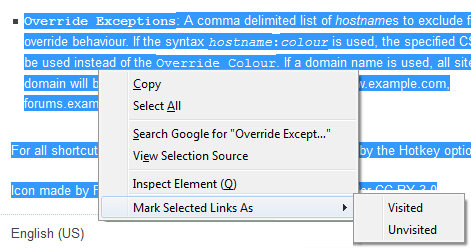
For selected links, select the area containing the desired links, right click and select 'Mark Selected Links As' then 'Visited' or 'Unvisited'.
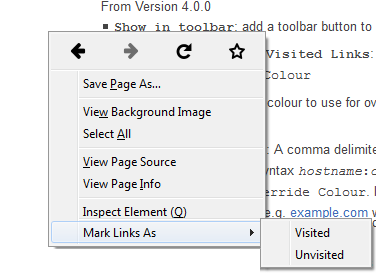
For all links on a page, right click and select 'Mark Links As' then 'Visited' or 'Unvisited' (Note: this will not appear if you right click on a link or have text selected) Alternatively select the toolbar button and pick the desired option.
Preferences: (v5)
Always Mark Bookmarks as Visited: if set, bookmarked links will not be marked unvisited.Override Colour of Visited Links: if selected, force the style of all visited links to the specifiedOverride ColourOverride Colour: The colour to use for overriding the default or site colour on visited linksOverride Exceptions: A comma delimited list of hostnames to exclude from the override behaviour. If the syntaxhostname:colouris used, the specified CSS Colour will be used instead of theOverride Colour. If a domain name is used, all sites within the domain will be excluded. (e.g. example.com will cover www.example.com, forums.example.com, etc.)Delay Interval: This is the delay between marking individual links, increase this to reduce CPU load, at the cost of time.Skip history check: Linkvisitors default behaviour is to check the history for the link, and only change the link to visited/unvisted if required. selecting this option will cause linkvisitor to add or remove the link without checking. Note: checking the history is quicker than adding a url, so there is a trade off depending on how many links need to be added vs those that will already be there.
Preferences are stored in the browsers local storage unless the browser sync storage is enabled for web extensions.
To enable browser sync storage set webextensions.storage.sync.enabled to true in about:config
Icon made by Freepik from www.flaticon.com is licensed under CC BY 3.0
Known Issues
- Shortcut keys are no longer customisable in this plugin, support is require by Firefox itself
- The 'v' shortcut key in the context menu to toggle visited status not supported by Firefox
- The speed at which links can be marked is slower that it used to be due to the performance of the history API available to WebExtensions
Link Visitor 是做什么的
Link Visitor 是一款面向 Firefox 的外观主题类扩展,主要用来更换浏览器配色、给网页加深色模式、调整界面观感。官方对它的介绍是:This add-on provides the ability to add single or multiple links to the browser history, making them appear visited, without having to actually visit them. It also allows them to be removed from the history.在Firefox 附加组件商店(AMO)上,它当前版本 5.4resigned1,评分 4.08(25 人评价),约 339 名用户。
适合什么人用
从功能定位看,Link Visitor 更适合长时间对着屏幕、希望降低眼睛负担的用户。如果你平时只是偶尔遇到相关需求,用浏览器自带功能也能凑合;但如果这件事每天都发生,装一个专门处理它的扩展通常比手动操作省事得多。需要注意的是它作用于所有网站,装上后建议先观察一两天,确认不影响常用站点的正常使用。
怎么安装 Link Visitor
- 打开Firefox 附加组件商店(AMO)上的官方页面;
- 点「添加到浏览器」并确认权限提示;
- 装好后在扩展列表里固定图标,方便随时开关。
本站只做索引与介绍,安装包来自官方商店。如果商店页面提示当前地区不可用,说明该扩展未在你所在区域上架。
常见问题
Link Visitor 是免费的吗?
Link Visitor 在Firefox 附加组件商店(AMO)免费提供下载。它是浏览器扩展,装上就能直接用,不需要注册账号。
Link Visitor 安全吗?
它只申请了 0 项权限,范围比较克制,没有申请「读取所有网站数据」这种大权限。
Link Visitor 支持哪些浏览器?
当前收录的版本来自Firefox 附加组件商店(AMO),适用于 Firefox。同一个扩展在其他商店可能有对应版本,但功能与版本号不一定相同。
怎么卸载 Link Visitor?
在扩展管理页找到 Link Visitor,点移除即可。它在本地保存的设置会一起清掉,不会残留数据。
权限清单 来自 manifest.json 原文
站点访问 3
<all_urls>http://*/*https://*/*
接口权限 6
activeTabbookmarkscontextMenushistorystoragetabs