
 BetterTTV
Enhances Twitch and YouTube wi…
Firefox

Keyboard & Mouse for Xbox xCloud EN
ModernKit.one · Firefox
Play Xbox Cloud Gaming (xCloud) games with a keyboard and mouse.
2.4/5
22 人评分
1千用户
v3.5.4当前版本
截图
简介
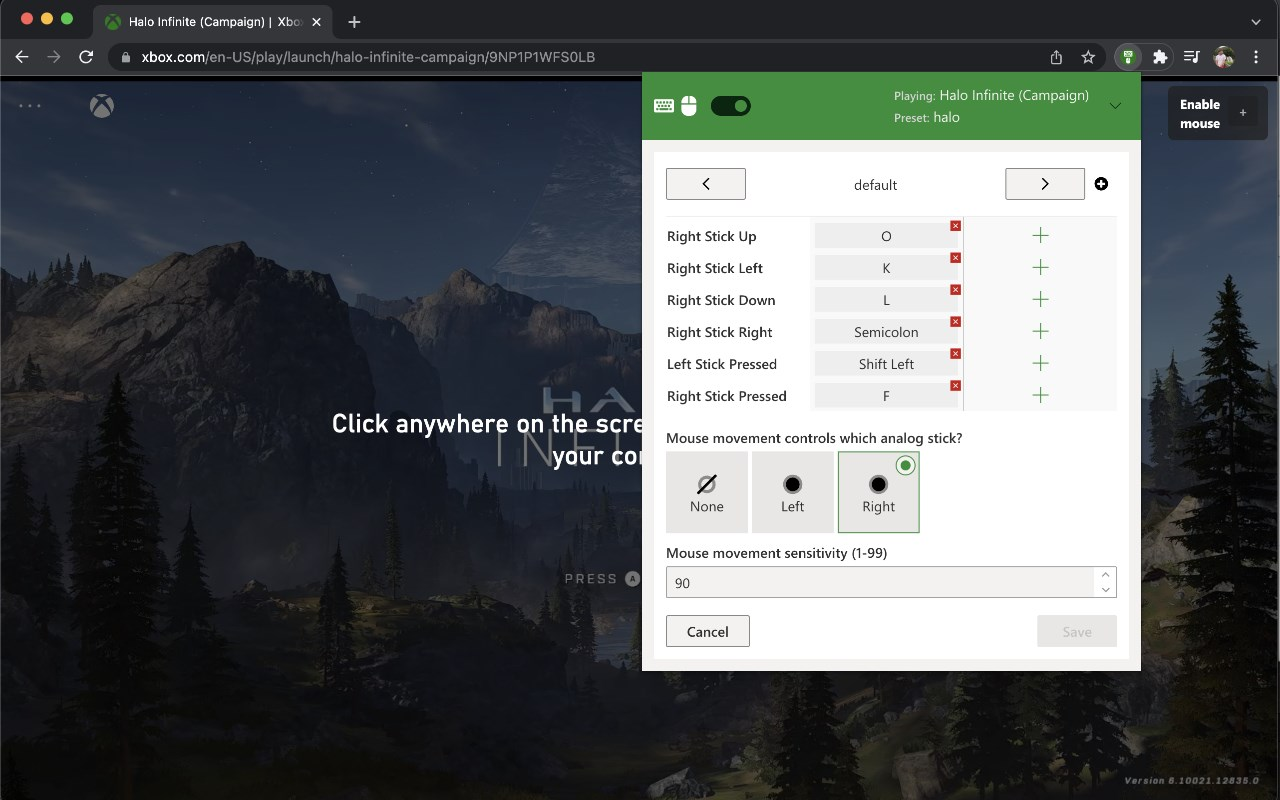
A browser extension to control *any* game on Xbox Cloud Gaming (Project xCloud) with a keyboard and mouse.
✅ Works for every game
- Every game on xCloud is supported - regardless of whether or not it natively supports mouse and keyboard
✅ Quick enable/disable
- Easily disable the mouse/keyboard override and switch back to your controller whenever you feel like it with one click of the toggle
✅ Configurable sensitivity
- Control how sensitive you want mouse movement to be on a per-profile basis (you may also need to tweak the control sensitivity in the game options as well for optimal use)
✅ Multiple presets
- Manage multiple preset and custom configurations (e.g. create separate presets for "fighting games", "shooter", etc.)
- Bind multiple keyboard keys or mouse buttons to any controller button
✅ Respects your privacy
- No keyboard/mouse data is ever recorded or sent anywhere from your computer
- The extension only runs on xCloud; not other sites you visit
You may need to configure the sensitivity in the in-game settings as well (and it is recommended to turn off any "deadzone" options in the game).
If you have a feature request or found a bug to report, please contact us via email: support@modernkit.one
Try the extension for free, no card required. If you like it, play anytime with a single payment (no subscription). Use your upgraded account on up to 5 devices.
This extension works by acting as a "virtual" controller. It listens for keyboard presses and (optionally) mouse movement and translates these into what appear as controller button presses and analog stick movements.
There is no added input delay introduced by this extension - all keyboard/mouse input is instantly translated into virtual controller input immediately by the extension without any extra software or steps.
(This project is not affiliated with Microsoft or Xbox in any way. All Microsoft, Xbox logos/icons/trademarks are copyright of their respective owners.)
Keyboard & Mouse for Xbox xCloud 是做什么的
Keyboard & Mouse for Xbox xCloud 是一款面向 Firefox 的游戏娱乐类扩展,主要用来增强游戏社区功能、显示额外数据。官方对它的介绍是:Play Xbox Cloud Gaming (xCloud) games with a keyboard and mouse.在Firefox 附加组件商店(AMO)上,它当前版本 3.5.4,评分 2.41(22 人评价),约 1,036 名用户。
适合什么人用
从功能定位看,Keyboard & Mouse for Xbox xCloud 更适合游戏玩家与游戏社区常客。如果你平时只是偶尔遇到相关需求,用浏览器自带功能也能凑合;但如果这件事每天都发生,装一个专门处理它的扩展通常比手动操作省事得多。
怎么安装 Keyboard & Mouse for Xbox xCloud
- 打开Firefox 附加组件商店(AMO)上的官方页面;
- 点「添加到浏览器」并确认权限提示;
- 装好后在扩展列表里固定图标,方便随时开关。
本站只做索引与介绍,安装包来自官方商店。如果商店页面提示当前地区不可用,说明该扩展未在你所在区域上架。
常见问题
Keyboard & Mouse for Xbox xCloud 是免费的吗?
Keyboard & Mouse for Xbox xCloud 在Firefox 附加组件商店(AMO)免费提供下载。它是浏览器扩展,装上就能直接用,不需要注册账号。
Keyboard & Mouse for Xbox xCloud 安全吗?
它只申请了 0 项权限,范围比较克制,没有申请「读取所有网站数据」这种大权限。
Keyboard & Mouse for Xbox xCloud 支持哪些浏览器?
当前收录的版本来自Firefox 附加组件商店(AMO),适用于 Firefox。同一个扩展在其他商店可能有对应版本,但功能与版本号不一定相同。
怎么卸载 Keyboard & Mouse for Xbox xCloud?
在扩展管理页找到 Keyboard & Mouse for Xbox xCloud,点移除即可。它在本地保存的设置会一起清掉,不会残留数据。
权限清单 来自 manifest.json 原文
接口权限 1
storage
标签 点标签看同类扩展
BetterTTV
Enhances Twitch and YouTube wi…
Firefox
 7TV
Improve your viewing experienc…
Firefox
 FrankerFaceZ
The Twitch Enhancement Suite -…
Firefox
 Improve YouTube! (Open-Source for YouTube)
Make YouTube tidy & powerf…
Firefox
 关灯看视频
观看视频时调暗页面,仿佛置身电影院
Firefox
 Watch2Gether
With Watch2Gether you can watc…
Firefox
 Librezam
使用Shazam API的开源音乐识别扩展(也支持Audd、…
Firefox
 Netflix Party is now Teleparty
Watch Netflix, Youtube, Disney…
Firefox