
Keep or Delete Bookmarks EN
Sören Hentzschel · Firefox
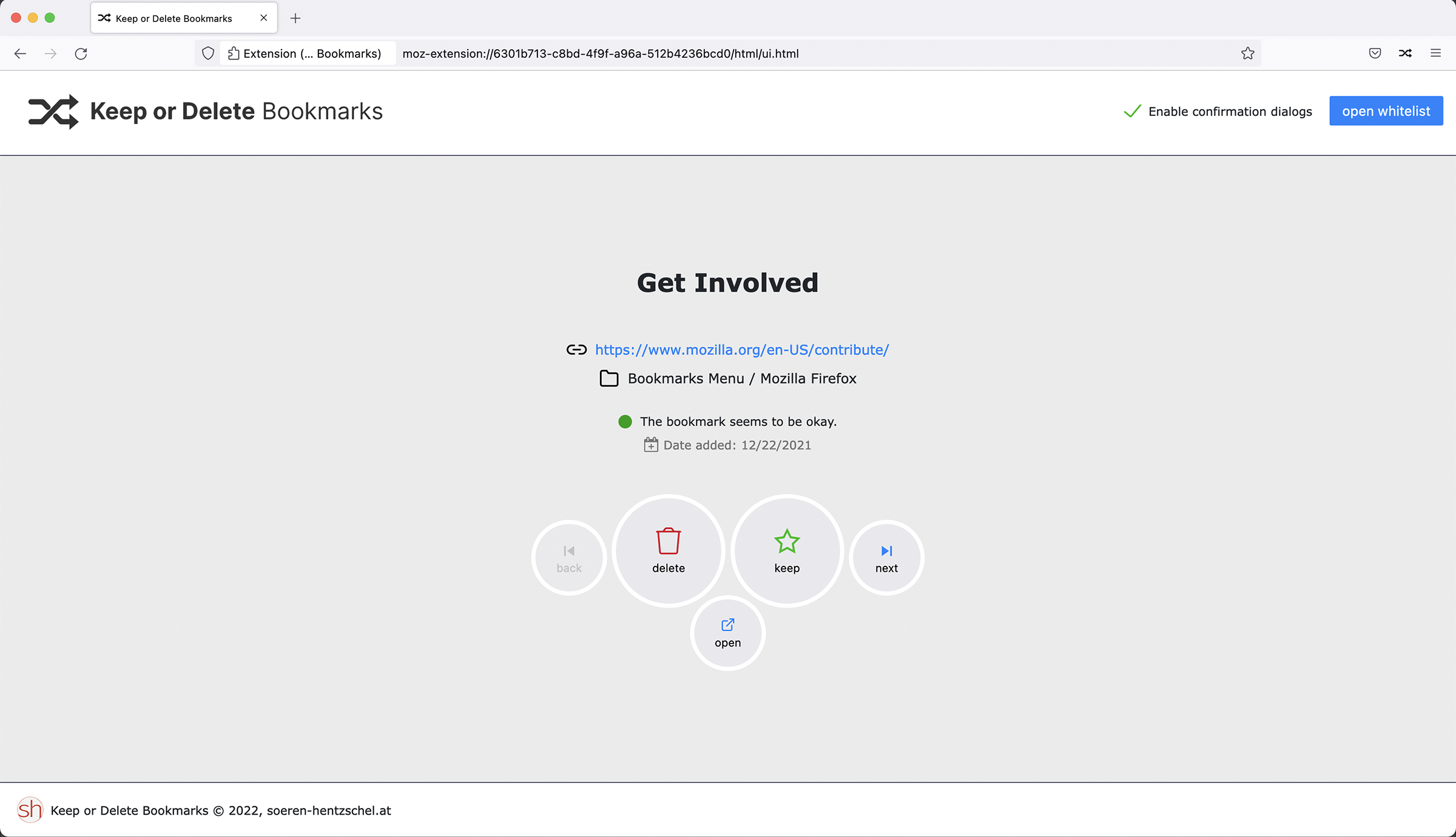
Cleaning up bookmarks is boring. The Firefox add-on Keep or Delete Bookmarks brings some fun to this task by allowing you to sort out the bookmarks like on “Tinder” or similar services.
截图


简介
The add-on randomly displays one bookmark, including the title, the URL and the bookmark folder. The user has several options:
1) Keep the bookmark. The bookmark will be added to a whitelist and Keep or Delete Bookmarks will never ask again about this bookmark.
2) Delete the bookmark. The bookmark will be deleted from your Firefox.
3) Skip the bookmark and defer the decision. Keep or Delete Bookmarks will show you the next bookmark without any action.
4) Open the bookmark. Maybe you are not sure about the bookmark yet. This options lets you open the bookmark in a new tab before you make a decision.
Features
- Keep or Delete Bookmarks always shows one random bookmark
- The add-on automatically checks whether the bookmark still works or is broken
- An internal skip list is used for domains that are known to be unverifiable
- You can keep or delete the bookmark, you can open the bookmark in a new tab, or you can defer the decision
- After an action Keep or Delete Bookmarks shows you the next bookmark
- Keep or Delete Bookmark makes sure that you never see the same bookmark two times in a row
- There is a confirmation dialog when you press the delete button
- You can disable the confirmation dialogs with one click
- You can remove bookmarks from the whitelist at any time
- You can also use keyboard shortcuts for the primary actions:
- Left Arrow: show previous bookmark
- Right Arrow: show next (random) bookmark
- Enter: open bookmark
- Space: add bookmark to whitelist
- Backspace: delete bookmark (or opens confirmation dialog if enabled)
- in bookmark deletion confirmation dialog:
- ESC: close dialog
- Enter: delete bookmark
Planned features
You can find the roadmap and request new features in the issues tracker.
Languages
The extension is currently available in the following languages:
- English
- German
- Dutch (Thanks, PanderMusubi!)
- Japanese (Thanks, Shitennouji!)
- Upper Sorbian (Thanks, milupo!)
- Lower Sorbian (Thanks, milupo!)
Permissions
Keep or Delete Bookmarks does not work without the following permissions:
- access browser tabs
The permission to access the browser tabs is needed so that Keep or Delete Bookmarks can jump to the already opened user interface if the user interface is already opened in another tab and you click the button in the browser's toolbar.
- read and modify bookmarks
You installed Keep or Delete Bookmarks to show and remove bookmarks so it should be clear why the permission is needed to read and modify your bookmarks.
Optional permissions:
- access your data for all sites
The add-on checks the bookmarks by sending a request to the appropriate URLs. This cannot work without the permission to access these sites. Keep or Delete Bookmarks asks at runtime for this permission if you want to execute this check.
Keep or Delete Bookmarks needs some more permissions, but Firefox does not prompt for the following permissions:
- menus
The menus permission is needed for providing a menu entry in the tools menu to access Keep or Delete Bookmarks's user interface.
- storage
The storage permission is needed so that Keep or Delete Bookmarks can remember which bookmarks you want to keep.
Keep or Delete Bookmarks 是做什么的
Keep or Delete Bookmarks 是一款面向 Firefox 的书签管理类扩展,主要用来整理书签、查重、批量导入导出。官方对它的介绍是:Cleaning up bookmarks is boring. The Firefox add-on Keep or Delete Bookmarks brings some fun to this task by allowing you to sort out the bookmarks like on “Tinder” or similar services.在Firefox 附加组件商店(AMO)上,它当前版本 3.0.0,评分 4.76(37 人评价),约 373 名用户。
适合什么人用
从功能定位看,Keep or Delete Bookmarks 更适合收藏了大量网页、需要定期整理的用户。如果你平时只是偶尔遇到相关需求,用浏览器自带功能也能凑合;但如果这件事每天都发生,装一个专门处理它的扩展通常比手动操作省事得多。
怎么安装 Keep or Delete Bookmarks
- 打开Firefox 附加组件商店(AMO)上的官方页面;
- 点「添加到浏览器」并确认权限提示;
- 装好后在扩展列表里固定图标,方便随时开关。
本站只做索引与介绍,安装包来自官方商店。如果商店页面提示当前地区不可用,说明该扩展未在你所在区域上架。
常见问题
Keep or Delete Bookmarks 是免费的吗?
Keep or Delete Bookmarks 在Firefox 附加组件商店(AMO)免费提供下载。它是浏览器扩展,装上就能直接用,不需要注册账号。
Keep or Delete Bookmarks 安全吗?
它只申请了 0 项权限,范围比较克制,没有申请「读取所有网站数据」这种大权限。
Keep or Delete Bookmarks 支持哪些浏览器?
当前收录的版本来自Firefox 附加组件商店(AMO),适用于 Firefox。同一个扩展在其他商店可能有对应版本,但功能与版本号不一定相同。
怎么卸载 Keep or Delete Bookmarks?
在扩展管理页找到 Keep or Delete Bookmarks,点移除即可。它在本地保存的设置会一起清掉,不会残留数据。
权限清单 来自 manifest.json 原文
接口权限 4
bookmarksmenusstoragetabs