
Sidebery EN
mbnuqw · Firefox
Vertical tabs tree and bookmarks in sidebar with advanced containers configuration, grouping and many other features.
<all_urls>),意味着它可以读取你在任意站点的页面内容,包括已登录的页面。这是许多扩展正常工作的必要条件,但也值得你确认来源可信。
截图
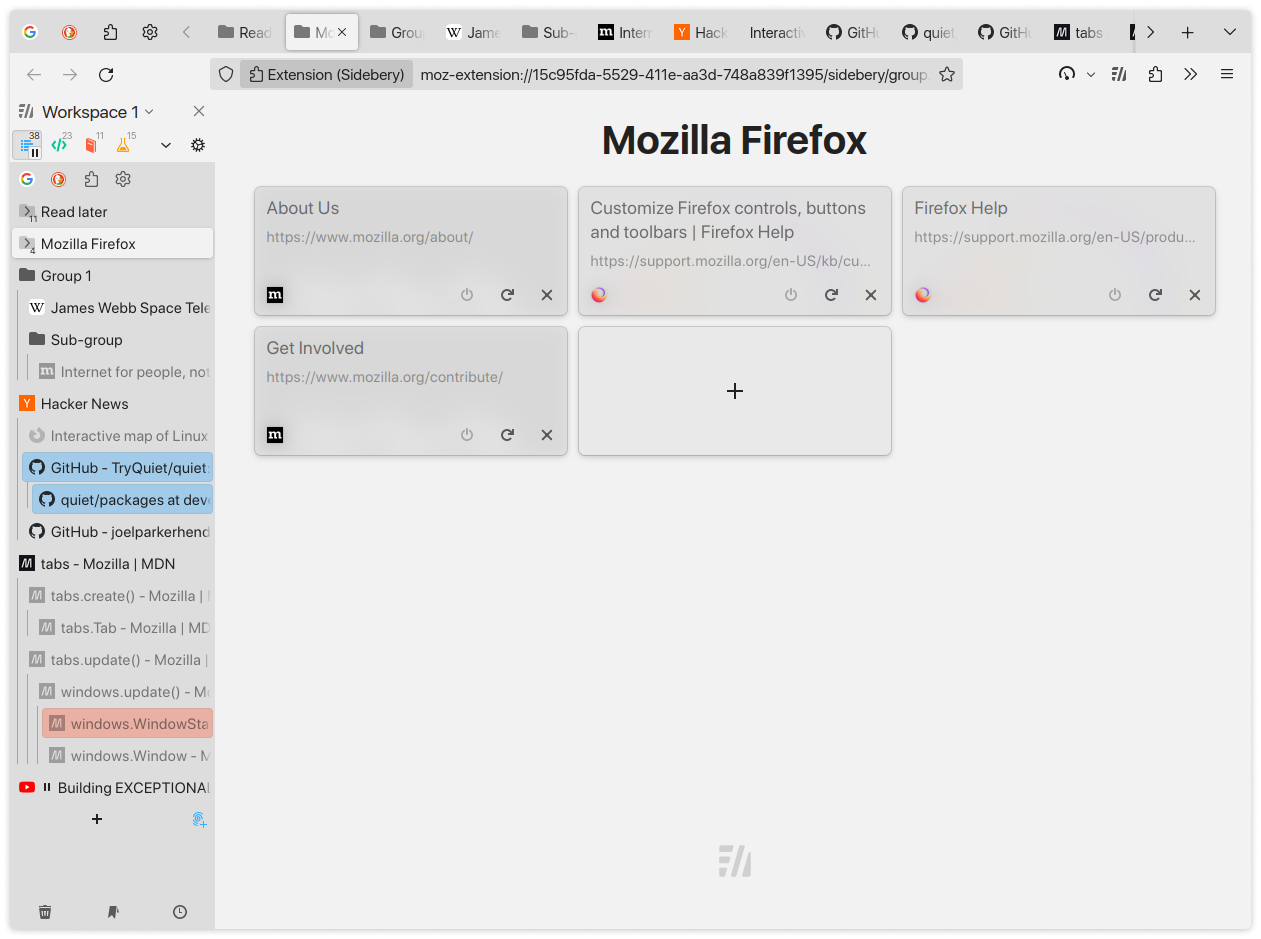


简介
Sidebery provides the list of tabs structured in a tree, bookmarks and history within the customizable panels. It aims to be fast and configurable.
Notice: Sidebery may conflict with addons that handle position of new tabs (e.g. Tree Style Tabs) or addons that move/sort tabs, which may result in unexpected behavior or broken tabs state at initialization. To avoid potential issues, please, disable such addons in Add-ons Manager page (about:addons).
Some of the key features:
- - Tabs
- - Simple flat list or tree with the option to set tree limit.
- Group tabs (aka folders) with a custom name helps organize open pages.
- Tabs colorization: Automatic per-domain/URL or manual.
- Tabs sorting: by title, url or access time
- Automatic unloading of tabs in a folded branch / inactive panel.
- Customizable tab title.
- ...
- Bookmarks
- - Tree or chronological view.
- Sort by name, URL or creation time
- Basic operations: open in... / create / edit / delete.
- Ability to highlight open bookmarks and activate the corresponding tab instead of opening a new one when clicked.
- Automatically delete a bookmark on opening from "Other Bookmarks" folder or configured bookmarks panel.
- ...
- Tabs / Bookmarks panels
- - Organize your browsing with panels of tabs/bookmarks.
- Convert open tabs in the panel to bookmarks and vice versa.
- Automatically move tabs by URL to configured panel.
- ...
- Containers
- - Bind container to the tabs panel.
- Automatically reopen tab in the target container by URL.
- Setup proxy config and UserAgent header for tabs in a container.
- ...
- Customizable context menu
- Sidebery allows you to change the context menu for tabs and bookmarks. You can enable/disable/move options, create sub-menus/separators.
- Customizable mouse/keyboard controls
- - Option to switch tabs with mouse-wheel.
- Configurable drag and drop behavior.
- A growing list of available actions for mouse/keyboard bindings.
- Customizable styles
- Sidebery provides full control of styles for sidebar and group page via variables and custom CSS.
- Snapshots
- You can setup auto snapshots that will keep info about open windows and tabs.
Privacy policy
- - Sidebery does not engage in ad targeting, data collection, or other activities that could compromise your privacy.
- By default, all data is stored locally on your machine.
- Sidebery sends data only when synchronization is enabled and only to chosen provider.
- You can optionally enable one or more synchronization providers (third-party services) to sync your data across multiple devices.
More detailed information can be found on this page: https://github.com/mbnuqw/sidebery/blob/v5/PRIVACY.md
Source code
- Source code can be found here: https://github.com/mbnuqw/sidebery
Permissions
- - "Access recently closed tabs" - needed for the "Undo close tab" function.
- "Access browser tabs" - needed to get info and control tabs.
- "Store unlimited amount of client-side data" - needed to store favicons cache and snapshots.
Optional permissions
- - "Access your data for all websites" and "Control browser proxy settings"
- Required for the next features:
- Context menu option for cleaning cookies
- Proxy and url rules of containers
- Page-screenshots for the group page and windows selection panel
- Changing the User-Agent per container
- "Hide and show browser tabs"
- Required for the next features:
- Hiding tabs on inactive panels
- Hiding folded tabs
- "Read and modify bookmarks" - needed for bookmarking the tabs and bookmarks panel functionality.
- "Access browsing history" - for history panel functionality.
- "Input data to the clipboard" - Context menu option for copying urls of tabs and bookmarks
- "Download files and read and modify the browser’s download history" - Auto-export of snapshots.
Note: You can deny these permissions at any time on the settings page.
Notes
- - Firefox doesn't allow addons to hide the native (horizontal) tab bar. To achieve that, you can use userChrome.css hacks.
Donate to support the development of this project
- - Payeer:
P1128042154- Bitcoin (BTC):
bc1q2drx3x5pfl0c68urwztvjrwgksg9u3l7mn4g4m- Ethereum (ETH), USDT (ERC20), USDC (ERC20):
0x11667D20AB328194AEEc68F9385CCcf713607929- Tron (TRX), USDT (TRC20), USDC (TRC20):
TJEdp1TnsN7Jfhfi9Db8yXKDK8NEUovCZb- Litecoin (LTC):
ltc1qpv4c4kaahdzhcwzj8yyrwlvnfcw2hw5qpxqr62- Solana (SOL):
GdWipUmnhdDa7kqkF3SJm5jTYqp3UsTdbcGCC1xLbVJf- TON:
UQAxwOfvZQz1YR4qieiE-J4wHiz3zrMXAyxDiRJQQXIDX8MHSidebery 是做什么的
Sidebery 是一款面向 Firefox 的书签管理类扩展,主要用来整理书签、查重、批量导入导出。官方对它的介绍是:Vertical tabs tree and bookmarks in sidebar with advanced containers configuration, grouping and many other features.在Firefox 附加组件商店(AMO)上,它当前版本 5.6.1,评分 4.69(1077 人评价),约 54,626 名用户。
适合什么人用
从功能定位看,Sidebery 更适合收藏了大量网页、需要定期整理的用户。如果你平时只是偶尔遇到相关需求,用浏览器自带功能也能凑合;但如果这件事每天都发生,装一个专门处理它的扩展通常比手动操作省事得多。需要注意的是它作用于所有网站,装上后建议先观察一两天,确认不影响常用站点的正常使用。
怎么安装 Sidebery
- 打开Firefox 附加组件商店(AMO)上的官方页面;
- 点「添加到浏览器」并确认权限提示;
- 装好后在扩展列表里固定图标,方便随时开关。
本站只做索引与介绍,安装包来自官方商店。如果商店页面提示当前地区不可用,说明该扩展未在你所在区域上架。
常见问题
Sidebery 是免费的吗?
Sidebery 在Firefox 附加组件商店(AMO)免费提供下载。它是浏览器扩展,装上就能直接用,不需要注册账号。
Sidebery 安全吗?
它只申请了 0 项权限,范围比较克制,没有申请「读取所有网站数据」这种大权限。
Sidebery 支持哪些浏览器?
当前收录的版本来自Firefox 附加组件商店(AMO),适用于 Firefox。同一个扩展在其他商店可能有对应版本,但功能与版本号不一定相同。
怎么卸载 Sidebery?
在扩展管理页找到 Sidebery,点移除即可。它在本地保存的设置会一起清掉,不会残留数据。
权限清单 来自 manifest.json 原文
站点访问(可选) 1
<all_urls>
接口权限 12
activeTabcontextualIdentitiescookiesidentitymenusmenus.overrideContextsearchsessionsstoragetabsthemeunlimitedStorage
接口权限(可选) 9
bookmarksclipboardReadclipboardWritedownloadshistoryproxytabHidewebRequestwebRequestBlocking