
IBM Salesforce Extras EN
John Rawls · Firefox
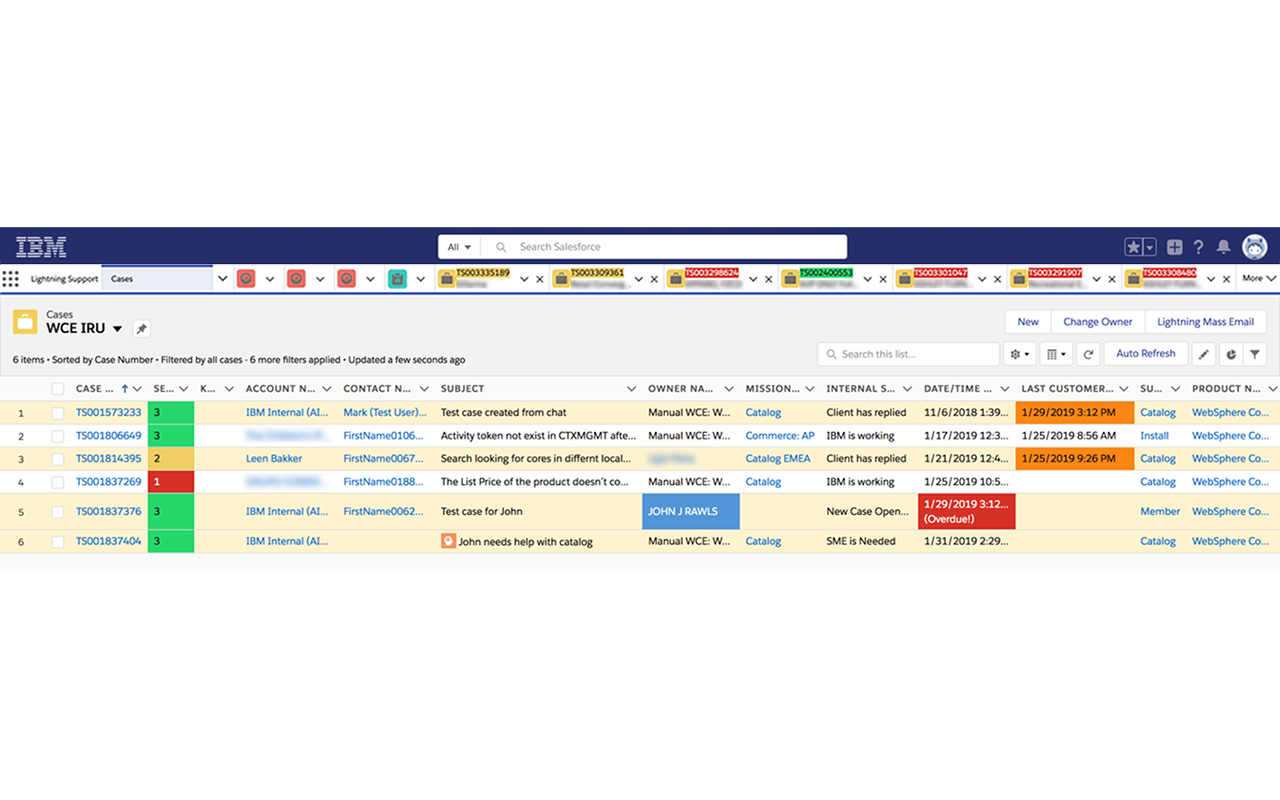
This extension adds some extra features to Salesforce Console for use by Support teams at IBM.
截图
简介
Restrictions: This extension is only designed for use with the Salesforce Lightning Console. It will not function on Salesforce Classic.
For questions or suggestions, reach out in the #ibmsfextras Slack channel.
Permissions notes: The extension only activates on tabs accessing *.force.com domains. The 'Access browser tabs' and 'Access browser activity during navigation' permissions are listed because of the use of the webNavigation and tabs APIs to effectively find open Salesforce tabs to inject our content scripts. The extension does not make any calls to external services of any kind; it strictly updates the Salesforce UI styling.
Cases views Features
- Severity level cell highlighting and shortened Severity text
- Auto-refresh button
- Highlighting of cases based on status ("New Case", "Waiting for IBM" or "Client has replied", etc.)
- Milestone Target Date/Time colorizing and countdown timer based on contact time left
- 'Last Customer Comment' cell highlighting if that time is > 1 hour ago.
- 'Next Action Datetime' cell highlighting if that time has been reached
- Skill case indicator icon in Subject column
- Highlighting my name in the Owner column for my cases
- Highlighting the Entitlement Name and Case Number fields purple for Advanced Support cases
Case Features
- Copy Case Details (to clipboard) button
- Keyboard shortcut to copy the current open Case # to the clipboard (CTRL+SHIFT+Y)
- Keyboard shortcut to copy the current open Case details (#, Severity, Account, Subj.) to the clipboard (CTRL+SHIFT+U)
- Keyboard shortcut to copy the parent Case # of the current open Skill case to the clipboard (CTRL+SHIFT+.)
- Keyboard shortcut to copy the Account Number of the current case CTRL+SHIFT+, (comma)
(Mac users substitute the Command ⌘ key for for CTRL)
- Slim left/right collapse buttons
- Trimmed padding in center and right side panels for a cleaner, more spacious look
- Always display the full subject heading in the left panel of a case
- Case Feed Badges (Enhanced Feed and Feed V2):
+ Purple 'Advanced Support' badge at the top of the feed for applicable accounts
+ Red/Orange 'Total Attention' badge at the top of the feed for applicable accounts
Older/deprecated Case Features:
- Compact case feed entries (about 1/2 the size as the original) (Feed V1)
- Feed entry highlighting in the Case Feed view(Feed V1)
- Auto focus cursor in @mention modal popup when composing a post (Feed V1)
- Background text area highlighting when composing internal posts (Feed V1)
- Condensed Task feed entries with Next Contact Date for Customer Communication tasks (Feed V1)
- Auto expand all case feed entries (optional) (Feed V1)
General Features
- Colorized navigation bar tab icons (optional)
- Condensed navigation bar
- Colorized case numbers in the navigation bar based on case severity
- Account names in Case tabs along with Case Subject mouseover tooltip
- Account names in Case tabs are colored purple if it's an Advanced Support account
- Colorized Omni-Channel statuses
- Colorize Client Escalated case tabs (light red)
IBM Salesforce Extras 是做什么的
IBM Salesforce Extras 是一款面向 Firefox 的外观主题类扩展,主要用来更换浏览器配色、给网页加深色模式、调整界面观感。官方对它的介绍是:This extension adds some extra features to Salesforce Console for use by Support teams at IBM.在Firefox 附加组件商店(AMO)上,它当前版本 2.4.1,评分 5(1 人评价),约 487 名用户。
适合什么人用
从功能定位看,IBM Salesforce Extras 更适合长时间对着屏幕、希望降低眼睛负担的用户。如果你平时只是偶尔遇到相关需求,用浏览器自带功能也能凑合;但如果这件事每天都发生,装一个专门处理它的扩展通常比手动操作省事得多。
怎么安装 IBM Salesforce Extras
- 打开Firefox 附加组件商店(AMO)上的官方页面;
- 点「添加到浏览器」并确认权限提示;
- 装好后在扩展列表里固定图标,方便随时开关。
本站只做索引与介绍,安装包来自官方商店。如果商店页面提示当前地区不可用,说明该扩展未在你所在区域上架。
常见问题
IBM Salesforce Extras 是免费的吗?
IBM Salesforce Extras 在Firefox 附加组件商店(AMO)免费提供下载。它是浏览器扩展,装上就能直接用,不需要注册账号。
IBM Salesforce Extras 安全吗?
它只申请了 0 项权限,范围比较克制,没有申请「读取所有网站数据」这种大权限。
IBM Salesforce Extras 支持哪些浏览器?
当前收录的版本来自Firefox 附加组件商店(AMO),适用于 Firefox。同一个扩展在其他商店可能有对应版本,但功能与版本号不一定相同。
怎么卸载 IBM Salesforce Extras?
在扩展管理页找到 IBM Salesforce Extras,点移除即可。它在本地保存的设置会一起清掉,不会残留数据。
权限清单 来自 manifest.json 原文
接口权限 5
activeTabclipboardWritestoragetabswebNavigation