
 Facebook Container
Prevent Facebook from tracking…
Firefox

FoxyTab
erosman · Firefox
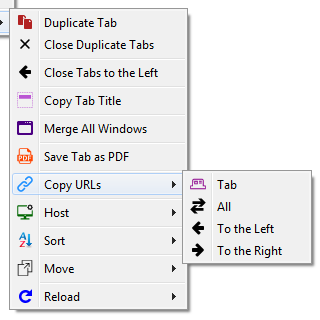
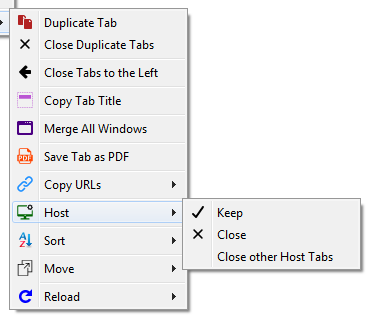
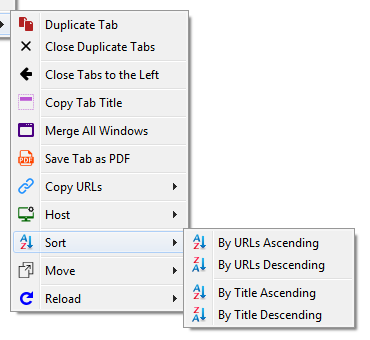
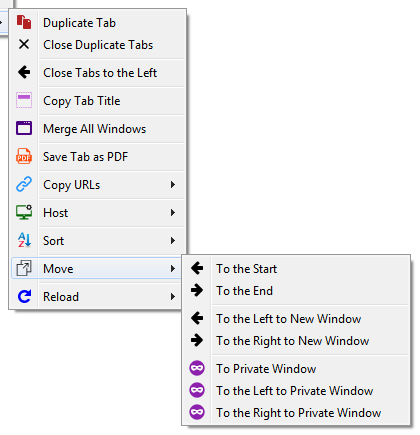
Collection of Tab Related Actions e.g. Duplicate, Close Duplicates, Close to the Left, Copy Title, Merge Windows, Save as PDF, Copy Urls Tab/All/Left/Right, Host keep/close/close other, Sort by URL/Title, Asce/Desc, Move, Reload, Reload Timer
4.6/5
463 人评分
2万用户
v2.31当前版本
权限提示
该扩展申请访问所有网站(
<all_urls>),意味着它可以读取你在任意站点的页面内容,包括已登录的页面。这是许多扩展正常工作的必要条件,但也值得你确认来源可信。
截图
简介
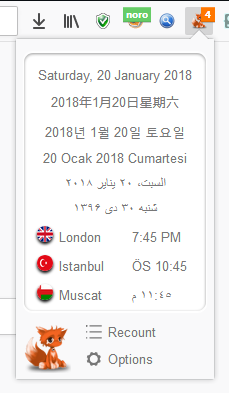
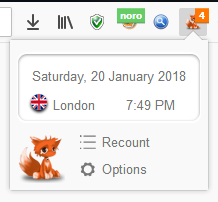
FoxyTab is a small extension that adds a great number of Tab related actions to the Tab Context Menu plus Tab Counter, Country Flag, Multiple Date & Time display in multiple languages and many more.
Note: Right-Click on Tab (on top) to get the context-menu.
Note: None of my extensions contain any tracking, advertising or privacy infringement.
Actions can be applied to a Tab, selected Tabs, All Tabs, Tabs to the Left or Right.
Features
- Bookmark
- Capture
- Clean URL (remove tracking/redirecting strings from Tab URLs)
- Close Bookmarked Tabs
- Close Duplicate Tabs
- Close Other Windows
- Container (set patterns to automatically open Tabs in containers)
- Copy (Title, URL, IP, Custom)
- Create Desktop Shortcut
- Date & Clock (multiple languages & time-zones in the Toolbar popup)
- Discard
- Editable Context Menus (enable, disable, move)
- Hide & Show
- Host (Keep, Close, Close other, Move to New Window, Reload)
- Keyboard Shortcuts
- Merge All Windows
- Move (to New or Private Window)
- Pin & Unpin
- Redirect (set custom rules to redirect Tabs)
- Reload (Group, 1-5 minutes, Custom interval)
- Save Tab as PDF
- Select Match based on Regular Expression pattern
- Show Flag (IP location & country flag; using internal database)
- Sort (by URL, Title, Last Accessed, Reverse; Ascending or Descending)
- Tab Counter (with editable color & background)
- Theme (create your own Firefox Theme)
- Help Guide
Permissions
- Read and modify Bookmarks: Used only to add bookmarks
- Input data to the clipboard: Used to Copy to Clipboard
- Download files and read and modify the browser’s download history: Used only to export Themes/Preference (nothing to do with download history)
- Display notifications to you: Used to inform users
- Hide and show browser tabs: Part of features
- Access browser tabs: Used to get data for tab operations
- Store unlimited amount of client-side data: Used to store extension data
- Access your data for all websites: Used to get IP for the Copy IP & Flag
External Reviews
FoxyTab is a highly customizable tab manager extension for Firefox
How to save the names and URLs of open Firefox tabs in a plain text file
Dica do Dia: Extensão FoxyTab para o Firefox
Mozilla Re-Mix: FirefoxのタブコンテキストメニューからURLの一括コピーなどができるアドオン「FoxyTab」
開いているタブのURL を一括してコピーしたり、左にあるタブを一括して閉じたりできるようにするFirefox アドオン「FoxyTab」 - フリーソフト・無料ソフトの番外編
How to add new tab options to context menu in Firefox [Tip] | Reviews, news, tips, and tricks | dotTechdotTech
[WebExt扩展] FoxyTab(简洁的标签页增强扩展
FoxyTab – 增强标签页栏上鼠标右键菜单[Firefox 扩展]
How to Customize Firefox’s Context Menus With Extensions
FoxyTab 是做什么的
FoxyTab 是一款面向 Firefox 的隐私与安全类扩展,主要用来拦截追踪器、屏蔽广告、管理 Cookie、加固浏览器指纹。官方对它的介绍是:Collection of Tab Related Actions e.g. Duplicate, Close Duplicates, Close to the Left, Copy Title, Merge Windows, Save as PDF, Copy Urls Tab/All/Left/Right, Host keep/close/close other, Sort by URL/Title, Asce/Desc, Move, Reload, Reload Timer在Firefox 附加组件商店(AMO)上,它当前版本 2.31,评分 4.64(463 人评价),约 19,682 名用户。
适合什么人用
从功能定位看,FoxyTab 更适合在意上网被跟踪、希望减少广告干扰的用户。如果你平时只是偶尔遇到相关需求,用浏览器自带功能也能凑合;但如果这件事每天都发生,装一个专门处理它的扩展通常比手动操作省事得多。需要注意的是它作用于所有网站,装上后建议先观察一两天,确认不影响常用站点的正常使用。
怎么安装 FoxyTab
- 打开Firefox 附加组件商店(AMO)上的官方页面;
- 点「添加到浏览器」并确认权限提示;
- 装好后在扩展列表里固定图标,方便随时开关。
本站只做索引与介绍,安装包来自官方商店。如果商店页面提示当前地区不可用,说明该扩展未在你所在区域上架。
常见问题
FoxyTab 是免费的吗?
FoxyTab 在Firefox 附加组件商店(AMO)免费提供下载。它是浏览器扩展,装上就能直接用,不需要注册账号。
FoxyTab 安全吗?
它只申请了 0 项权限,范围比较克制,没有申请「读取所有网站数据」这种大权限。
FoxyTab 支持哪些浏览器?
当前收录的版本来自Firefox 附加组件商店(AMO),适用于 Firefox。同一个扩展在其他商店可能有对应版本,但功能与版本号不一定相同。
怎么卸载 FoxyTab?
在扩展管理页找到 FoxyTab,点移除即可。它在本地保存的设置会一起清掉,不会残留数据。
权限清单 来自 manifest.json 原文
站点访问 1
<all_urls>
接口权限 14
bookmarksclipboardWritecontextualIdentitiescookiesdownloadsmenusnotificationsstoragetabHidetabsthemeunlimitedStoragewebRequestwebRequestBlocking
标签 点标签看同类扩展
Facebook Container
Prevent Facebook from tracking…
Firefox
 Firefox Multi-Account Containers
Firefox Multi-Account Containe…
Firefox
 Simple Tab Groups
Create, modify, and quickly ch…
Firefox
 Group Speed Dial
🟦 适合高级用户的带有 ✅ 高级功能的终极快速拨号! 📈 在…
Firefox
 Temporary Containers
Open tabs, websites, and links…
Firefox
 Google Container
THIS IS NOT AN OFFICIAL ADDON …
Firefox
 Always active Window (Always Visible)
Pretend that all browser windo…
Firefox
 view - Bypass Paywalls
A clean , FOSS reading experie…
Firefox