


 Facebook Container
Prevent Facebook from tracking…
Firefox

Container Tab Groups
Menhera.org · Firefox
Chrome-like tab groups using private and isolated containers: The ultimate tab manager and groups for Firefox.
4.0/5
51 人评分
747用户
v11.12.0.200当前版本
权限提示
该扩展申请访问所有网站(
<all_urls>),意味着它可以读取你在任意站点的页面内容,包括已登录的页面。这是许多扩展正常工作的必要条件,但也值得你确认来源可信。
截图
简介
This extension realizes Chrome-like tab groups using Firefox’s secure and private container tabs.
No special configuration nor other add-ons required!
Tab group = Container
- Use different logins for each tab group
- By using temporary containers or cookie-erasing containers, you can prevent cookies from accumulating.
Per-container overrides available for:
- Preferred languages
- User agent strings (Chrome UAData/Sec-CH-UA emulation included)
- Per-container proxy settings
Uses:
The button to show controls for containers is by default on the corner of the tab strip. The button has three dots in it.
- Before starting a task, create a new container for it!
- Open tabs related to the task in that container.
- When finished, delete the container to remove all the clutters.
Features:
- Isolated cookies/logins for each of tab groups because they are containers.
- Per-window container management
- Automatically sorts tabs based on containers
- Show/hide tabs of a container
- Create and delete containers as you like
- Switch windows
- Change the order of containers
- Enables First-Party Isolate (FPI) by default (configurable)
- Panorama Grid - View all the tabs in a nice grid sorted by Containers.
- Choose a container for each new Tab opened by external applications.
- List tabs by websites in a window.
- Button to clear cookies for a container.
- List and delete cookies by sites in a container.
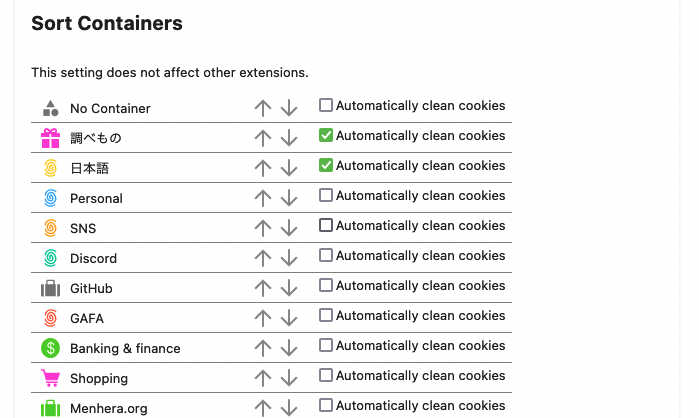
- Option to remove cookies automatically for a container when closing it.
- Option to save memory for inactive tabs withoug closing them.
- Reopen any tab in any container, from the button in the address bar.
- Group containers.
- Use tags to organize tabs inside a container.
Keyboard shorcuts (can be changed or disabled in Add-ons Manager):
- Ctrl+Alt+G: Open the containers popup.
- Ctrl+Alt+S: Open the containers sidebar.
- Ctrl+Alt+1: Windows view on the popup.
- Ctrl+Alt+2: Containers view on the popup.
- Ctrl+Alt+3: Sites view on the popup.
- Ctrl+Alt+5: Open settings.
Compatibility and other extensions
Now private browsing is supported. No data is stored in persistent storage or sent elsewhere, whether or not in private browsing. You need to give permission to use the extension in private browsing.
This add-on is probably compatible with the Firefox Multi-Account Containers add-on. But you do not need it for this addon to operate.
This may not be compatible with our previous add-on “Site-based Tabs.” Please disable the old one if you find any problems.
This extension is compatible with most tab management extension such as Tree Style Tab extension. See more compatibility information (additions welcome) at https://github.com/menhera-org/TabArray#compatiblity .
Perfect replacement for Chrome’s tab groups and the discontinued add-on Conex.
Development
This extension is actively developed/maintained as of 2023, so please wait for new features/fixes.
Available languages: English, 日本語, Esperanto, Français, Español, Русский, Deutsch, Čeština, Galego, Interlingua, 中文 (简体)
(Help us translate!)
Please report any bugs here: https://github.com/menhera-org/TabArray/issues
Container Tab Groups 是做什么的
Container Tab Groups 是一款面向 Firefox 的隐私与安全类扩展,主要用来拦截追踪器、屏蔽广告、管理 Cookie、加固浏览器指纹。官方对它的介绍是:Chrome-like tab groups using private and isolated containers: The ultimate tab manager and groups for Firefox.在Firefox 附加组件商店(AMO)上,它当前版本 11.12.0.200,评分 3.96(51 人评价),约 747 名用户。
适合什么人用
从功能定位看,Container Tab Groups 更适合在意上网被跟踪、希望减少广告干扰的用户。如果你平时只是偶尔遇到相关需求,用浏览器自带功能也能凑合;但如果这件事每天都发生,装一个专门处理它的扩展通常比手动操作省事得多。需要注意的是它作用于所有网站,装上后建议先观察一两天,确认不影响常用站点的正常使用。
怎么安装 Container Tab Groups
- 打开Firefox 附加组件商店(AMO)上的官方页面;
- 点「添加到浏览器」并确认权限提示;
- 装好后在扩展列表里固定图标,方便随时开关。
本站只做索引与介绍,安装包来自官方商店。如果商店页面提示当前地区不可用,说明该扩展未在你所在区域上架。
常见问题
Container Tab Groups 是免费的吗?
Container Tab Groups 在Firefox 附加组件商店(AMO)免费提供下载。它是浏览器扩展,装上就能直接用,不需要注册账号。
Container Tab Groups 安全吗?
它只申请了 0 项权限,范围比较克制,没有申请「读取所有网站数据」这种大权限。
Container Tab Groups 支持哪些浏览器?
当前收录的版本来自Firefox 附加组件商店(AMO),适用于 Firefox。同一个扩展在其他商店可能有对应版本,但功能与版本号不一定相同。
怎么卸载 Container Tab Groups?
在扩展管理页找到 Container Tab Groups,点移除即可。它在本地保存的设置会一起清掉,不会残留数据。
权限清单 来自 manifest.json 原文
站点访问 1
<all_urls>
接口权限 17
alarmsbrowserSettingsbrowsingDatacontextualIdentitiescookiesmenusmenus.overrideContextprivacyproxyscriptingsessionsstoragetabHidetabsthemewebRequestwebRequestBlocking
标签 点标签看同类扩展
Facebook Container
Prevent Facebook from tracking…
Firefox
 Firefox Multi-Account Containers
Firefox Multi-Account Containe…
Firefox
 Simple Tab Groups
Create, modify, and quickly ch…
Firefox
 Group Speed Dial
🟦 适合高级用户的带有 ✅ 高级功能的终极快速拨号! 📈 在…
Firefox
 FoxyTab
Collection of Tab Related Acti…
Firefox
 Temporary Containers
Open tabs, websites, and links…
Firefox
 Google Container
THIS IS NOT AN OFFICIAL ADDON …
Firefox
 Always active Window (Always Visible)
Pretend that all browser windo…
Firefox