
DiReec All-in-One Screen Recorder for Firefox EN
AmoyShare Team · Firefox
Record screen, webcam & audio seamlessly with the DiReec one-click screen recorder extension. Unleash your content creation now!
截图


简介
Introducing DiReec Screen Recorder, the all-in-one add-on designed for content creators, professionals, gamers, and those who demand more from their screen recording, webcam recording, or voice recording experience. This screen recorder for Firefox goes beyond the basics, providing a comprehensive features that cater to a range of recording needs.
🌟 Key Features:
🔹1️⃣ Free Forever:
Utilize the free screen recorder extension to capture any screen activities, facial expressions, microphone sounds, or system audio without spending a dime. It's completely free forever for everyone!
🔹2️⃣ Watermark-Free:
Preserve the integrity of your recorded videos via the robust watermark-free screen recording extension, ensuring that no intrusive watermarks or logos obstruct your masterpiece.
🔹3️⃣ Multi-Mode Recording:
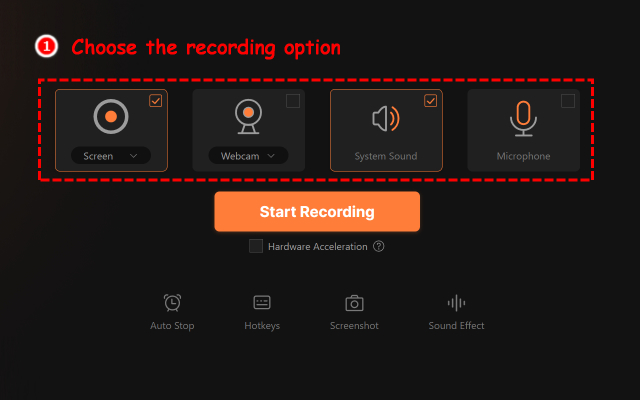
Choose your desired recording options, such as screen, webcam, microphone and system sound, for a multimedia experience. You can select to capture all of them or choose each one separately as needed.
🔹4️⃣ No Login Required:
Good news! The DiReec screen recorder extension doesn't require you to log in or create an account for any recording actions. Just simply click the "Start Recording" button to initiate the recording journey!
🔹5️⃣ User-Friendly Interface:
Say goodbye to those old-fashioned recording tools with a complex interface. Opt for the DiReec platform with an intuitive interface to make simple recordings with just a few clicks and get desired files effortlessly.
🔹6️⃣ Limitless Recording:
Gain the ability to do unlimited times of screen recordings via the screen recorder by DiReec. Handle screen records almost anywhere, anytime using the Firefox browser.
🔹7️⃣ Privacy & Security:
Embrace the realm of absolute safety with DiReec, the screen recording tool that guarantees 100% safe - where there are no ads, viruses, or malware and it won't fetch any user data.
🎯 Multi-Scene Screen Recording:
✅ Switch between your screen, microphone and webcam to create engaging educational content.
✅ Capture any highlight gameplay or important live game streaming sessions to improve gaming strategies.
✅ Record any collaborative meetings online to ensure you never miss any key points or discussions.
✅ Handle video recordings from 1000+ video-sharing sites or social media platforms for future reference.
✅ Use the screen recorder to document and report software bugs or issues with detailed information.
✅ Capture raw footage through recording to produce engaging content for vloggers, creators, podcasters, etc.
🎥 Why the Screen Recorder by DiReec?
- Professional-grade recording with no steep learning curve.
- Capture anything, anytime, without limitations.
- Lag-free, simple, and secure records at your fingertips.
📧 Contact Us:
If you have any technical questions or suggestions for us, please feel free to submit them to our DiReec support team - support@direec.com. Thank you!
Download our DiReec screen recorder and embark on your recording journey right now~ Capture, replay, and download files at ease without any hassle. If our add-on proves useful to you, please give us a 5-star rating!
DiReec All-in-One Screen Recorder for Firefox 是做什么的
DiReec All-in-One Screen Recorder for Firefox 是一款面向 Firefox 的外观主题类扩展,主要用来更换浏览器配色、给网页加深色模式、调整界面观感。官方对它的介绍是:Record screen, webcam & audio seamlessly with the DiReec one-click screen recorder extension. Unleash your content creation now!在Firefox 附加组件商店(AMO)上,它当前版本 1.2,评分 1.6(5 人评价),约 332 名用户。
适合什么人用
从功能定位看,DiReec All-in-One Screen Recorder for Firefox 更适合长时间对着屏幕、希望降低眼睛负担的用户。如果你平时只是偶尔遇到相关需求,用浏览器自带功能也能凑合;但如果这件事每天都发生,装一个专门处理它的扩展通常比手动操作省事得多。
怎么安装 DiReec All-in-One Screen Recorder for Firefox
- 打开Firefox 附加组件商店(AMO)上的官方页面;
- 点「添加到浏览器」并确认权限提示;
- 装好后在扩展列表里固定图标,方便随时开关。
本站只做索引与介绍,安装包来自官方商店。如果商店页面提示当前地区不可用,说明该扩展未在你所在区域上架。
常见问题
DiReec All-in-One Screen Recorder for Firefox 是免费的吗?
DiReec All-in-One Screen Recorder for Firefox 在Firefox 附加组件商店(AMO)免费提供下载。它是浏览器扩展,装上就能直接用,不需要注册账号。
DiReec All-in-One Screen Recorder for Firefox 安全吗?
它只申请了 0 项权限,范围比较克制,没有申请「读取所有网站数据」这种大权限。
DiReec All-in-One Screen Recorder for Firefox 支持哪些浏览器?
当前收录的版本来自Firefox 附加组件商店(AMO),适用于 Firefox。同一个扩展在其他商店可能有对应版本,但功能与版本号不一定相同。
怎么卸载 DiReec All-in-One Screen Recorder for Firefox?
在扩展管理页找到 DiReec All-in-One Screen Recorder for Firefox,点移除即可。它在本地保存的设置会一起清掉,不会残留数据。
权限清单 来自 manifest.json 原文
未解析到权限条目。