
Bookmarks clean up EN
itwillnotbeasy · Firefox
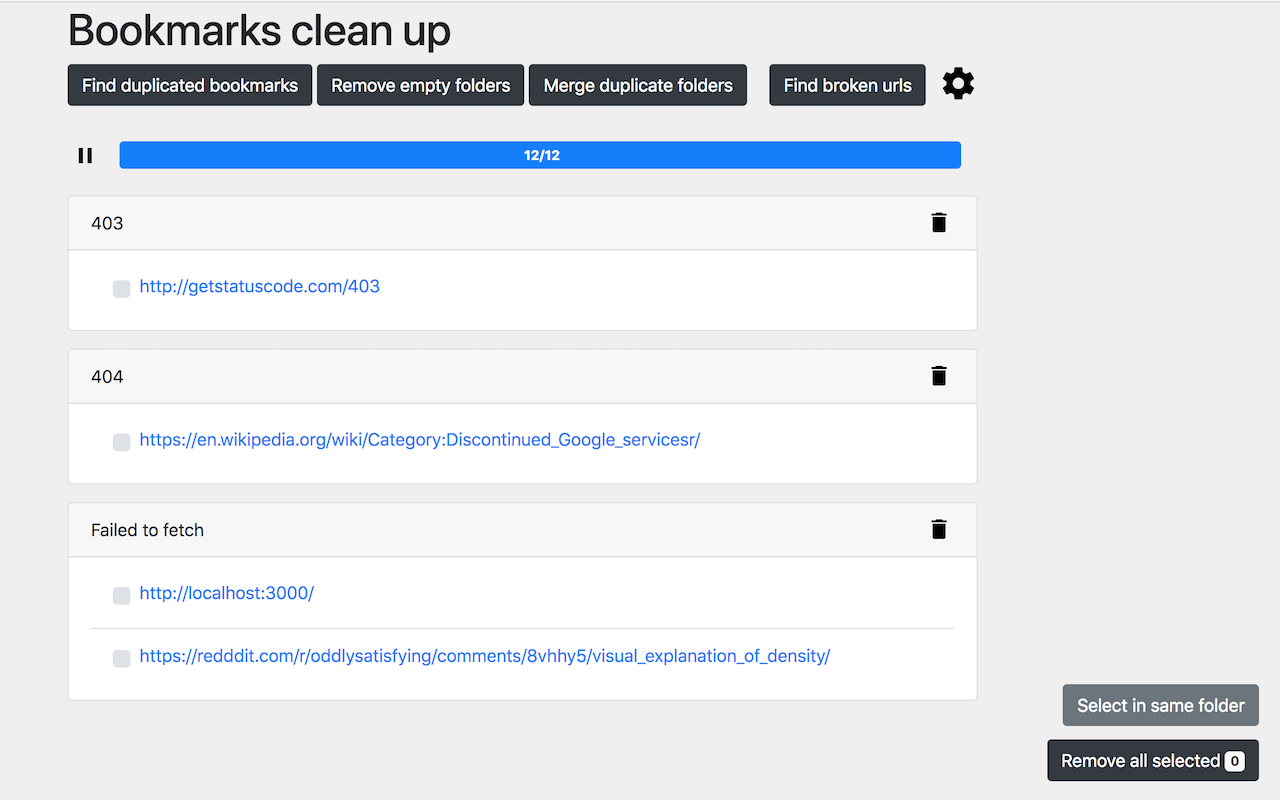
Find and remove duplicated bookmarks manually and in batches, get rid of broken bookmark links and empty folders.
截图


简介
Find and remove duplicated bookmarks manually and in batches, get rid of broken bookmark links and empty folders.
This extension allows to find and delete duplicate bookmarks, empty folders, merge folders with the same name (within the same path), find no longer working and expired bookmarks and remove them easily.
Permissions explained:
1. Read and change your bookmarks(required on install) - required for core functions to work
2. Read and change all your data on the websites you visit(optional, not asked until you use Broken URLs checker) – to check if bookmarked page loads and doesn't return any error.
Support further development:
If you find this extension useful, consider supporting me through Patreon: https://www.patreon.com/itwillnotbeasy (A donation of any amount is welcome!). If you want to make an one-time donation there is two options:
1. Donate using cryptocurrency (you can find all required information inside extension settings->donate link)
2. You can cancel your membership on Patreon after being succesfully billed (money are debited once a month, visit https://support.patreon.com/hc/en-us/articles/204606215-Can-I-make-a-one-time-payment for more details)
Warning: there is no way to restore removed bookmarks, so make sure backup your bookmarks before using this extension.
If your screen becomes RED, saying that site is deceptive while scanning for broken links you can have 2 options:
1. Remove this site from your bookmarks: (error screen shows which site causes error, just open bookmarks manager and search for this site)
2. Disable this "feature" in chrome (go to Settings -> Advanced -> Under "Privacy and security," turn off "Protect you and your device from dangerous sites"),
Changelog (most recent versions first)
0.1
Better privacy:
- Only "Read and change your bookmarks" permission is asked on install.
- “Access your data for all websites” permission is only requested, when running broken URLs checker, and removed after extension tab is closed.
Features asked by users:
- Finally, duplicate checker no longer ignores the URL part after "#".
- Only HTTP and HTTPS protocols are being checked.
- This means no more "Authentication Required" popups for FTP resources when checking for broken links.
- It also fixes bookmarks separators in Firefox and Opera(which was using data:// protocol) being incorrectly flagged as duplicates.
Bug fixes:
- Fixed options page not being displayed when called from the in-browser extension preferences page.
0.0.8
- Got rid of unsafe-eval in content_security_policy.
- Also added 64x64px icon for HiDPI displays in manifest.json
0.0.7 Improved Keyboard Accessibility - now you can navigate using keyboard only
0.0.6 Loading indicator is now shown when searching for duplicates
The long text will in results is now wrapped to be more readable
0.0.5 Bugfix release
0.0.4 Fixes bug in Broken URLs checker, settings page now can be also opened from chrome extension dashboard
Broken URLs page now also has a sticky header, so you will always know what error group you are currently looking at
0.0.3 UI now won't become too wide on large screens.
Fixed a bug that caused to show only a few duplicates when more than 1000 duplicates were found.
0.0.2.0 Added option in settings which allows excluding certain folders from being scanned by extension.
0.0.1.1 URLs containing hashbang (#!, used by some SPA websites) now considered as different URLs, this doesn't affect traditional URLs with anchors (example.com/#heading1).
0.0.1 Added page with information on how to donate(gear icon->donate), when looking for broken URLs there is now a button to select/deselect all entries in a group; firefox version released
0.0.0.4 UI is optimized for smaller screens, fixed issue when some empty folders weren't deleted, other small bugfixes
0.0.0.3 Bugfix release
0.0.0.2 View details about network error when checking broken links
Bookmarks clean up 是做什么的
Bookmarks clean up 是一款面向 Firefox 的书签管理类扩展,主要用来整理书签、查重、批量导入导出。官方对它的介绍是:Find and remove duplicated bookmarks manually and in batches, get rid of broken bookmark links and empty folders.在Firefox 附加组件商店(AMO)上,它当前版本 0.2.0,评分 4.3(195 人评价),约 9,486 名用户。
适合什么人用
从功能定位看,Bookmarks clean up 更适合收藏了大量网页、需要定期整理的用户。如果你平时只是偶尔遇到相关需求,用浏览器自带功能也能凑合;但如果这件事每天都发生,装一个专门处理它的扩展通常比手动操作省事得多。
怎么安装 Bookmarks clean up
- 打开Firefox 附加组件商店(AMO)上的官方页面;
- 点「添加到浏览器」并确认权限提示;
- 装好后在扩展列表里固定图标,方便随时开关。
本站只做索引与介绍,安装包来自官方商店。如果商店页面提示当前地区不可用,说明该扩展未在你所在区域上架。
常见问题
Bookmarks clean up 是免费的吗?
Bookmarks clean up 在Firefox 附加组件商店(AMO)免费提供下载。它是浏览器扩展,装上就能直接用,不需要注册账号。
Bookmarks clean up 安全吗?
它只申请了 0 项权限,范围比较克制,没有申请「读取所有网站数据」这种大权限。
Bookmarks clean up 支持哪些浏览器?
当前收录的版本来自Firefox 附加组件商店(AMO),适用于 Firefox。同一个扩展在其他商店可能有对应版本,但功能与版本号不一定相同。
怎么卸载 Bookmarks clean up?
在扩展管理页找到 Bookmarks clean up,点移除即可。它在本地保存的设置会一起清掉,不会残留数据。
权限清单 来自 manifest.json 原文
接口权限 3
activeTabbookmarksstorage