
✨ Awesome Emoji Picker ✨ EN
rugk · Firefox
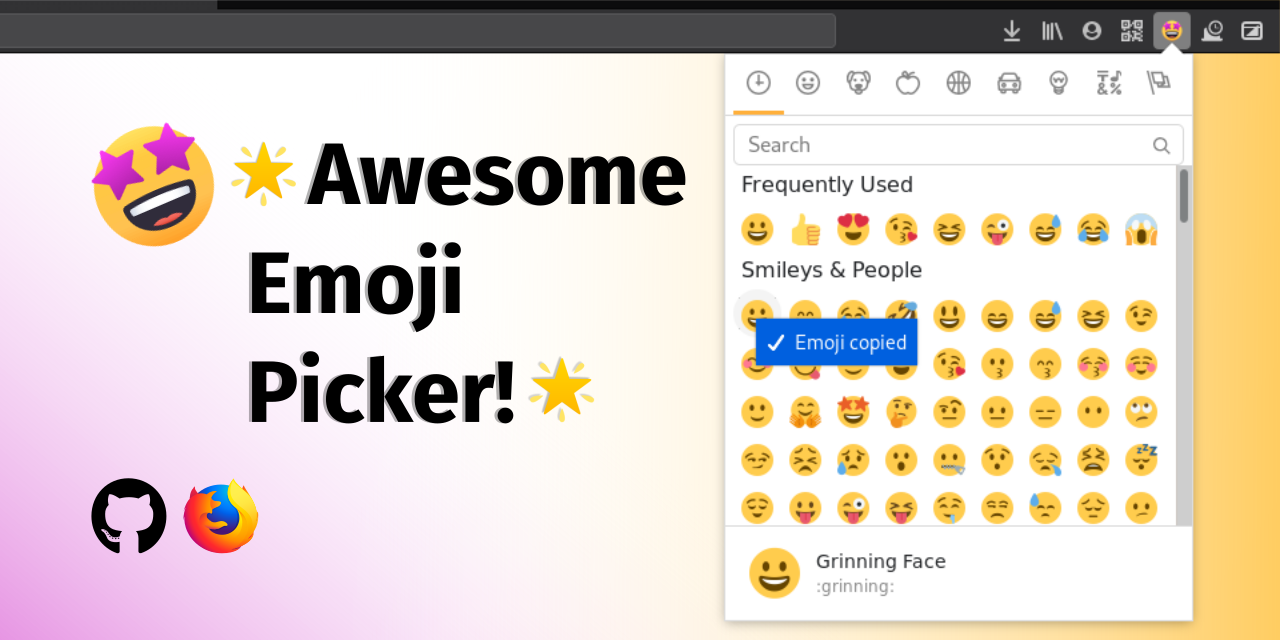
Modern, nice emoji picker that you can use to find 🔎 and select emojis. 😀 It will be copied to your clipboard 📋 or even directly inserted into the page, when you click 🖱️ on it. You will certainly like it. 😎
截图


简介
This add-on provides you with a modern emoji picker that you can use to find and select emojis (i.e. the emoticons/smileys you know from messengers such as 😃, 😎 or 🤪). You can copy them into your clipboard or insert them into the active page.
It uses up-to-date Emojis and let's you access your Emojis in different styles you know from different devices and applications.
😊 Simple & effective! 😊
You can then use the emojis on almost any web page, including your favourite messenger (such as WhatsApp, Telegram, Threema, Signal, Wire etc.), social media (Facebook, Instagram, Twitter, Mastodon etc.) and even e-mails.
It will remember your recently used emojis across sites. Additionally it may often be faster than the emoji picker on the website itself.
It is based on the awesome project emoji-mart. You can test many features on the website there already, without installing it.
This extension only works with Firefox v63 or higher.
It has an effective built-in search, so you can use it as an ”emoji cheat sheet”. Find exactly the emoji you wanted to find with your search term!
🎨 Choose the Emoji style you want! 🎨
The add-on is very customizable and it lets you configure the up-to-date Emojis in different styles that you know from different devices and applications. Here is a list of styles, it supports:
- Apple emojis
- Google emojis
- Twitter emojis (Twemoji)
- Facebook emojis
- or just what your system/browser offers (e.g. on Windows thus Windows emojis will be used)
You can also adjust the size of the emojis and the width of the emoji picker.
📢 More Features 📢
- Display the emojis in the design of Apple, Google, Twitter, Facebook or just the native style your browser uses.
- Quickly search for any emoji with various keywords.
- Search for emojis directly in the address bar.
- Supports the dark/black mode of your system automatically.
- Copy emoji to your clipboard.
- …or directly insert it into the current page.
- Remembers frequently used emojis.
- Emoji skin tone is adjustable and is remembered.
- You can also insert the emoji's
:colon:syntax instead of the Unicode emoji that is used by default. - Use the hot key (by default
Ctrl+Shift+Period) to quickly access the emoji picker. - Integrates into Firefox Sync, so you have all your emojis/settings on all devices.
- Adjust the style and many other options to your liking.
- The size of the whole emoji picker and the emojis itself is also adjustable.
- Use a colored toolbar icon or a decent monochrome (black/white) one.
- Follows the Firefox Photon Design.
- It does not violate your privacy and does send data anywhere.
- Compatible with Firefox for Android
- Translated into several language already. You contribute your own language!
- Settings can be managed by your administrator.
📝 Development 📝
The add-on is free/libre open-source software and developed on GitHub. Fork it on GitHub and contribute.
There are some easy issues to start with.
The development of this add-on was also triggered, because the development of another add-on called “Emoji Helper” or “Emoji Cheatsheet” stalled.
🐬 Contribute 🐬
You can easily get involved in this project and help. Here are some ideas:
- 📃 Translate this add-on into multiple languages!
- 🐛 Fix some easy issues and get started in add-on development (or just try out the development version)
- 💡 Or chec…
✨ Awesome Emoji Picker ✨ 是做什么的
✨ Awesome Emoji Picker ✨ 是一款面向 Firefox 的外观主题类扩展,主要用来更换浏览器配色、给网页加深色模式、调整界面观感。官方对它的介绍是:Modern, nice emoji picker that you can use to find 🔎 and select emojis. 😀 It will be copied to your clipboard 📋 or even directly inserted into the page, when you click 🖱️ on it. You will certainly like it. 😎在Firefox 附加组件商店(AMO)上,它当前版本 2.0,评分 4.67(150 人评价),约 2,967 名用户。
适合什么人用
从功能定位看,✨ Awesome Emoji Picker ✨ 更适合长时间对着屏幕、希望降低眼睛负担的用户。如果你平时只是偶尔遇到相关需求,用浏览器自带功能也能凑合;但如果这件事每天都发生,装一个专门处理它的扩展通常比手动操作省事得多。
怎么安装 ✨ Awesome Emoji Picker ✨
- 打开Firefox 附加组件商店(AMO)上的官方页面;
- 点「添加到浏览器」并确认权限提示;
- 装好后在扩展列表里固定图标,方便随时开关。
本站只做索引与介绍,安装包来自官方商店。如果商店页面提示当前地区不可用,说明该扩展未在你所在区域上架。
常见问题
✨ Awesome Emoji Picker ✨ 是免费的吗?
✨ Awesome Emoji Picker ✨ 在Firefox 附加组件商店(AMO)免费提供下载。它是浏览器扩展,装上就能直接用,不需要注册账号。
✨ Awesome Emoji Picker ✨ 安全吗?
它只申请了 0 项权限,范围比较克制,没有申请「读取所有网站数据」这种大权限。
✨ Awesome Emoji Picker ✨ 支持哪些浏览器?
当前收录的版本来自Firefox 附加组件商店(AMO),适用于 Firefox。同一个扩展在其他商店可能有对应版本,但功能与版本号不一定相同。
怎么卸载 ✨ Awesome Emoji Picker ✨?
在扩展管理页找到 ✨ Awesome Emoji Picker ✨,点移除即可。它在本地保存的设置会一起清掉,不会残留数据。
权限清单 来自 manifest.json 原文
接口权限 2
activeTabstorage
接口权限(可选) 2
clipboardWritesearch