
Mind Mail – AI Email Assistant for Gmail EN
Smart Processes s.r.l · EEdge MV3
An AI-powered assistant for Gmail to enhance your email experience.
截图
简介
Mind Mail – AI Email Assistant for Gmail
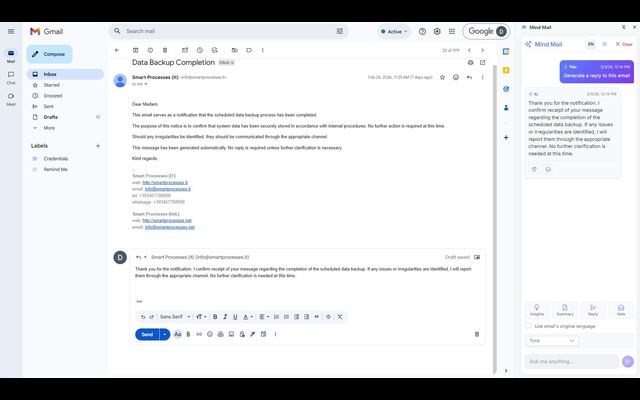
Mind Mail is an intelligent AI assistant that integrates directly into Gmail to help users compose, analyze, and manage emails more efficiently. It works within Gmail’s side panel, providing real-time AI assistance without requiring users to switch tabs or leave their inbox.
Core Functionalities
AI-Powered Email Assistance
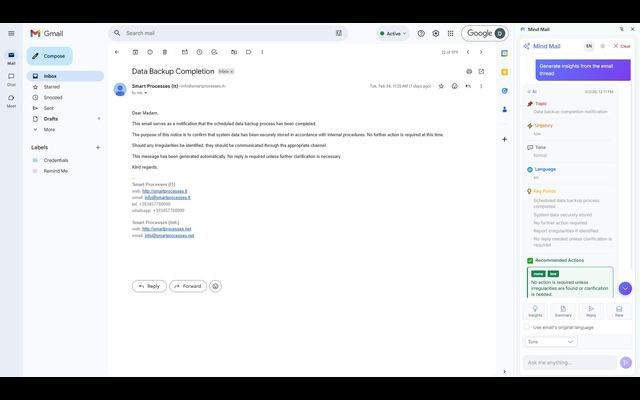
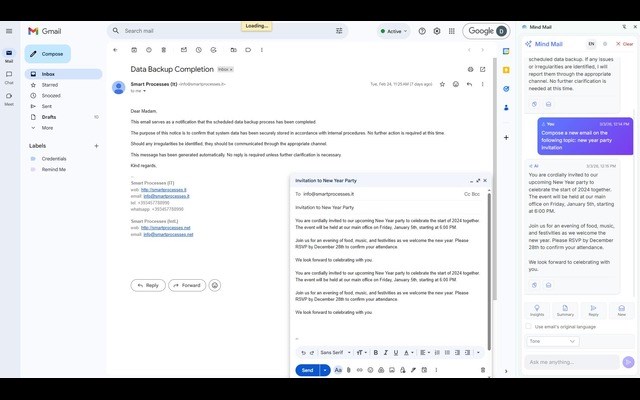
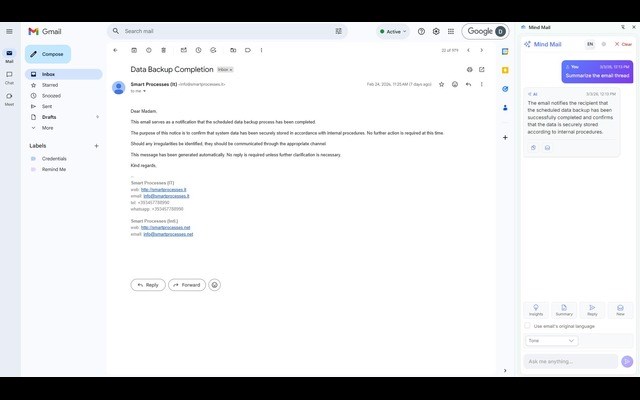
Mind Mail allows users to compose professional emails with AI support, generate context-aware replies based on the current email thread, analyze entire email conversations, provide smart summaries and actionable insights, and deliver structured responses tailored to the conversation context. Mind Mail processes only the email content required to generate the requested output and does not access emails beyond user interaction.
Seamless Gmail Integration
Mind Mail operates directly inside the Gmail interface and is accessible through a dedicated side panel. It detects the currently opened email for contextual assistance, performs real-time analysis of active conversations, and tracks conversation context to provide consistent responses. The extension enhances Gmail functionality without modifying or interfering with core Gmail services.
Mind Spaces Integration
Mind Mail integrates seamlessly with Mind Spaces. Users can access and retrieve documents stored in Mind Spaces, use information from Mind Spaces documents to generate emails, create emails based on structured knowledge saved inside Mind Spaces, and maintain a unified workflow between email communication and document knowledge. This integration enables users to compose informed, document-based emails without switching applications.
Account Authentication and Google Drive Permission
To use Mind Mail, users must sign in with their Google account and grant permission to access Google Drive during the setup process. This permission is required solely to securely store Mind Spaces connections and RAG configuration settings within the user’s own Google Drive environment. The extension cannot function without Google authentication and the necessary Drive permission, as these are essential for secure configuration storage and proper integration.
Multi-Language Support
Mind Mail supports English, Spanish, French, German, Italian, and Albanian. The interface and AI responses are localized to enhance user experience.
Original Email Language Option
Users can enable a checkbox that instructs Mind Mail to automatically generate responses in the original language of the email thread. When this option is selected, the AI detects the primary language of the email conversation, generates responses strictly in that same language, applies no automatic translation, and preserves language consistency within the thread. This ensures accurate communication in multilingual professional environments.
Smart Email Workflows
Mind Mail provides quick access to email data, supports thread and conversation management, enables streamlined AI-assisted email drafting, and supports efficient handling of high email volumes.
Privacy and Security
Mind Mail prioritizes user privacy and security. It uses secure Google OAuth authentication, does not access emails without user interaction, does not share or sell user data, and uses permissions strictly for declared functionality.
Permissions Explanation
Storage is used to save user preferences and chat history for a personalized experience.
Active Tab is used to detect the currently opened email in order to provide contextual AI assistance.
Side Panel is used to display the AI assistant interface inside Gmail.
Identity is used for secure Google authentication and account access.
Scripting is used to integrate seamlessly with the Gmail interface and retrieve necessary email content for user-requested AI processing.
Intended Users
Mind Mail is designed for professionals managing high email volumes, business users requiring fast and professional responses, teams improving communication quality, and individuals seeking time-efficient email workflows.
Mind Mail – AI Email Assistant for Gmail 是做什么的
Mind Mail – AI Email Assistant for Gmail 是一款面向 Edge 的实用工具类扩展,主要用来解决浏览器里某类具体的小问题。官方对它的介绍是:An AI-powered assistant for Gmail to enhance your email experience.在微软 Edge 加载项商店上,它当前版本 1.2.11,约 7 名用户。
适合什么人用
从功能定位看,Mind Mail – AI Email Assistant for Gmail 更适合想补上浏览器原生缺失功能的用户。如果你平时只是偶尔遇到相关需求,用浏览器自带功能也能凑合;但如果这件事每天都发生,装一个专门处理它的扩展通常比手动操作省事得多。
怎么安装 Mind Mail – AI Email Assistant for Gmail
- 打开微软 Edge 加载项商店上的官方页面;
- 点「添加到浏览器」并确认权限提示;
- 装好后在扩展列表里固定图标,方便随时开关。
本站只做索引与介绍,安装包来自官方商店。如果商店页面提示当前地区不可用,说明该扩展未在你所在区域上架。
常见问题
Mind Mail – AI Email Assistant for Gmail 是免费的吗?
Mind Mail – AI Email Assistant for Gmail 在微软 Edge 加载项商店免费提供下载。它是浏览器扩展,装上就能直接用,不需要注册账号。
Mind Mail – AI Email Assistant for Gmail 安全吗?
它只申请了 0 项权限,范围比较克制,没有申请「读取所有网站数据」这种大权限。
Mind Mail – AI Email Assistant for Gmail 支持哪些浏览器?
当前收录的版本来自微软 Edge 加载项商店,适用于 Edge。同一个扩展在其他商店可能有对应版本,但功能与版本号不一定相同。
怎么卸载 Mind Mail – AI Email Assistant for Gmail?
在扩展管理页找到 Mind Mail – AI Email Assistant for Gmail,点移除即可。它在本地保存的设置会一起清掉,不会残留数据。
权限清单 来自 manifest.json 原文
接口权限 3
activeTabidentitystorage