
Videochat Extension - IP Locator for Omegle
qrlk · Edge MV3
Universal WebRTC monitoring and geolocation tool, works great with Omegle-like sites.
截图


简介
Videochat Extension is a fully independent browser extension that allows you to monitor online audio/video calls on various websites, particularly useful on Omegle-like platforms.
We are rebuilding our extension from scratch to create a universal solution, but our original code only worked on Omegle, Ome.tv, Chatruletka, Minichat, Chatrulez, and Coomeet Free.
The legacy UI is available as an option, but we are working on more modern interfaces for universal WebRTC monitoring.
☆☆ Key Features (Legacy Interface) ☆☆
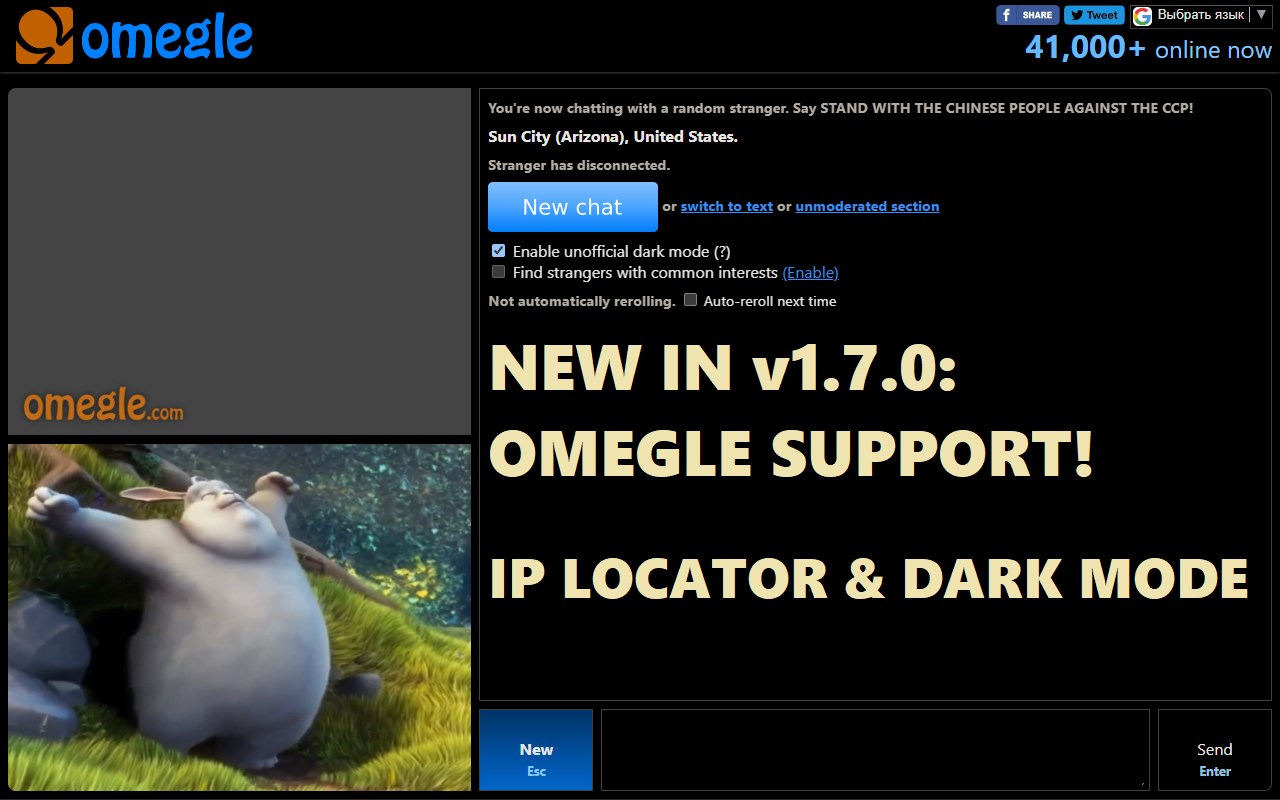
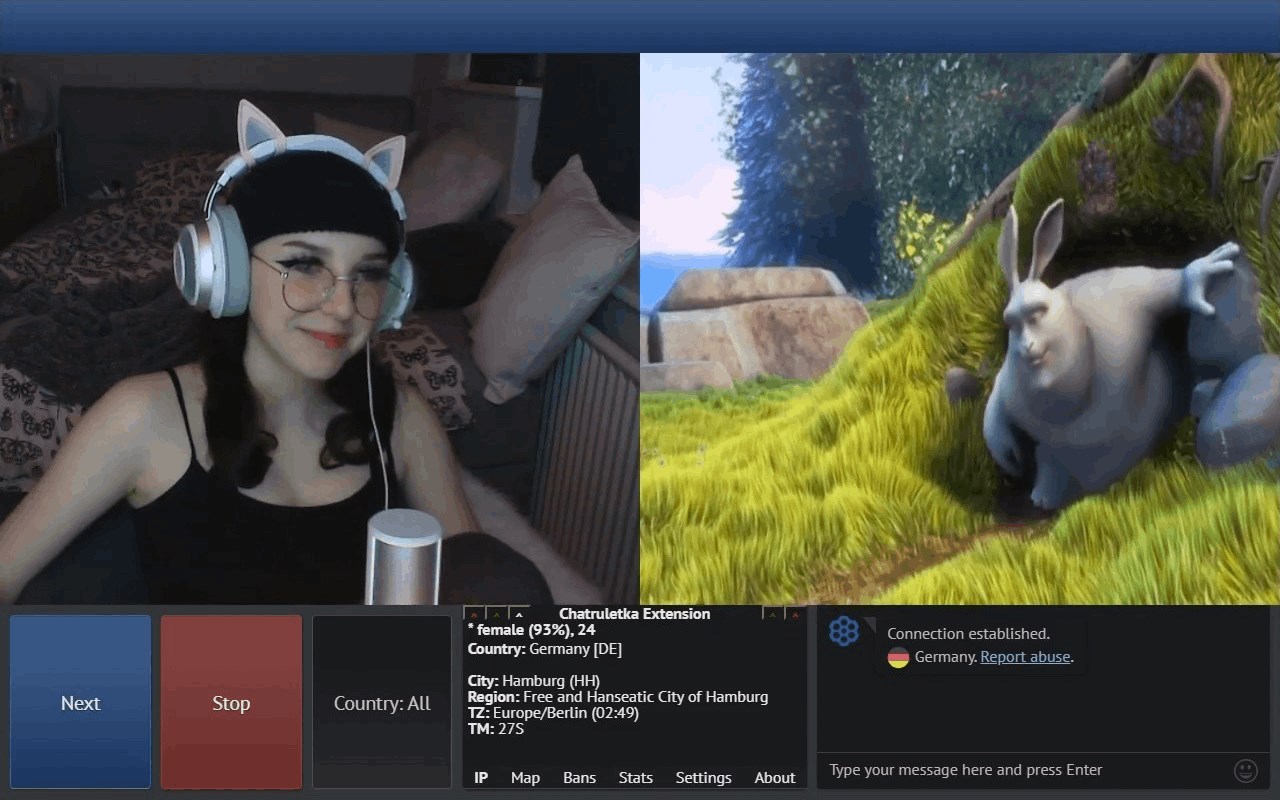
✓ IP Locator — determines the stranger's approximate location
✓ World map
✓ Dark Mode
✓ Blacklist
✓ Stats
✓ Streamer Mode
✓ Customizable — configure features as you like
✓ Indie project — community-supported development
✓ Private and secure — we don't collect/sell your data
With this extension installed, you can find out where your interlocutors are from, monitor WebRTC usage on any website, enable dark mode, and much more!
☆☆ Indie development ☆☆
★ This is an entirely independent project that can evolve only because people like you support its indie development on Patreon.
★ This extension is free and fully functional. Patreon supporters get access to Browser Mode, which allows to monitor WebRTC without modifying the webpage APIs. Free Website Mode provides the same functionality.
★ Consider supporting our indie extension:
https://patreon.com/videochat_extension
☆☆ Complete list of features ☆☆
★ geolocation (IP Locator)
— determines the stranger's IP address used for WebRTC connection.
— uses the IP geolocation service to get the information about that IP address.
— displays the stranger's approximate location (city/region/country), ISP, and whether they use a cellular network.
— integration with the 'map' module: IP geolocation data is displayed on the world map.
— integration with the 'streamer mode' module: IP geolocation data can be displayed in the OBS's text source.
— determines if a stranger is using a proxy/tor/vpn connection to hide their real IP.
— option to select the language of ip geolocation data from English, Deutsch (German), Español (Spanish), Português (Portuguese), Français (French), 日本語 (Japanese), 中国 (Chinese), and Русский (Russian).
★ map
— IP geolocation data is displayed on a world map embedded in the UI.
— displays the approximate area where the stranger you are talking to may be located.
— displays a marker popup with information about the stranger's approximate location.
— different options to customize map's behavior.
★ interface
— dark mode (dark theme).
— multiple UI options available.
★ stats
— counts the number of people you've met.
— counts how much time you've spent in conversations.
— counts various statistics for other modules such as faceapi / blacklist.
★ controls
— improvised control panel that acts as the extension UI.
— it consists of a header, a content block, and tabs that select what will be displayed in the content block.
— list of tabs: 'IP', 'Map', 'Bans', 'Stats', 'Settings', 'Info'.
— the 'Info' tab contains helpful information about the extension: useful links, credits, version history, etc.
— the header contains the extension name/version, and blocks with buttons for the extension functionality.
— provides control buttons for other modules such as 'streamer mode'.
★ settings
— this module is responsible for the functionality of the 'Settings' tab in the UI.
— all settings are grouped by their module.
— if you hover over a setting, detailed information about what this setting does will be displayed.
★ streamer mode
— a section of specialized features that help streamers broadcast video chats on YouTube and other services.
— OBS integration - allows you to display IP geolocation data in the text source and control the visibility of the image, which covers the video while you look for a suitable interlocutor.
— integration with the 'controls' module: header buttons to toggle cover
☆☆ Supported sites ☆☆
* This extension is a universal solution and can work on any kind of WebRTC-based websites and even on a browser level if required.
* We used to have website-level support for the following platforms:
🎥 Chatruletka (full support):
* https://videochatru.com
* 24 other less popular instances
🎥 Ome.tv (full support):
* https://ome.tv
* https://ome.chat
* 18 other less popular instances
🎥 Minichat (full support):
* https://minichat.com
🎥 Omegle (work-in-progress):
* https://www.omegle.com
* 1 other less popular instance
🎥 Coomeet Free (bot recognition & interface tweaks):
* 3 other less popular instances
☆☆ Social Pages ☆☆
* Patreon: https://patreon.com/videochat_extension
* Discord: https://discord.gg/7DYWu5RF7Y
Videochat Extension - IP Locator for Omegle 是做什么的
Videochat Extension - IP Locator for Omegle 是一款面向 Edge 的实用工具类扩展,主要用来解决浏览器里某类具体的小问题。官方对它的介绍是:Universal WebRTC monitoring and geolocation tool, works great with Omegle-like sites.在微软 Edge 加载项商店上,它当前版本 4.1.7,评分 4(4 人评价),约 10,002 名用户。
适合什么人用
从功能定位看,Videochat Extension - IP Locator for Omegle 更适合想补上浏览器原生缺失功能的用户。如果你平时只是偶尔遇到相关需求,用浏览器自带功能也能凑合;但如果这件事每天都发生,装一个专门处理它的扩展通常比手动操作省事得多。
怎么安装 Videochat Extension - IP Locator for Omegle
- 打开微软 Edge 加载项商店上的官方页面;
- 点「添加到浏览器」并确认权限提示;
- 装好后在扩展列表里固定图标,方便随时开关。
本站只做索引与介绍,安装包来自官方商店。如果商店页面提示当前地区不可用,说明该扩展未在你所在区域上架。
常见问题
Videochat Extension - IP Locator for Omegle 是免费的吗?
Videochat Extension - IP Locator for Omegle 在微软 Edge 加载项商店免费提供下载。它是浏览器扩展,装上就能直接用,不需要注册账号。
Videochat Extension - IP Locator for Omegle 安全吗?
它只申请了 0 项权限,范围比较克制,没有申请「读取所有网站数据」这种大权限。
Videochat Extension - IP Locator for Omegle 支持哪些浏览器?
当前收录的版本来自微软 Edge 加载项商店,适用于 Edge。同一个扩展在其他商店可能有对应版本,但功能与版本号不一定相同。
怎么卸载 Videochat Extension - IP Locator for Omegle?
在扩展管理页找到 Videochat Extension - IP Locator for Omegle,点移除即可。它在本地保存的设置会一起清掉,不会残留数据。
权限清单 来自 manifest.json 原文
接口权限 7
activeTabcontextMenussidePanelstoragetabsttsunlimitedStorage
接口权限(可选) 4
identitynativeMessagingscriptingtabCapture