
Mask - Disposable Privacy EN
Socklet Extensions · EEdge MV3
Generate disposable emails and check inboxes instantly. Privacy first.
截图
简介
Mask – Disposable Privacy is a powerful browser extension crafted to safeguard your digital identity by providing an effortless way to generate disposable email addresses and instantly access temporary inboxes. Designed with privacy and simplicity in mind, Mask offers an ideal solution for users who need to keep their personal email addresses confidential, especially when signing up on sketchy or untrusted websites, to avoid spam, unwanted newsletters, or intrusive marketing communications. By leveraging the secure mail.tm API, this extension creates anonymous, unique email accounts on demand while seamlessly integrating into your browsing experience for maximum convenience.
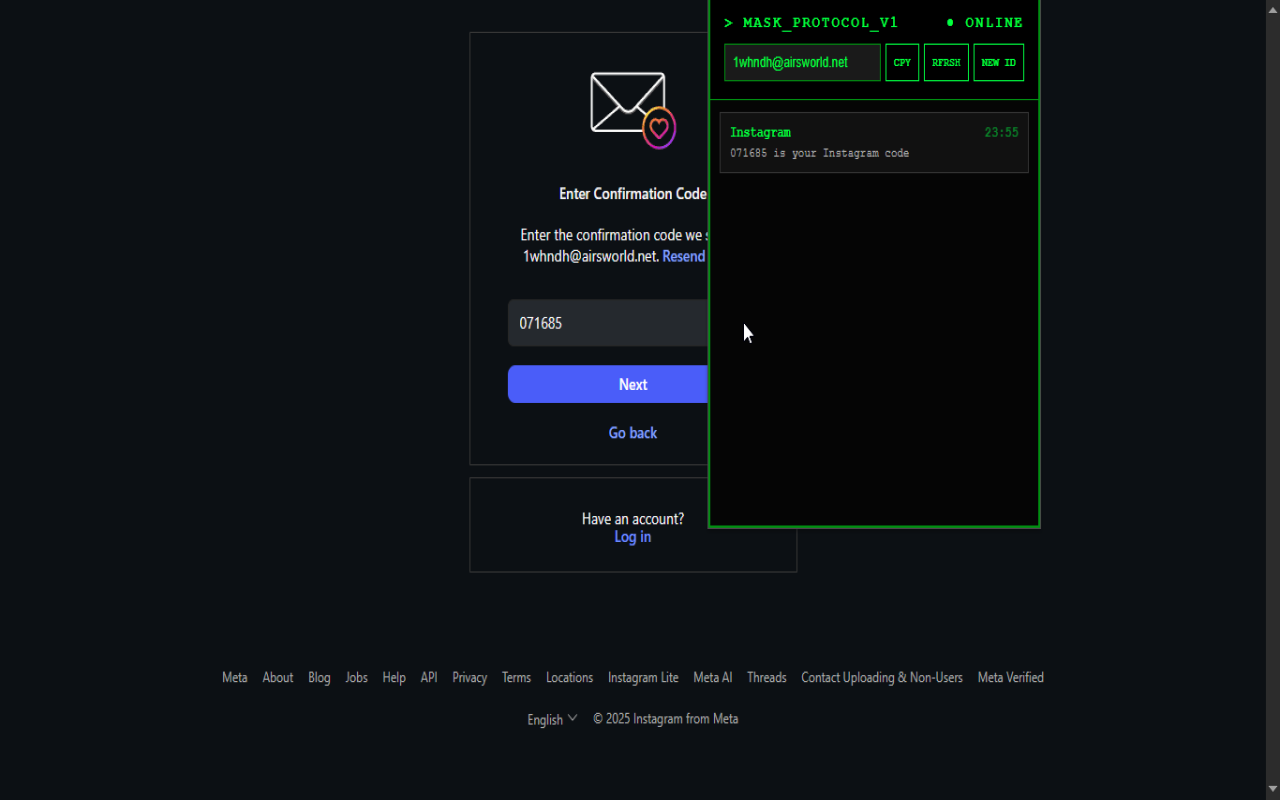
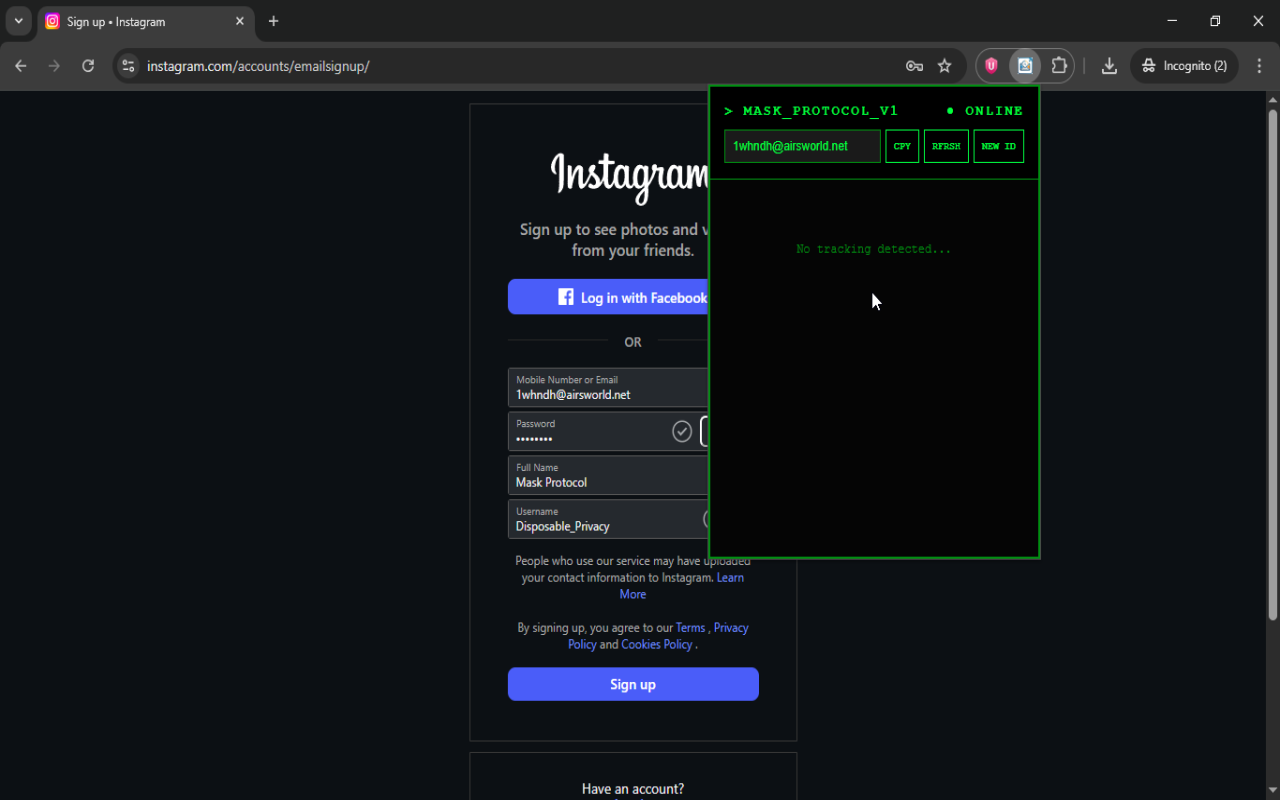
Once installed, Mask adds a handy context menu item that enables users to paste a freshly generated disposable email address directly into any input field with a simple right-click, eliminating the need to switch tabs or open new windows. The extension popup offers an elegant, terminal-inspired user interface that presents clear status indicators, interactive buttons, and a secure, scrolling inbox panel. Here, users can view their current temporary email address, copy it instantly, generate new identities with a single click, and refresh their inbox to read incoming messages safely and securely. Advanced HTML sanitization technology ensures that the content of received emails is displayed without any harmful scripts or tracking elements, making browsing and reading mail safer for you.
Mask stores all email credentials and tokens locally on your device, protecting your data from external leaks. Your disposable email accounts remain fully under your control, and the extension communicates only with the encrypted mail.tm endpoints, ensuring no personal or sensitive information is exposed beyond your browser. This local data storage facilitates smooth reuse of temporary addresses until you decide to switch to a new one, enhancing both privacy and usability. Whether you are registering for new online services, testing workflows that require email validation, or simply avoiding unsolicited email clutter, Mask provides a practical, fast, and anonymous means to maintain your online privacy right from your browser's toolbar.
Key Features:
- Instant Disposable Email Generation: Produces random, anonymous email addresses using publicly available domains powered by the mail.tm API without any signup or cumbersome setup.
- Integrated Inbox Viewer: Check and manage incoming emails directly within the extension popup, with easy-to-use controls for refreshing and reading messages safely in-app.
- One-Click Copy and Paste: Conveniently copy your current disposable email address or paste it into web forms through the context menu without interrupting your workflow.
- Secure Inbox Message Rendering: Utilizes advanced HTML sanitization to guarantee that received messages are free from tracking techniques or malicious scripts.
- Fast Identity Switching: Generate a brand-new disposable email account instantly, discarding old identities for improved privacy and reducing your digital footprint.
- Local Account Storage: All disposable email addresses and access tokens are securely stored locally in your browser, with no personal data sent beyond encrypted mail.tm servers.
- Context Menu Integration: Right-click in any editable field to quickly paste your disposable email, streamlining usage across diverse websites and platforms.
How It Works:
1. Install the Mask – Disposable Privacy extension from the browser’s add-on or extension store.
2. Open the extension popup to view your current disposable email address or right-click any input field and select “Paste Mask Email” to generate and fill in an anonymous email instantly.
3. Use the “Copy Email” button within the popup to easily copy your masked email address for use in registrations, confirmations, or other form entries.
4. Manage your disposable inbox by clicking “Refresh” to retrieve new messages, preview contents, and view sender information—all within the secure extension interface.
5. When desired, click “New Identity” to discard the previous disposable email address and generate a completely new one, delivering enhanced privacy and email segregation.
6. Rest assured that all credentials and emails are processed and stored locally in your browser; communication is restricted solely to secure mail.tm API endpoints.
7. Take advantage of convenient context menu and popup controls anytime, ensuring quick access to disposable emails and inbox management during your browsing sessions.
Privacy: - No personal data collected.
Mask - Disposable Privacy 是做什么的
Mask - Disposable Privacy 是一款面向 Edge 的实用工具类扩展,主要用来解决浏览器里某类具体的小问题。官方对它的介绍是:Generate disposable emails and check inboxes instantly. Privacy first.在微软 Edge 加载项商店上,它当前版本 1.1,评分 5(2 人评价),约 13 名用户。
适合什么人用
从功能定位看,Mask - Disposable Privacy 更适合想补上浏览器原生缺失功能的用户。如果你平时只是偶尔遇到相关需求,用浏览器自带功能也能凑合;但如果这件事每天都发生,装一个专门处理它的扩展通常比手动操作省事得多。
怎么安装 Mask - Disposable Privacy
- 打开微软 Edge 加载项商店上的官方页面;
- 点「添加到浏览器」并确认权限提示;
- 装好后在扩展列表里固定图标,方便随时开关。
本站只做索引与介绍,安装包来自官方商店。如果商店页面提示当前地区不可用,说明该扩展未在你所在区域上架。
常见问题
Mask - Disposable Privacy 是免费的吗?
Mask - Disposable Privacy 在微软 Edge 加载项商店免费提供下载。它是浏览器扩展,装上就能直接用,不需要注册账号。
Mask - Disposable Privacy 安全吗?
它只申请了 0 项权限,范围比较克制,没有申请「读取所有网站数据」这种大权限。
Mask - Disposable Privacy 支持哪些浏览器?
当前收录的版本来自微软 Edge 加载项商店,适用于 Edge。同一个扩展在其他商店可能有对应版本,但功能与版本号不一定相同。
怎么卸载 Mask - Disposable Privacy?
在扩展管理页找到 Mask - Disposable Privacy,点移除即可。它在本地保存的设置会一起清掉,不会残留数据。
权限清单 来自 manifest.json 原文
接口权限 4
activeTabcontextMenusscriptingstorage