
YouNote - Create personal notes EN
CloudCompanion · Firefox
YouNote - Create personal notes / to-do list
<all_urls>),意味着它可以读取你在任意站点的页面内容,包括已登录的页面。这是许多扩展正常工作的必要条件,但也值得你确认来源可信。
截图


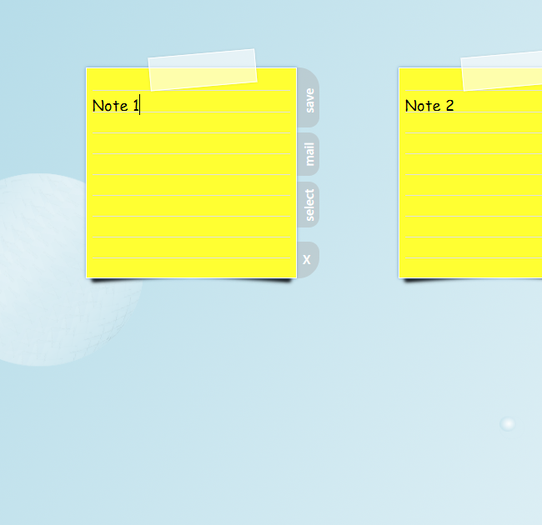


简介
YouNote offers the possibility to create up to 10 personal notes.
To affix a new note just one click on the new-note field is required. That field disappears if the maximum number of notes is reached.
Each note has some option in addition. These become visible if the mouse pointer hovers above a certain note:
The first option is saving changes. After the text of a note has been updated, through the use of the save button those changes will save persistent in the local storage of the browser.
Also there is the opportunity to send a note via mail to anyone.
Because of the darg/drop functionality it is not possible to select the complete text of a note.
The attached select option can be use to copy (and after paste) or delete the complete text.
The selection of a single word still doable, regardless of the drag/drop function.
And a selected note can be finally deleted to get space for a new one.
A further feature is the ability the rearrange the order of the notes via drag and drop. For example to change the priority. The most important note gets the first position and the more or less unimportant notes take the back positions.
That new order will save in the local storage after a change automatically.
Requirements:
To use the send via mail function, a local installation of a mail program is needed.
Preview:
- a sync function for the storage to see personal notes on different instances of the browser (PC, laptop etc.) by using the same user credentials. (browser account)
- a notification option for notes. Each note can get a certain date (deadline, closing date) and during the browser is open (not the add-on itself, just the browser), users can get a notification if the date is almost expired. (reminder function)
Attention:
Every note is only saved in the local browser storage and will never be send outside by this add-on.
Nevertheless, the browser is always the portal to the world wide web. Do never put private or critical informations, like PIN, bank account numbers or similiar data, in the browser storage.
Help:
If you have any complaints or errors, please contact me and descripe your case.
I will try to solve it in a short period of time. Also if you have suggestions for improvement or ideas to extend this add-on, don't hesitate to write down some thoughts and send it to me.
Thank you for that!
engertmartin@web.de
YouNote bietet die Möglichkeit, bis zu 10 eigene Notizen zu erstellen.
Um eine neue Notiz anzulegen, genügt ein Klick auf das new-note Feld. Dieses Feld verschwindet sobald die maximale Anzahl an Notizen erreicht ist.
Jede Notiz hat zusätzliche Optionen. Diese werden sichtbar, wenn der Mauszeiger über eine bestimmte Notiz bewegt wird:
Mit der erste Option können Änderungen gespeichert werden. Nachdem der Text einer Notiz aktualisiert wurde, können die Änderungen mit der Speichertaste dauerhaft in der lokalen Datenbank des Browser hinterlegt werden.
Auch gibt es Möglichkeit, eine Notiz per Mail an eine beliebige Person zu senden.
Wegen der drag/drop Funktion, ist es nicht möglich den kompletten Text einer Notiz zu markieren.
Die select Option kann genutzt werden, um den vollständigen Text zu kopieren (um diesen anschließend an anderer Stelle einzufügen) oder zu löschen.
Einzelne Wörter jedoch, können weiterhin wie gewöhnt markiert werden, unabhängig von der drag/drop Funktion.
Weiterhin kann eine Notiz endgültig gelöscht werden, um beispielsweise Platz für eine Neue zu schaffen.
Eine zusätzliche Funktionalität besteht darin, die Reihenfolge der Notizen unter Verwendung der drag/drop Möglichkeit neu zu organisieren. Das kann unter anderem dazu genutzt werden, um die Priorität der einzelnen Notizen anzupassen. Die wichtigste Notiz kann somit auf die erste Position verschoben werden, während die eher Unwichtigeren nach hinten rutschen.
Die neue Anordnung wird automatisch dauerhaft in der lokalen Datenbank des Browsers gespeichert.
Vorauszusetzen:
Um Notizen per Mail versenden zu können, ist die lokale Installation eines Mailprogramms notwendig.
Ausblick:
- eine synchronisations-Funktion für die Datenbank. Alle gespeicherten Notizen können mit verschiedenen Instanzen des Browsers (PC, Laptop usw.) betrachtet werden, unter Nutzung einheitlicher Anmeldedaten. (Browser Konto)
- eine Möglichkeit der Benachrichtigung für Notizen. Für jede Notiz kann ein bestimmtes Datum (Ende einer Frist) angegeben werden und während der Browser geöffnet ist (nicht unbedingt das Add-on selbst, sondern nur der Browser), kann der Benutzer eine Mitteilung erhalten, dass eine bestimmte Frist bald abläuft. (Erinnerungsfunktion)
Achtung:
Jede Notiz wird nur in der zugrundeliegenden Datenbank des Browser gespeichert und niemals durch das Add-on nach außen gesendet. Ungeachtet dessen, ein Browser stellt stets den Zugang zum world wide web dar. Aus diesem Grund sollten Sie niemals persönliche Daten, wie eine PIN, Bankdaten oder ähnliches, in der Browserdatenbank speichern.
Hilfe:
Wenn Sie Beschwerden oder Fehler jeglicher Art haben, bitte kontaktieren Sie mich und beschreiben Sie mir Ihr Anliegen. Ich werde versuchen das geschilderte Problem zeitnahe zu beheben. Auch wenn Sie bestimmte Verbesserungsvorschläge oder Ideen zur Erweiterung des Add-ons haben, zögern Sie nicht mir Ihre Gedanken mitzuteilen.
Vielen Dank dafür!
engertmartin@web.de
YouNote - Create personal notes 是做什么的
YouNote - Create personal notes 是一款面向 Firefox 的开发者工具类扩展,主要用来调试页面、查看样式与请求、测试接口、辅助前端开发。官方对它的介绍是:YouNote - Create personal notes / to-do list在Firefox 附加组件商店(AMO)上,它当前版本 1.1resigned1,评分 4.5(2 人评价),约 32 名用户。
适合什么人用
从功能定位看,YouNote - Create personal notes 更适合前端工程师、测试与需要经常查看页面结构的用户。如果你平时只是偶尔遇到相关需求,用浏览器自带功能也能凑合;但如果这件事每天都发生,装一个专门处理它的扩展通常比手动操作省事得多。需要注意的是它作用于所有网站,装上后建议先观察一两天,确认不影响常用站点的正常使用。
怎么安装 YouNote - Create personal notes
- 打开Firefox 附加组件商店(AMO)上的官方页面;
- 点「添加到浏览器」并确认权限提示;
- 装好后在扩展列表里固定图标,方便随时开关。
本站只做索引与介绍,安装包来自官方商店。如果商店页面提示当前地区不可用,说明该扩展未在你所在区域上架。
常见问题
YouNote - Create personal notes 是免费的吗?
YouNote - Create personal notes 在Firefox 附加组件商店(AMO)免费提供下载。它是浏览器扩展,装上就能直接用,不需要注册账号。
YouNote - Create personal notes 安全吗?
它只申请了 0 项权限,范围比较克制,没有申请「读取所有网站数据」这种大权限。
YouNote - Create personal notes 支持哪些浏览器?
当前收录的版本来自Firefox 附加组件商店(AMO),适用于 Firefox。同一个扩展在其他商店可能有对应版本,但功能与版本号不一定相同。
怎么卸载 YouNote - Create personal notes?
在扩展管理页找到 YouNote - Create personal notes,点移除即可。它在本地保存的设置会一起清掉,不会残留数据。
权限清单 来自 manifest.json 原文
站点访问 1
<all_urls>
接口权限 2
storagetabs