
WME Toolbox EN
Toolbox Developers · Firefox
Adds many features to the Waze Map Editor. Must be installed from the Waze Forum. See details below. Don't install from here.
截图
简介
WME Toolbox adds many new features to the Waze Map Editor ( www.waze.com/editor ).
----------
PLEASE NOTE: The Firefox version of the WME Toolbox extension is now hosted in the Waze Forum:
https://www.waze.com/forum/viewtopic.php?t=403283
The version here will not work. Do not install it.
----------
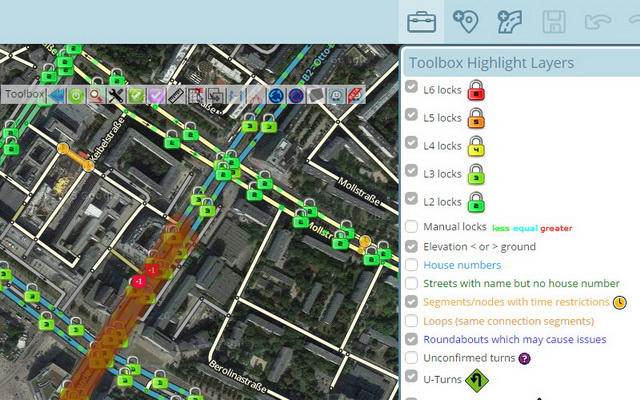
Layers menu with following features:
- Highlight of rank-locked segments
- Highlight of manual locks (greater, equal, less than automatic lock)
- Highlight segments with positive or negative elevation
- Highlight of segments with house numbers
- Highlight of named streets without any house number
- Highlight of segments/nodes with time restrictions
- Highlight of loops
- Highlight of roundabouts which may cause issues
- Highlight of U-Turns
- Highlight of reverse connections
- Highlight of Dead-end loops
- Highlight of soft turns
- Highlight of TTS override instructions
- Highlight of simple segments (which have unneeded geometry nodes)
Toolbar with following features:
- Configuration panel for the plugin options
- Quick access to keyboard shortcuts editor
- Select segments panel to enable multi-selection based on filters
- Properties editor panel to modify several segments at a time
- Copy segment attributes
- Clear road geometry
- Cut segment in two
- Select all roundabout segments
- Redo a roundabout
- Convert a roundabout to a standard road
- Draw landmark inside a roundabout (to give it a name)
- Select segments in landmark
- Suppress unneeded junctions on screen
- Suppress unneeded geometry nodes on screen
- Delete expired restrictions (past ending date) on screen
- Auto fix loops
- Auto fix unconfirmed turns
- Auto remove toll attribute on non freeway/ramp segments
- Auto fix reverse connections, dead-end and unterminated roads
- Auto fix u-turns
And more:
- Rights settings per country
- Popups to help new editors on basic editing
- Option to hide user greetings on the left sidebar
- Option to force fullscreen
- New shortcuts for Toolbox features
- Enable shortcuts on numpad
- Pan the map from screen size
- links to PM last editor, creator
- links to PM conversation
- links to PM Area Managers
WME Toolbox 是做什么的
WME Toolbox 是一款面向 Firefox 的实用工具类扩展,主要用来解决浏览器里某类具体的小问题。官方对它的介绍是:Adds many features to the Waze Map Editor. Must be installed from the Waze Forum. See details below. Don't install from here.在Firefox 附加组件商店(AMO)上,它当前版本 1.7.9resigned1,评分 3.5(20 人评价),约 271 名用户。
适合什么人用
从功能定位看,WME Toolbox 更适合想补上浏览器原生缺失功能的用户。如果你平时只是偶尔遇到相关需求,用浏览器自带功能也能凑合;但如果这件事每天都发生,装一个专门处理它的扩展通常比手动操作省事得多。
怎么安装 WME Toolbox
- 打开Firefox 附加组件商店(AMO)上的官方页面;
- 点「添加到浏览器」并确认权限提示;
- 装好后在扩展列表里固定图标,方便随时开关。
本站只做索引与介绍,安装包来自官方商店。如果商店页面提示当前地区不可用,说明该扩展未在你所在区域上架。
常见问题
WME Toolbox 是免费的吗?
WME Toolbox 在Firefox 附加组件商店(AMO)免费提供下载。它是浏览器扩展,装上就能直接用,不需要注册账号。
WME Toolbox 安全吗?
它只申请了 0 项权限,范围比较克制,没有申请「读取所有网站数据」这种大权限。
WME Toolbox 支持哪些浏览器?
当前收录的版本来自Firefox 附加组件商店(AMO),适用于 Firefox。同一个扩展在其他商店可能有对应版本,但功能与版本号不一定相同。
怎么卸载 WME Toolbox?
在扩展管理页找到 WME Toolbox,点移除即可。它在本地保存的设置会一起清掉,不会残留数据。
权限清单 来自 manifest.json 原文
未解析到权限条目。