
WebP / Avif image converter EN
Nullbrains · Firefox
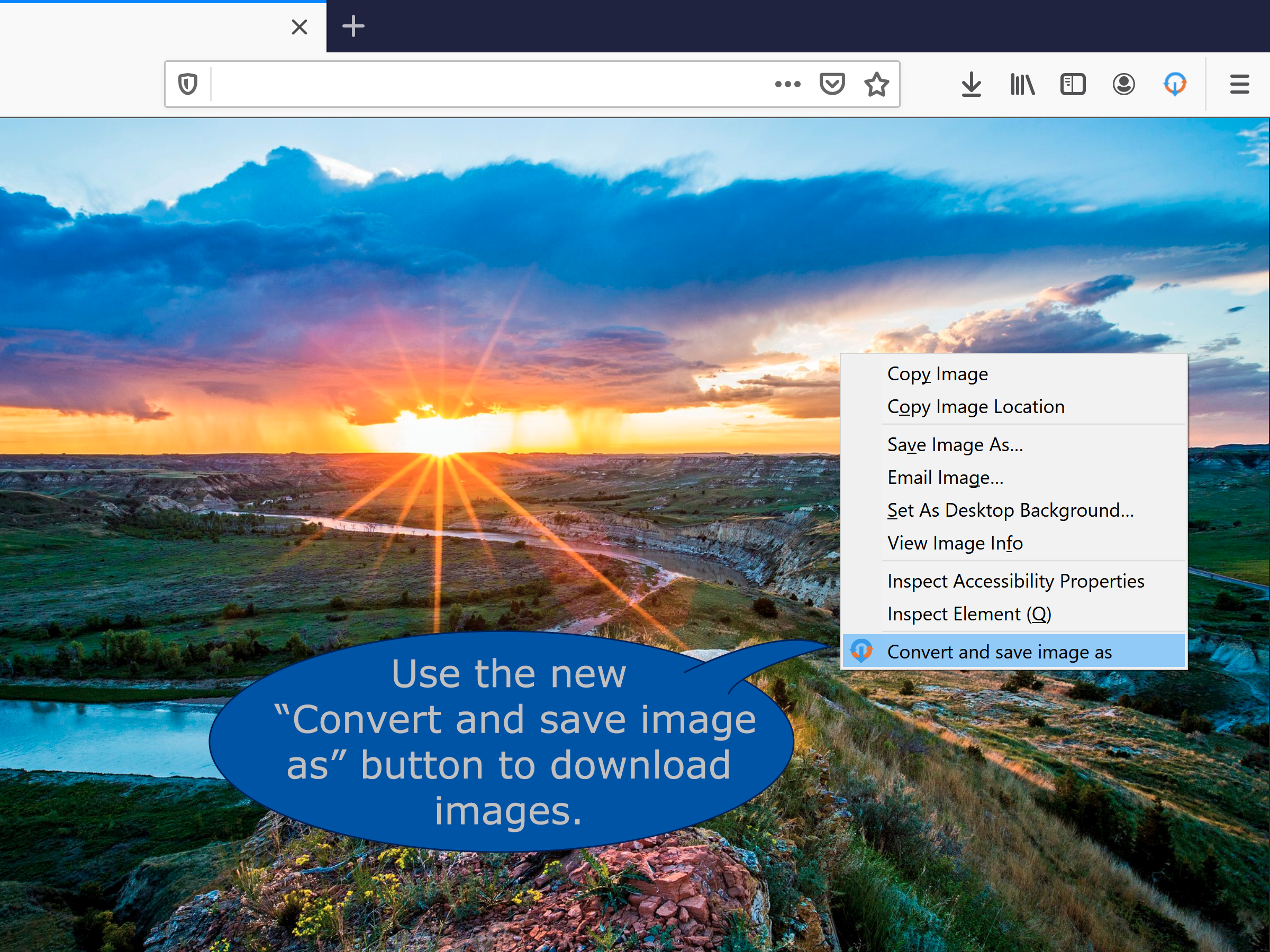
Convert WebP, Avif and other image types before saving and store them in an orderly fashion. All based on your preferences and fully automatic. Simply right click on an image and use the "Convert and save as" button. More details in the description.
<all_urls>),意味着它可以读取你在任意站点的页面内容,包括已登录的页面。这是许多扩展正常工作的必要条件,但也值得你确认来源可信。
截图


简介
WebP / Avifimage Converter: convert, download and store images from the web just the way you want.
How does it work?
After downloading the addon you get a new button Convert and Save image as in the image context menu (When you right click on an image). Now the image is being processed and downloaded based on your preferences. Conversion to JPG and PNG are supported.
These preferences can be set in the option menu that you can reach by clicking on the addons’ browser button located on the top right of your browser next to the address bar.
What can you configure?
Image conversion types
For each image type you can select if and to what image type it is supposed to be converted or not.
Download location
To keep downloads sorted you can specify your preferred download location and filename. The Download location and filenames can include information of the time and date of downloading, image origin and image format. The exact details can be found in the addon.
Note that download locations are always relative to your download folder.
Actions (Advanced section)
The action performed by the addon can be changed, and by using optional modifier keys multiple actions can easily be available. This can be useful when you occasionally want to download images without converting them yet but still want to store them on the specified location. Or if you want to download only PNG files for example.
Popup layout (Advanced section)
For quick access specify which tab you want to open by default.
Generic (Advanced section)
To optimize your workflow you can turn off the popup that suggests download location and filename.
To stop cluttering your download history all downloads can be done in incognito mode thereby all downloads are forgotten. This however requires that you allow the addon to run in "private windows".
Faq
- The image that was downloaded and converted did not converted to the intended filetype.
Webp /Avif image converter uses the actual file data to determine the file type not the url.Therefor, you may experience that a conversion may be different than what you may expect if you look at the url.
Also file extensions are corrected to the appropriate extension in these cases if you turned off conversion for the specific file type. - The quality settings for Webp conversion cannot be lowered.
For conversion to Webp, Webp /Avif image converter uses the firefox engine to do the heavy lifting. Although Webp conversion is supported from Firefox version 96, quality settings can only be adjusted from Firefox 98 onward. Version 96 and 97 show the slider maxed out since that matches the default settings when you upgrade to Firefox 98 or higher.
Permission justification
- storage: Allows the addon to save your settings.
- downloads: Allows the addon to initiate a file download for the converted image.
- contextMenus: Allows the addon to add the "convert and save" button to the image contextmenu
- <all_urls>: Allows the addon to download the image before converting the it.
WebP / Avif image converter 是做什么的
WebP / Avif image converter 是一款面向 Firefox 的下载管理类扩展,主要用来接管浏览器下载、批量抓取资源、加速大文件。官方对它的介绍是:Convert WebP, Avif and other image types before saving and store them in an orderly fashion. All based on your preferences and fully automatic. Simply right click on an image and use the "Convert and save as" button. More details in the description.在Firefox 附加组件商店(AMO)上,它当前版本 1.3.1,评分 3.9(130 人评价),约 16,640 名用户。
适合什么人用
从功能定位看,WebP / Avif image converter 更适合经常下载视频、素材或整站资源的用户。如果你平时只是偶尔遇到相关需求,用浏览器自带功能也能凑合;但如果这件事每天都发生,装一个专门处理它的扩展通常比手动操作省事得多。需要注意的是它作用于所有网站,装上后建议先观察一两天,确认不影响常用站点的正常使用。
怎么安装 WebP / Avif image converter
- 打开Firefox 附加组件商店(AMO)上的官方页面;
- 点「添加到浏览器」并确认权限提示;
- 装好后在扩展列表里固定图标,方便随时开关。
本站只做索引与介绍,安装包来自官方商店。如果商店页面提示当前地区不可用,说明该扩展未在你所在区域上架。
常见问题
WebP / Avif image converter 是免费的吗?
WebP / Avif image converter 在Firefox 附加组件商店(AMO)免费提供下载。它是浏览器扩展,装上就能直接用,不需要注册账号。
WebP / Avif image converter 安全吗?
它只申请了 0 项权限,范围比较克制,没有申请「读取所有网站数据」这种大权限。
WebP / Avif image converter 支持哪些浏览器?
当前收录的版本来自Firefox 附加组件商店(AMO),适用于 Firefox。同一个扩展在其他商店可能有对应版本,但功能与版本号不一定相同。
怎么卸载 WebP / Avif image converter?
在扩展管理页找到 WebP / Avif image converter,点移除即可。它在本地保存的设置会一起清掉,不会残留数据。
权限清单 来自 manifest.json 原文
站点访问 2
<all_urls>file:///*
接口权限 3
contextMenusdownloadsstorage
接口权限(可选) 1
webRequest