
WebAPI Manager EN
Peter Snyder · Firefox
**This project is currently un-maintained. Please email if you're interested in co-maintaining the project.** Improves browser security and privacy by controlling page access to the Web API.
<all_urls>),意味着它可以读取你在任意站点的页面内容,包括已登录的页面。这是许多扩展正常工作的必要条件,但也值得你确认来源可信。
截图
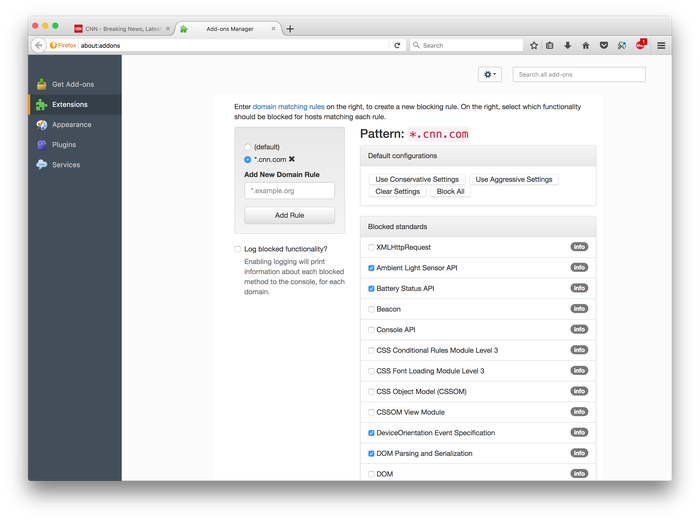
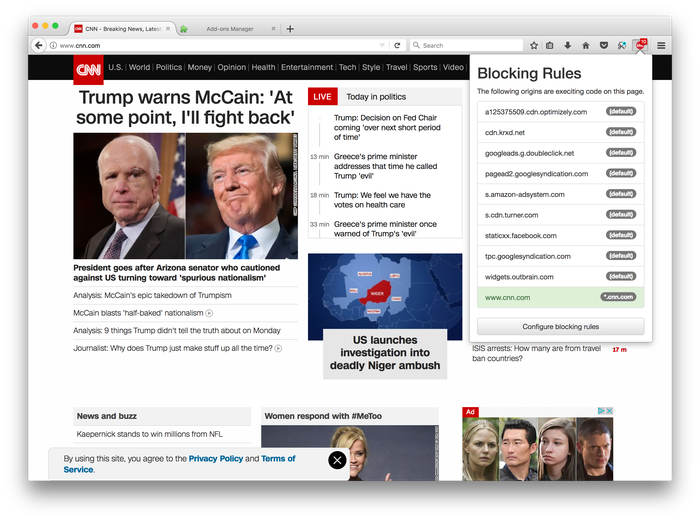
简介
Web API Manager
===
Note
---
By default, this extension does not make any changes. No aspects of the Web API are affected until you start creating custom rule sets, or modifying what Web API standards sites have access to by default. You can start creating these rules through the site's configuration pane.
Overview
---
This extension allows users to selectively allow different hosts on the web to have access to different types of browser functionality. Doing so allows security and privacy sensitive web users to limit the attack surface presented to websites, and to limit websites to the functionality they actually need to carry out user-serving purposes.
Background
---
Web browsers gain staggering numbers of new features, without their users knowing what new functionality is being pushed into their trusted base. While some of this functionality is broadly useful for things commonly thought of as "web" related, a large amount of it is useful in only rare situations, if ever. Examples of this rarely-needed functionality includes the low level audio synthesis capabilities of the Web Audio API, the low level graphics capabilities of WebGL, or the light sensing capabilities of the Ambient Light Sensor API. Such complex-but-rarely-used functionality has been often used in attacks on the security and privacy of the web.
Other functionality is frequently used by web sites, but for non-user-serving purposes, like fingerprinting anonymous users and tracking them across websites. Examples of such functionality includes parts of the SVG API, parts of the the Canvas Element's functionality, and the Beacon standard, among many others.
This extension helps users stay private and secure online by limiting websites to only the functionality they need, and prevent them from accessing rarely needed and/or privacy violating functionality.
Functionality
---
The extension currently includes the following functionality:
- Creation of domain-specific functionality rules, based on host-matching regular expressions.
- Blocking of functionality across all domains, with a fallback, "default" blocking rule.
- A novel method of blocking functionality, designed to minimize the effect of removing functionality on existing code that expects that functionality to be in place.
- A categorization of approximately 1,400 JavaScript methods into 74 different Web API standards (and, where appropriate, sub-standards).
- User feedback to alert users how many hosts are executing script every time they visit a site, to ease the creating of new rules.
The following functionality is not currently implemented, but is being considered for future inclusion:
- The ability to subscribe to blocking rule sets created by trusted third parties, similar to the EasyList / AdBlockPlus model of rule subscriptions.
- Blocking property accesses on non-global structures through an additional level of interposition on runtime created objects.
- Adding new Web API standards into the code base.
- Extend blocking to properties and events (currently only functions and methods are interposed on).
Background
---
This extension is based on research conducted at the BITSLab at the University of Illinois at Chicago. Further information on the measurements and techniques used in this extension can be found in the following papers.
- Peter Snyder, Cynthia Taylor, and Chris Kanich, “Most Websites Don’t Need to Vibrate: A Cost–Benefit Approach to Improving Browser Security,” in Proceedings of the 2017 ACM Conference on Computer and Communications Security, 2017.
- Pete Snyder, Laura Waitker, Cynthia Taylor, and Chris Kanich, “CDF: Predictably Secure Web Documents,” in Proceedings of the <a rel="nofollow" href="https://prod.outgoing.prod.webservices.mozgcp.net/v1/2ba627d8c40a9fa2fef8248371ab44222401df7501db7eb07af941a…
WebAPI Manager 是做什么的
WebAPI Manager 是一款面向 Firefox 的隐私与安全类扩展,主要用来拦截追踪器、屏蔽广告、管理 Cookie、加固浏览器指纹。官方对它的介绍是:**This project is currently un-maintained. Please email if you're interested in co-maintaining the project.** Improves browser security and privacy by controlling page access to the Web API.在Firefox 附加组件商店(AMO)上,它当前版本 0.9.28resigned1,评分 4.94(18 人评价),约 68 名用户。
适合什么人用
从功能定位看,WebAPI Manager 更适合在意上网被跟踪、希望减少广告干扰的用户。如果你平时只是偶尔遇到相关需求,用浏览器自带功能也能凑合;但如果这件事每天都发生,装一个专门处理它的扩展通常比手动操作省事得多。需要注意的是它作用于所有网站,装上后建议先观察一两天,确认不影响常用站点的正常使用。
怎么安装 WebAPI Manager
- 打开Firefox 附加组件商店(AMO)上的官方页面;
- 点「添加到浏览器」并确认权限提示;
- 装好后在扩展列表里固定图标,方便随时开关。
本站只做索引与介绍,安装包来自官方商店。如果商店页面提示当前地区不可用,说明该扩展未在你所在区域上架。
常见问题
WebAPI Manager 是免费的吗?
WebAPI Manager 在Firefox 附加组件商店(AMO)免费提供下载。它是浏览器扩展,装上就能直接用,不需要注册账号。
WebAPI Manager 安全吗?
它只申请了 0 项权限,范围比较克制,没有申请「读取所有网站数据」这种大权限。
WebAPI Manager 支持哪些浏览器?
当前收录的版本来自Firefox 附加组件商店(AMO),适用于 Firefox。同一个扩展在其他商店可能有对应版本,但功能与版本号不一定相同。
怎么卸载 WebAPI Manager?
在扩展管理页找到 WebAPI Manager,点移除即可。它在本地保存的设置会一起清掉,不会残留数据。
权限清单 来自 manifest.json 原文
站点访问 1
<all_urls>
接口权限 10
activeTabcontextMenuscookiesprivacystoragetabsunlimitedStoragewebNavigationwebRequestwebRequestBlocking