
VeeHD Enhanced EN
SubDevo · Firefox
Site enhancements for VeeHD.com members and guests. "This is how VeeHD was meant to be..."
截图


简介
Also for Chrome!
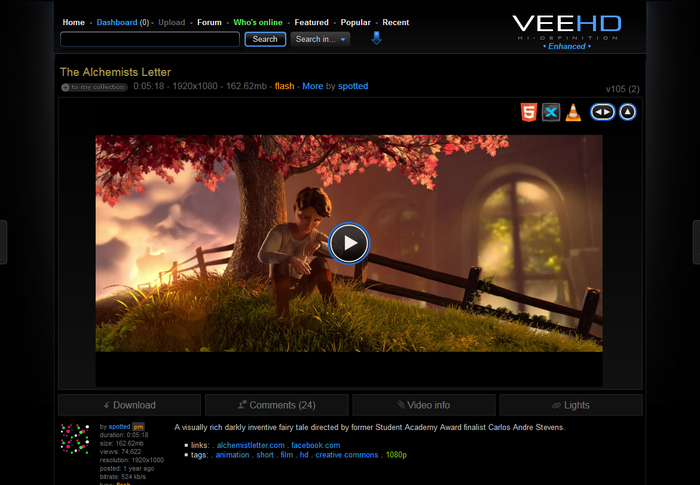
The goal of this extension is to make the VeeHD.com experience as user-friendly as possible without changing the "brand that is veehd". No major cosmetic theme changes, simply "enhanced". Most commonly used info is a click away. All site bugs that can be fixed client side has been done. Many features have been added to "enhance" the basic functionalility of the site for all, including special features for uploaders and normal users alike. A couple examples... on video pages, you now have a choice of using HTML5 video player, DivX Web Player, or VLC Web Plugin instead of just Flash. Optional player options will appear only if installed, enabled and supported by the browser. For uploaders... streamlined video edit page, enhanced overview page with many helpful features such as video sorting, filtering and statistics (new views, avg video size etc). This is a VERY small example and there are a huge amount of obvious and not so obvious helpful enhancements.
The following is a list of every change made to VeeHD.com using VeeHD Enhanced:
All Pages
- Added various "hover" and "active link" effects throughout the site. Too numerous to detail here.
- Removed obsolete Channels button.
- Added "Recent", "Popular" and "Featured" links to links menu (above search box).
- Added a "Search in..." dropdown next to the "normal" search button.
Search tags and also google search of forum, profiles and video.
Google searches go through http://blankrefer.com for a little more privacy. - New items (number greater than 0) are colored green for new messages, private timeline and dashboard numbers.
- Added a "Back to Top" link next to "DMCA Complaint" in the bottom bar.
- Added a "Down to Bottom" link at the top of the page.
- Added "Down to Bottom" and "Back to Top" links on the far left and right (center) of the browser.
- Lightened the "last event was 50 seconds ago" text (above the "Users logged in" box) for better visibility.
- Lightened (and added light blue hover color) to the "Privacy Policy / Terms" links (at very bottom of page) for better visibility.
- Changed the page/tab title that appears on certain pages to be more informative.
- Added a "quick login" box in the mini dashboard (replaces the big login button).
- If users access the site secured (https), then the extension will respect this and use https (where possible).
- Logins are now done secured (https).
- Disabled autoplay of YouTube vids in forum posts, profiles, PMs and video comments.
Autoplay vids will have an orange border that tells you that autoplay has been blocked. - YouTube vids in a private message are resized to fit the pm width or width of quotes if inside of one.
- All YouTube object/embeds site-wide are now replaced with the newest YouTube iframe code that will autoselect using flash or html5 based upon the viewing device/browser's support.
- Added a "HTTPS" link at the top of the page if site is loaded using HTTPS.
Clicking it, reloads the page using HTTP. Hover text has info/explanation.
All Video Search Results Pages
- Put a copy of the "jump to page" links bar at the top of page.
- Removed obsolete "related popular" links in "Tags Info" box.
- Added background images for "effect".
- Colored the "divx" and "flash" indicators (green and orange) for better visibility.
- Added an "edit video" link IF the vid is yours. Test on "My Videos"...
- Added "+ to my collection" link.
- Added small avatar of uploader.
- Colored video stats line a dim yellow.
- All long titles with no spaces now wrap and NOT run off the page to the right.
Search Results Page (not tag search)
- Added "all - flash - divx" sorting links with result counts.
- Added ability to sort results alphabetically as well as normally.
Tag Search Results Page
- Added a "Toggle popular/alphabetically" link in "Tag refine" section.
Recent, Popular and Featured Pages
- Added "all - flash - divx" sorting links.
Sorting by flash or divx effectively gets you 100 (instead of 50) results. - Added a "Next" icon/link in the page jump if you are on page 5.
This allows you to view an unlimited amount of these page results.
Friends and Fans Pages
- Fixed "by name" link. Works on all pages now.
- Title of "Fans" page incorrectly said "Friends". Fixed.
- All avatars are resized. No more oversized avatars covering the "remove" and "+to friends" links.
- Fans and Friends "boxes" (avatar/name etc) are all centered and long names wrap instead of stretching into another "box".
- Added a "send pm" link to each fan and friend.
- Issue: If you have more than 17 pages of friends/fans the page jump is limited to 17 pages.
Added a "Next" icon/link in the page jump if you are on page …
VeeHD Enhanced 是做什么的
VeeHD Enhanced 是一款面向 Firefox 的影音图像类扩展,主要用来处理图片、调节音量、增强播放器功能。官方对它的介绍是:Site enhancements for VeeHD.com members and guests. "This is how VeeHD was meant to be..."在Firefox 附加组件商店(AMO)上,它当前版本 1.4.7resigned1,评分 4.5(10 人评价),约 68 名用户。
适合什么人用
从功能定位看,VeeHD Enhanced 更适合经常在网页上看视频、听音乐或处理图片的用户。如果你平时只是偶尔遇到相关需求,用浏览器自带功能也能凑合;但如果这件事每天都发生,装一个专门处理它的扩展通常比手动操作省事得多。
怎么安装 VeeHD Enhanced
- 打开Firefox 附加组件商店(AMO)上的官方页面;
- 点「添加到浏览器」并确认权限提示;
- 装好后在扩展列表里固定图标,方便随时开关。
本站只做索引与介绍,安装包来自官方商店。如果商店页面提示当前地区不可用,说明该扩展未在你所在区域上架。
常见问题
VeeHD Enhanced 是免费的吗?
VeeHD Enhanced 在Firefox 附加组件商店(AMO)免费提供下载。它是浏览器扩展,装上就能直接用,不需要注册账号。
VeeHD Enhanced 安全吗?
它只申请了 0 项权限,范围比较克制,没有申请「读取所有网站数据」这种大权限。
VeeHD Enhanced 支持哪些浏览器?
当前收录的版本来自Firefox 附加组件商店(AMO),适用于 Firefox。同一个扩展在其他商店可能有对应版本,但功能与版本号不一定相同。
怎么卸载 VeeHD Enhanced?
在扩展管理页找到 VeeHD Enhanced,点移除即可。它在本地保存的设置会一起清掉,不会残留数据。
权限清单 来自 manifest.json 原文
接口权限 1
storage