
URL Link EN
Neil Bird · Firefox
URL Link is a small Firefox and Thunderbird extension that allows you to select a non-URL in a mail/news message or web-page, and open it in a browser window.
截图

简介
URL Link has been wholly re-written to be a WebExtension. <b>The version here will not work on Thunderbird as it requires a minor tweak for that which cannot be uploaded here.</b> Please see the separate Thunderbird add-ons site instead: https://addons.thunderbird.net/en-GB/thunderbird/addon/url-link/
<i>The force-submenu option does not yet do anything as menus cannot currently be recreated on-the-fly (Firefox issue).</i>
<b>Explanation of required permissions</b>
<ul>
<li><i>Access your data for all websites</i> — installs a “content script” into visited pages in order to better analyse the current selection.</li>
<li><i>Input data to the clipboard</i> — copies file:/// URLs to the clipboard for pasting (in lieu of automatic access).
<li><i>Access browser tabs</i> — open new windows and tabs.
</ul>
For emails, it reconnects links in emails which have been broken across several lines, and also replaces spaces with the URL character code %20 so that you may follow emailed network 'file:' links (which it auto-detects from Windows "X:" or \servdir references).
For web pages, it also allows you to select textual links/URLs in web pages or edit boxes, and follow them as if they were real links. It will also let you use actual links, and analyses mailto: links as well.
It analyses 'mailto:' links (converts, e.g., mailto:someone@somesite.com to http://www.somesite.com) and can also 'follow' javascript: links that would otherwise generate a pop-up (e.g., http://www.kelkoo.co.uk/).
There are currently more translations than I care to keep listing here (thanks to the guys at http://www.babelzilla.org/)! Unfortunately, Babelzilla has retired due to the new format of Firefox add-ons. If you would like to provide new translations, or fix existing ones, please email me, add them to a feature-request issue on GitHub, or add them in a GitHub fork for me to pull in.
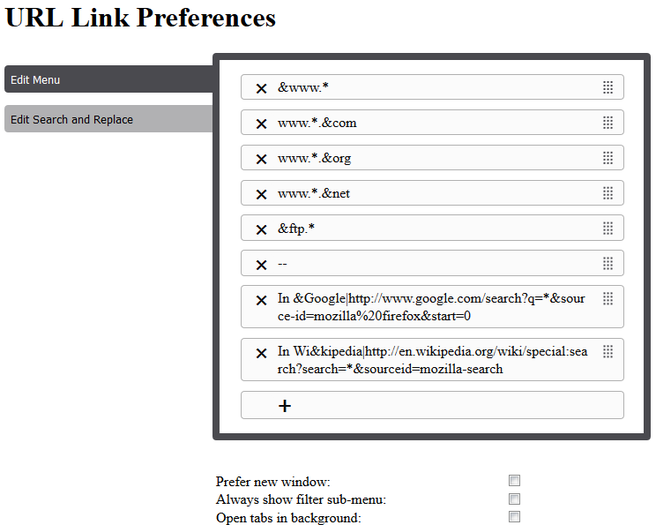
URL Link has a preferences dialogue allowing customisation of the 'not a proper URL' sub-menu which converts, e.g., "sometext" to "www.sometext.com", so that locale-specific conversions can be added (like 'www.*.co.uk').
Nicknames can be applied to the entries (such that the nickname appears in the menu, not the conversion string) by using a bar '|', e.g.:
"In Google|http://www.google.com/search?q=*&source-id=Mozilla%20Firefox&start=0"
It also allows separators to be added to the custom menu by using entries made up of hyphens, e.g. "--".
Hold down <b>Shift</b> when opening a link in the current window to instead open in a new window.
Either hold down <b>Control</b> when opening a link, or add <b>|p</b> to the end of a custom menu entry to make that entry always open in a private window.
You can also set up custom search and replace strings (e.g., convert Windows driver letter to some file:///mnt/smb/ path for Linux users).
If you have problems with file: or network (\server\share) links, especially in Thunderbird emails, see the following page:
<a href="http://kb.mozillazine.org/Links_to_local_pages_do_not_work#Firefox_1.5.2C_SeaMonkey_1.0_and_newer">http://kb.mozillazine.org/Links_to_local_pages_do_not_work#Firefox_1.5.2C_SeaMonkey_1.0_and_newer</a>
However, <b>note that Firefox currently does not allow add-ins to acess file:/// URLs at all</b>. Until they cater for this, I am providing a work-around that copies the required file:/// URL to the clipboard, and prompts you to paste-and-go into a new tab.
URL Link 是做什么的
URL Link 是一款面向 Firefox 的实用工具类扩展,主要用来解决浏览器里某类具体的小问题。官方对它的介绍是:URL Link is a small Firefox and Thunderbird extension that allows you to select a non-URL in a mail/news message or web-page, and open it in a browser window.在Firefox 附加组件商店(AMO)上,它当前版本 3.6,评分 4.22(18 人评价),约 939 名用户。
适合什么人用
从功能定位看,URL Link 更适合想补上浏览器原生缺失功能的用户。如果你平时只是偶尔遇到相关需求,用浏览器自带功能也能凑合;但如果这件事每天都发生,装一个专门处理它的扩展通常比手动操作省事得多。
怎么安装 URL Link
- 打开Firefox 附加组件商店(AMO)上的官方页面;
- 点「添加到浏览器」并确认权限提示;
- 装好后在扩展列表里固定图标,方便随时开关。
本站只做索引与介绍,安装包来自官方商店。如果商店页面提示当前地区不可用,说明该扩展未在你所在区域上架。
常见问题
URL Link 是免费的吗?
URL Link 在Firefox 附加组件商店(AMO)免费提供下载。它是浏览器扩展,装上就能直接用,不需要注册账号。
URL Link 安全吗?
它只申请了 0 项权限,范围比较克制,没有申请「读取所有网站数据」这种大权限。
URL Link 支持哪些浏览器?
当前收录的版本来自Firefox 附加组件商店(AMO),适用于 Firefox。同一个扩展在其他商店可能有对应版本,但功能与版本号不一定相同。
怎么卸载 URL Link?
在扩展管理页找到 URL Link,点移除即可。它在本地保存的设置会一起清掉,不会残留数据。
权限清单 来自 manifest.json 原文
接口权限 4
clipboardWritemenusstoragetabs