
User Agent Switcher
ntninja · Firefox
修改浏览器的 User-Agent 字符串
<all_urls>),意味着它可以读取你在任意站点的页面内容,包括已登录的页面。这是许多扩展正常工作的必要条件,但也值得你确认来源可信。
截图
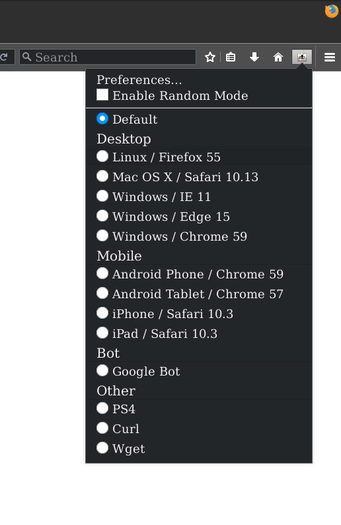


简介
🌈⚧🌈⚧🌈⚧🌈 Easily pose as another browser by changing the User-Agent header.¹ 🌈⚧🌈⚧🌈⚧🌈
Pretending to be a different browser can be useful in a number of different situations:
- Some web pages require you to log in or buy a subscription to view their content, but give full read access to search engines.
- Some web pages determine whether you’re using a mobile or desktop browser based on your user-agent.
- Some web pages require you to use a specific browser to access their site.
- And potentially more…
Note that your browser will not magically morph into a different piece of software just because it’s pretending to be some other software. If a web site locks you out because your browser does not support a feature they require then changing the User-Agent will not make any difference.
¹ Also changes navigator.userAgent, as well generating convincing values for several of the other navigator.* properties.
– Translating “User-Agent Switcher” to a new language
Any help in translating this extension is greatly appreciated! To do so, simply visit our project on the WebLate hosted instance, create an account and either select an existing language or add a new one to get going. Thanks for helping out!
(Alternatively you may submit a merge request on GitLab with the updated translation files or send me the translations using the “Support E-mail”-Address.)
– Getting Help
Found a bug or want a new feature? Please use the GitLab issue tracker (until I get around to switching to Codeberg at least) or write an e-mail to submit these. I am not notified of your message if you just leave a comment on this page.
Please note however that “User-Agent Switcher” is mostly in maintenance-only mode now and new features will not be added by me (the primary author, ntninja anymore. I’m still open for patches from the community however, but might get back to it myself at some point.
– Observing it work
If you want to watch User-Agent Switcher work, there are a few things you could try:
- Use a web service (such as UserAgentString.com) to see your currently sent User-Agent header.
- Use the built-in Network Analyzer (Ctrl-Shift-Q) to view the User-Agent header.
- Enter
navigator.userAgentinto the Scripting Console (Ctrl-Shift-K) to view the client-side User-Agent value. (Note that the scripting console needs to be unlocked on modern browser versions as some nifty found it makes a great to over unsuspecting people’s accounts…)
– Frequently Asked Questions
- Why doesn’t the extension work on this very site (Mozilla/Firefox Add-ons)?
To find out more about why these restrictions exist and how disable them if you must, please take a look at the following blog article: https://ntninja.yukis.eu/extensions-modify-mozilla-sites.html(This information was moved from this extension’s description to an external site, since a Mozilla reviewer felt that suggesting changes like the one proposed in the linked article are not acceptable for the listing of sandboxed browser extension.)
- Why is the extension file so large (4MiB) compared to others?
In order to provide almost perfect emulation of User-Agent values, User Agent-Switcher bundles a stripped-down version of BrowsCap. This allows us to derive all relevant JavaScriptnavigator.*browser/OS identification values from just a single value: The User-Agent value you enter (and a bit of magic behind the scenes). Other extensions with a similarly complete level of emulation used to store all these values in huge tables along with the User-Agent value itself, making it very hard to add new entries.Doing this kind of emulation without using BrowsCap would be extremely hard for us, as there are only few rules regarding the structure of User-Agent strings and the most interesting part end up in the extremely browser-specific comment section of the string. As such, we consider these extra 3MiB+ of data shipped with the extension a fair price to pay for having almost perfect out-of-the-box emulation of all these values with no extra user configuration required.
Replacing BrowsCap is a long-term …
User Agent Switcher 是做什么的
User Agent Switcher 是一款面向 Firefox 的开发者工具类扩展,主要用来调试页面、查看样式与请求、测试接口、辅助前端开发。官方对它的介绍是:修改浏览器的 User-Agent 字符串在Firefox 附加组件商店(AMO)上,它当前版本 1.4.113,评分 4.33(574 人评价),约 62,536 名用户。
适合什么人用
从功能定位看,User Agent Switcher 更适合前端工程师、测试与需要经常查看页面结构的用户。如果你平时只是偶尔遇到相关需求,用浏览器自带功能也能凑合;但如果这件事每天都发生,装一个专门处理它的扩展通常比手动操作省事得多。需要注意的是它作用于所有网站,装上后建议先观察一两天,确认不影响常用站点的正常使用。
怎么安装 User Agent Switcher
- 打开Firefox 附加组件商店(AMO)上的官方页面;
- 点「添加到浏览器」并确认权限提示;
- 装好后在扩展列表里固定图标,方便随时开关。
本站只做索引与介绍,安装包来自官方商店。如果商店页面提示当前地区不可用,说明该扩展未在你所在区域上架。
常见问题
User Agent Switcher 是免费的吗?
User Agent Switcher 在Firefox 附加组件商店(AMO)免费提供下载。它是浏览器扩展,装上就能直接用,不需要注册账号。
User Agent Switcher 安全吗?
它只申请了 0 项权限,范围比较克制,没有申请「读取所有网站数据」这种大权限。
User Agent Switcher 支持哪些浏览器?
当前收录的版本来自Firefox 附加组件商店(AMO),适用于 Firefox。同一个扩展在其他商店可能有对应版本,但功能与版本号不一定相同。
怎么卸载 User Agent Switcher?
在扩展管理页找到 User Agent Switcher,点移除即可。它在本地保存的设置会一起清掉,不会残留数据。
权限清单 来自 manifest.json 原文
站点访问 1
<all_urls>
接口权限 5
storagetabswebNavigationwebRequestwebRequestBlocking