
Tridactyl EN
Colin Caine · Firefox
Vim, but in your browser. Replace Firefox's control mechanism with one modelled on Vim. This addon is very usable, but is in an early stage of development. We intend to implement the majority of Vimperator's features.
<all_urls>),意味着它可以读取你在任意站点的页面内容,包括已登录的页面。这是许多扩展正常工作的必要条件,但也值得你确认来源可信。
截图




简介
Control your browser with your keyboard only.
Replace Firefox's control mechanism with one modelled on VIM. This is a "Firefox Quantum" replacement for VimFX, Vimperator and Pentadactyl. Most common tasks you want your browser to perform are bound to a single key press:
- You want to open a new tab? Hit
t. - You want to follow that link? Hit
fand type the displayed label. (Note: hint characters should be typed in lowercase.) - You want to go to the bottom of the page? Hit
G. Or the top?gg. - You want to focus the text field on Wikipedia to search for another term?
gi. - Switch to the next tab?
gt. - Got trapped in a place where Tridactyl can't run?
Ctrl-, - Go back in time?
H. - Notice that this tab is rubbish and you want to close it?
d. - Regret that decision?
urestores it. - Want to write something in Vim?
Ctrl-iin a text box opens it in Vim, if you have:nativeworking. - Temporarily disable all that magic because you can't stand it?
Shift-InsertorCtrl-Alt-Escape. - But how do you use your browser now?
Shift-InsertorCtrl-Alt-Escapeagain and we're back on.
The list could go on a bit here, but I guess you'll get the point. If you feel lost sometimes :help might help you a lot, and there's always :tutor.
Highlighted features:
- Follow any link on the site with just 2-3 key presses.
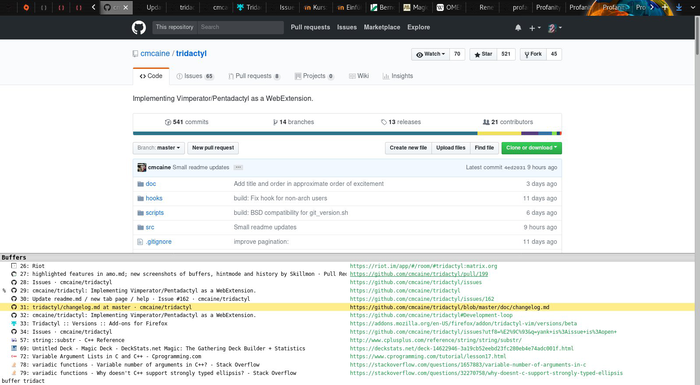
- Switch to any open tab by searching for its URL or title or entering its ID.
- Easy customizable search settings.
- Bind any supported command or commands to the key (sequence) of your liking.
- Great default bindings (if you're used to Pentadactyl or Vimperator).
This add-on is very usable, but is in an early stage of development. We intend to implement the majority of Vimperator's features.
You can get beta builds from our website.
Permissions:
Since Tridactyl aims to provide all the features Vimperator and Pentadactyl had, it requires quite a few permissions. Here we describe the specific permissions and why we need them.
- Access your data for all websites:
- This is Mozilla's way of saying that Tridactyl can read the content of web pages. This is necessary in order to e.g. find the links you can follow with the
:hintcommand (bound tofby default).
- This is Mozilla's way of saying that Tridactyl can read the content of web pages. This is necessary in order to e.g. find the links you can follow with the
- Exchange messages with programs other than Firefox:
- This permission is required for Tridactyl to interact with your operating system (opening your editor to edit text areas, sending links to your video player, reading a configuration file from your disk...). This is possible thanks to an external executable we provide. If you feel this gives Tridactyl too much power you can chose not to install the external executable: Tridactyl will still work but won't be able to start external programs.
- Read and modify bookmarks:
- Tridactyl's command line has a powerful autocompletion mechanism. In order to be able to autocomplete your bookmarks, Tridactyl needs to read them.
- Clear recent browsing history, cookies, and related data:
- Tridactyl implements the
:sanitisecommand Vimperator and Pentadactyl had. It works a bit like the "Clear All History" dialog you can access by pressingCtrl+Shift+Delon default Firefox.
- Tridactyl implements the
- Get data from the clipboard:
- If your clipboard contains a URL, pressing
pwill make Tridactyl follow this URL in the current tab.
- If your clipboard contains a URL, pressing
- Input data to the clipboard:
- Tridactyl lets you copy various elements to the clipboard such as a page's URL with
yy, a link's URL with;yor the content of an HTML element with;p.
- Tridactyl lets you copy various elements to the clipboard such as a page's URL with
- Download files and read and modify the browser's download history:
- By pressing
;s,;S,;aand;Ayou can save documents and pictures from a page to your download folder.
- By pressing
- Access browsing history:
- The URLs of websites you've visited previously can be suggested as arguments for
:tabopenand similar commands.
- The URLs of websites you've visited previously can be suggested as arguments for
- Access recently closed tabs:
- If you've accidentally closed a tab or window, Tridactyl will let you open it again with the
:undocommand which is bound touby default.
- If you've accidentally closed a tab or window, Tridactyl will let you open it again with the
- Access browser tabs:
- Tridactyl provides a quick tab-switching menu/command with the
:buffercommand (bound tob). This permission is also required to close, move, and pin tabs, amongst other things.
- Tridactyl provides a quick tab-switching menu/command with the
- Access browser activity during navigation:
- This is needed for Tridactyl to be able to go back to normal mode every time you open a new page. In the future we may use it for autocommands.
- Read the text of all open tabs:
- This allows us to use Firefox's built-in find-in-page API, for, for example, allowing you to bind find-next and find-previous to
nandN.
- This allows us to use Firefox's built-in find-in-page API, for, for example, allowing you to bind find-next and find-previous to
- Monitor extension usage and manage themes:
- Tridactyl needs this to integrate with and avoid conflicts with other extensions. For example, Tridactyl's contextual identity features use this to cooperate with the Multi-Account Containers extension.
- Hide and show browser tabs:
- Tridactyl needs this for tab group commands, which allow associatin…
- Tridactyl needs this for tab group commands, which allow associatin…
Tridactyl 是做什么的
Tridactyl 是一款面向 Firefox 的搜索增强类扩展,主要用来补充搜索结果、切换搜索引擎、过滤无效结果。官方对它的介绍是:Vim, but in your browser. Replace Firefox's control mechanism with one modelled on Vim. This addon is very usable, but is in an early stage of development. We intend to implement the majority of Vimperator's features.在Firefox 附加组件商店(AMO)上,它当前版本 1.25.1,评分 4.91(522 人评价),约 5,107 名用户。
适合什么人用
从功能定位看,Tridactyl 更适合每天大量搜索、希望结果更干净准确的用户。如果你平时只是偶尔遇到相关需求,用浏览器自带功能也能凑合;但如果这件事每天都发生,装一个专门处理它的扩展通常比手动操作省事得多。需要注意的是它作用于所有网站,装上后建议先观察一两天,确认不影响常用站点的正常使用。
怎么安装 Tridactyl
- 打开Firefox 附加组件商店(AMO)上的官方页面;
- 点「添加到浏览器」并确认权限提示;
- 装好后在扩展列表里固定图标,方便随时开关。
本站只做索引与介绍,安装包来自官方商店。如果商店页面提示当前地区不可用,说明该扩展未在你所在区域上架。
常见问题
Tridactyl 是免费的吗?
Tridactyl 在Firefox 附加组件商店(AMO)免费提供下载。它是浏览器扩展,装上就能直接用,不需要注册账号。
Tridactyl 安全吗?
它只申请了 0 项权限,范围比较克制,没有申请「读取所有网站数据」这种大权限。
Tridactyl 支持哪些浏览器?
当前收录的版本来自Firefox 附加组件商店(AMO),适用于 Firefox。同一个扩展在其他商店可能有对应版本,但功能与版本号不一定相同。
怎么卸载 Tridactyl?
在扩展管理页找到 Tridactyl,点移除即可。它在本地保存的设置会一起清掉,不会残留数据。
权限清单 来自 manifest.json 原文
站点访问 1
<all_urls>
接口权限 23
activeTabbookmarksbrowsingDataclipboardReadclipboardWritecontextMenuscontextualIdentitiescookiesdownloadsfindhistorymanagementnativeMessagingproxysearchsessionsstoragetabHidetabstopSiteswebNavigationwebRequestwebRequestBlocking