
Translator menu EN
y4v8 · Firefox
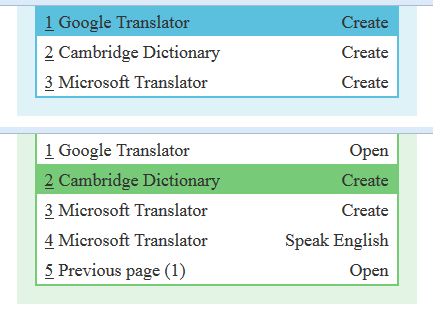
The menu for translation/switching between the current tab and a tab with one of translators in the current or another window.
<all_urls>),意味着它可以读取你在任意站点的页面内容,包括已登录的页面。这是许多扩展正常工作的必要条件,但也值得你确认来源可信。
截图
简介
The menu for translation/switching between the current tab and a tab with one of translators in the current or another window.
Currently for 'Google Translator', 'Microsoft Translator', 'Cambridge Dictionary'.
A simple usage scenario:
1) using the keyboard:
- open the menu by short pressing 'Shift';
- execute the menu item by pressing 'Shift' again.
2) using the mouse:
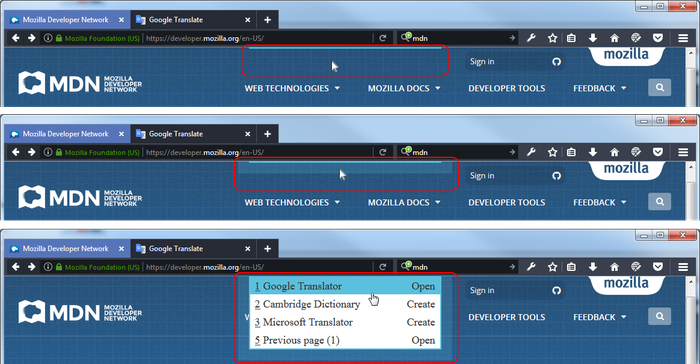
- hover over the menu border and swipe down;
- execute the menu item by clicking the left mouse button.
The menu is displayed at the top in the center of the screen.
In details:
To show the menu, do one of the following:
- shortly press the 'Shift' key;
- click on the menu border;
- hover over the menu border and move it down.
To hide the menu, do one of the following:
- press the 'Escape' key or the 'Control' key;
- click on the menu border or out of the menu;
- leave the menu.
To select a menu item, do one of the following:
- press one of the keys 'ArrowUp','ArrowDown','Home','End';
- move mouse pointer;
- scroll wheel mouse.
To execute a menu item, do one of the following:
- press one of the keys 'Shift','Space','Enter','ArrowRight';
- click the middle button (with the wheel) of the mouse;
- press the appropriate hotkey ('1','2','3'...).
To return to previous page, do one of the following:
- press one of the keys 'ArrowLeft','Backspace','Backquote';
- execute the appropriate menu item.
Known issues:
The extension does not work on the following sites:
- addons.mozilla.org (for security reasons);
- docs.google.com and sites similar to it (there is no possibility to get the selected text).
The menu item 'Microsoft Translator - Speaking English' may not work:
- if you have not visited this site before;
- if it is blocked by another extension, for example 'NoScript'.
Translator menu 是做什么的
Translator menu 是一款面向 Firefox 的语言辅助类扩展,主要用来划词翻译、语法校对、词典查询。官方对它的介绍是:The menu for translation/switching between the current tab and a tab with one of translators in the current or another window.在Firefox 附加组件商店(AMO)上,它当前版本 1.0.16resigned1,评分 4.6(10 人评价),约 31 名用户。
适合什么人用
从功能定位看,Translator menu 更适合需要阅读外文资料或写英文内容的用户。如果你平时只是偶尔遇到相关需求,用浏览器自带功能也能凑合;但如果这件事每天都发生,装一个专门处理它的扩展通常比手动操作省事得多。需要注意的是它作用于所有网站,装上后建议先观察一两天,确认不影响常用站点的正常使用。
怎么安装 Translator menu
- 打开Firefox 附加组件商店(AMO)上的官方页面;
- 点「添加到浏览器」并确认权限提示;
- 装好后在扩展列表里固定图标,方便随时开关。
本站只做索引与介绍,安装包来自官方商店。如果商店页面提示当前地区不可用,说明该扩展未在你所在区域上架。
常见问题
Translator menu 是免费的吗?
Translator menu 在Firefox 附加组件商店(AMO)免费提供下载。它是浏览器扩展,装上就能直接用,不需要注册账号。
Translator menu 安全吗?
它只申请了 0 项权限,范围比较克制,没有申请「读取所有网站数据」这种大权限。
Translator menu 支持哪些浏览器?
当前收录的版本来自Firefox 附加组件商店(AMO),适用于 Firefox。同一个扩展在其他商店可能有对应版本,但功能与版本号不一定相同。
怎么卸载 Translator menu?
在扩展管理页找到 Translator menu,点移除即可。它在本地保存的设置会一起清掉,不会残留数据。
权限清单 来自 manifest.json 原文
站点访问 1
<all_urls>
接口权限 1
tabs