
TitleCase EN
Joshua Pack · Firefox
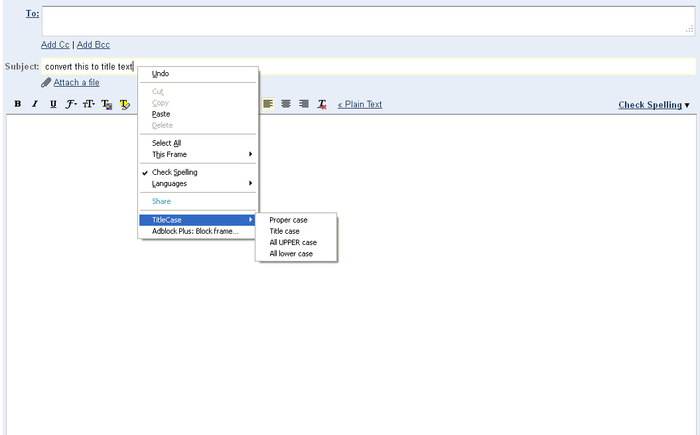
Transform strings into Title Case, Proper Case, Start Case, Camel Case, Upper Case, and Lower Case. You have 2 ways to change text. Either by right clicking on the field and changing the case or by highlighting and only changing what you highlighted.
<all_urls>),意味着它可以读取你在任意站点的页面内容,包括已登录的页面。这是许多扩展正常工作的必要条件,但也值得你确认来源可信。
截图


简介
Transform strings into Title Case, Proper Case, Upper Case, and Lower Case.
You have 2 ways to change text. Either by right clicking on the field and changing the case or by highlighting and only changing what you highlighted. Keyboard Shortcut available in version 2.0!
I have made this addon available for community updates through github at https://github.com/joshuapack/TitleCaseFirefoxAddon
KEYBOARD SHORTCUTS All you have to do is right click and Go To Options Page and scroll to bottom of page and select the checkbox Allow ALT Shortcut and hit Save. This will enable it forever, until you shut it off.
Suggestions: If you have any suggestions, please do not hesitate to ask at https://www.htdsoftware.com/support
Support: If you find you want me to add something or you find a bug that needs fixed, use my support system at https://www.htdsoftware.com/support
I have noticed a couple people putting bugs into reviews. That is fine, but I take my time to edit and fix these bugs and yet they leave the low star review without explanation after I fixed. It would be really nice to let me know so I can fix the issue if you would submit a ticket instead, that way you can be notified.
New 3.0 Update: Wanted to let you know this is a full rewrite using the new WebExtension format. I was going to use the jQuery Library to help with this, but I feel like it will cause more trouble than what it is worth. So, I am writing it in pure Javascript just like version 2.0 but instead in WebExtension format.
Permissions
This add-on can:
- Access your data for all websites (This is to allow access to text on each page)
- Access browser tabs (This is to allow context menu to make changes to highlighted text)
Note: Please do not post bugs or problems in review as I will actively fix them.
3.1.4 Bug Fix
- Fixed bug where sometimes the ALT shortcut works and sometimes it doesn't
- Removed Context Menu CheckBox and replaced it to go to options page
3.1.3 Bug Fix
- A user sent a bug in where there was an issue with hyphens and quotes when using TitleCase. This has been fixed.
- Added new rules with StartCase as well.
- Possibly fixed issue where it stopped working on some websites.
3.1.2 Bug Fix
- A user sent a bug in where there was an issue with colons and parentheses when using TitleCase. This has been fixed.
3.1.1 Bug Fix
- Due to new re-write, it no longer had the ability to change text without highlighting. This is now fixed.
3.0 Added Features (Requires Firefox 42 or higher)
- Context menu to turn on and off ALT keyboard shortcuts.
- Full Rewrite of extension using new WebExtension
2.0 Added Features
- Keyboard Shortcuts!
- ALT+1 = Proper case
- ALT+2 = Title Case
- ALT+3 = Title Case (CamelCase)
- ALT+4 = Start Case
- ALT+5 = Start Case (CamelCase)
- ALT+6 = CamelCase
- ALT+7 = UPPER CASE
- ALT+8 = lower case
1.6 Added Features
- Highlighted text stays highlighted after Change!
1.5 Added Features
- Added "Start Case"
- Added "Start Case (CamelCase)"
- Added "CamelCase
- Cleaned up code to be more compatible with newer versions of Firefox
1.3 Added Feature
- Added "Title Case (CamelCase)" Which will allow you to change text without affecting the Camel Case (Ex: "thisIsCamelCase" Will be changed to "ThisIsCamelCase")
- Tested for Firefox 6.*
1.2a Fix (Version number was suppose to be 1.2.1)
- Fixed title case from not working on UPPER cased strings.
1.2 Added Feature
- Highlight text change.
1.1 Release
- Fixed TitleCase to Convert all Strings and added exceptions.
- 'and', 'the', 'to', 'for', 'is', 'in', 'a', 'at', 'an', 'from', 'by', 'if', 'of'
1.0 Beta Release
If you are looking for the thunderbird addon click the link below.
https://addons.mozilla.org/en-US/thunderbird/addon/titlecase-for-thunderbird/
TitleCase 是做什么的
TitleCase 是一款面向 Firefox 的开发者工具类扩展,主要用来调试页面、查看样式与请求、测试接口、辅助前端开发。官方对它的介绍是:Transform strings into Title Case, Proper Case, Start Case, Camel Case, Upper Case, and Lower Case. You have 2 ways to change text. Either by right clicking on the field and changing the case or by highlighting and only changing what you highlighted.在Firefox 附加组件商店(AMO)上,它当前版本 3.1.5resigned1,评分 4.38(24 人评价),约 416 名用户。
适合什么人用
从功能定位看,TitleCase 更适合前端工程师、测试与需要经常查看页面结构的用户。如果你平时只是偶尔遇到相关需求,用浏览器自带功能也能凑合;但如果这件事每天都发生,装一个专门处理它的扩展通常比手动操作省事得多。需要注意的是它作用于所有网站,装上后建议先观察一两天,确认不影响常用站点的正常使用。
怎么安装 TitleCase
- 打开Firefox 附加组件商店(AMO)上的官方页面;
- 点「添加到浏览器」并确认权限提示;
- 装好后在扩展列表里固定图标,方便随时开关。
本站只做索引与介绍,安装包来自官方商店。如果商店页面提示当前地区不可用,说明该扩展未在你所在区域上架。
常见问题
TitleCase 是免费的吗?
TitleCase 在Firefox 附加组件商店(AMO)免费提供下载。它是浏览器扩展,装上就能直接用,不需要注册账号。
TitleCase 安全吗?
它只申请了 0 项权限,范围比较克制,没有申请「读取所有网站数据」这种大权限。
TitleCase 支持哪些浏览器?
当前收录的版本来自Firefox 附加组件商店(AMO),适用于 Firefox。同一个扩展在其他商店可能有对应版本,但功能与版本号不一定相同。
怎么卸载 TitleCase?
在扩展管理页找到 TitleCase,点移除即可。它在本地保存的设置会一起清掉,不会残留数据。
权限清单 来自 manifest.json 原文
站点访问 1
<all_urls>
接口权限 4
activeTabcontextMenusstoragetabs