




 Google学术搜索按钮
可让您在浏览网页时查询学术文章。
Firefox

Time Capsule EN
maxlath · Firefox
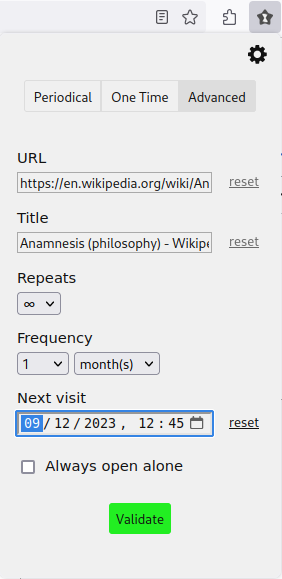
The best person to send you links matching your interests is a time-traveling version of yourself: set a periodicity when you bookmark a URL, and the tab will re-open in the future, be it an hour, a day, a month, a year, or a decade!
4.3/5
12 人评分
45用户
v2.4.1当前版本
截图
简介
The best person to send you links matching your interests is a time traveling version of yourself: create a time capsule by choosing when the current tab should be re-opened; this will bookmark the current tab, and program to re-open it in the future, according to the choosen periodicity, be it an hour, a day, a month, a year, a decade!
It will then re-open at this periodicity until the end of times. Or until you un-bookmark it.
Why would I need this?
- Do you have a bookmark folder with 10,000 things-you-should-absolutely-keep-in-mind but never actually re-open once bookmarked? Now, if you don't come back to those things, those things come back to you!
- Works very well when learning a new subject: you open many links which for most don't make sense now, but would probably make sense in a few months. (that worked awesome for me when learning web development).
- Works very well as a memo/alarm mechanism: "Now isn't the time to deal with [enter the task on which you plan to procrastinate], but I got to see this page in X hours/days/etc."
- In some ways, the logo may look like a bow tie. Bow ties are cool.
Top features
- Super customizable periodicity: if the offered buttons aren't enough, click on the popup (to get focus on it) and start typing the precise number of a time unit you want.
- Integrated with the browser bookmarks, which gives numerous advantages:
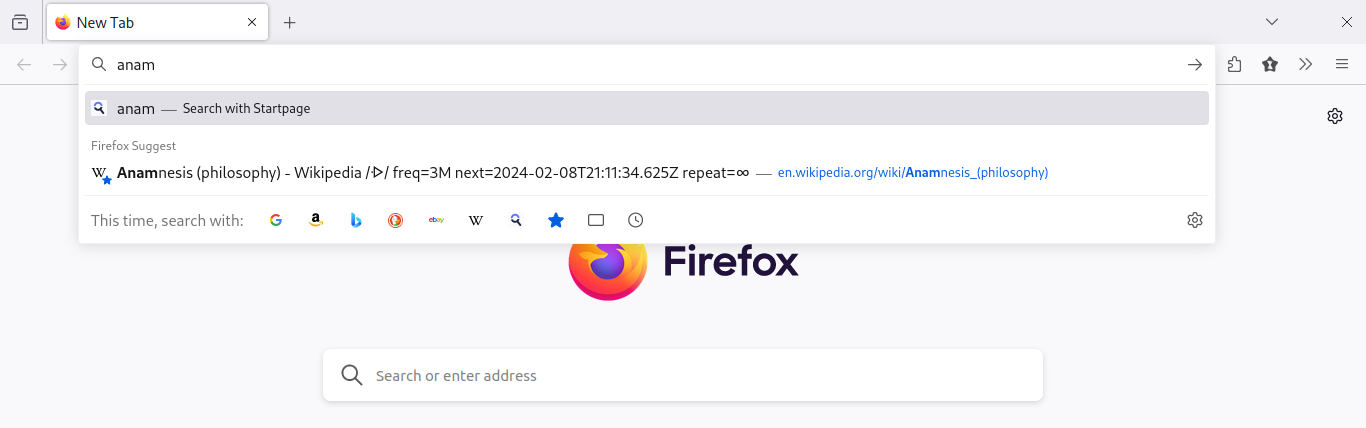
- Pages you bookmark this way will show up when you're searching a page (if you activated bookmark suggestion)
- All your time capsules are grouped in a folder in your bookmarks, which makes them easy to browse/search
- Easy to export/import: simply import export your bookmarks and your time capsules will come along!
- It's libre/open source
- Built with the latest WebExtension standard: shouldn't break until next decade addon revolution
- Comes with (poor) time-traveling jokes
If you feel the need but this doesn't match your expectations, you might be happy with the perfectly fine Snooze Tab addon.
Sending links to your past self isn't possible yet, but could come in a future version. It might be a premium feature reserved to generous donators.
Advices to keep it sane
- Do not keep too many bookmarks with a short periodicity: that's gonna be very spammy.
- Rule of thumb: if a tab re-opens 3 times, and you closed it immediatly the 3 times without considering acting upon it, deal with it now or un-bookmark it.
- Avoid time paradoxes.
How does it works?
It basically rely on an internal time vortex to send the links. See the code for more details.
See also
If you like this addon, you might like this other project of mine: inventaire.io, a web app to share your books inventory with your friends!
Time Capsule 是做什么的
Time Capsule 是一款面向 Firefox 的资讯订阅类扩展,主要用来订阅 RSS、聚合新闻、跟踪博客更新。官方对它的介绍是:The best person to send you links matching your interests is a time-traveling version of yourself: set a periodicity when you bookmark a URL, and the tab will re-open in the future, be it an hour, a day, a month, a year, or a decade!在Firefox 附加组件商店(AMO)上,它当前版本 2.4.1,评分 4.25(12 人评价),约 45 名用户。
适合什么人用
从功能定位看,Time Capsule 更适合想摆脱算法推荐、自己掌控信息源的用户。如果你平时只是偶尔遇到相关需求,用浏览器自带功能也能凑合;但如果这件事每天都发生,装一个专门处理它的扩展通常比手动操作省事得多。
怎么安装 Time Capsule
- 打开Firefox 附加组件商店(AMO)上的官方页面;
- 点「添加到浏览器」并确认权限提示;
- 装好后在扩展列表里固定图标,方便随时开关。
本站只做索引与介绍,安装包来自官方商店。如果商店页面提示当前地区不可用,说明该扩展未在你所在区域上架。
常见问题
Time Capsule 是免费的吗?
Time Capsule 在Firefox 附加组件商店(AMO)免费提供下载。它是浏览器扩展,装上就能直接用,不需要注册账号。
Time Capsule 安全吗?
它只申请了 0 项权限,范围比较克制,没有申请「读取所有网站数据」这种大权限。
Time Capsule 支持哪些浏览器?
当前收录的版本来自Firefox 附加组件商店(AMO),适用于 Firefox。同一个扩展在其他商店可能有对应版本,但功能与版本号不一定相同。
怎么卸载 Time Capsule?
在扩展管理页找到 Time Capsule,点移除即可。它在本地保存的设置会一起清掉,不会残留数据。
权限清单 来自 manifest.json 原文
接口权限 5
alarmsbookmarksmenusstoragetabs
标签 点标签看同类扩展
Google学术搜索按钮
可让您在浏览网页时查询学术文章。
Firefox
 Unpaywall
Get free text of research pape…
Firefox
 Web Archives
View archived and cached versi…
Firefox
 PrintFriendly - Print, PDF & Full Page Screenshot
Make web pages printer-friendl…
Firefox
 Pix Companion
Browser extension for Pix
Firefox
 LibKey Nomad
One-click access to millions o…
Firefox
 Linguist - web pages translator
翻译网页,选中文本并翻译,Netflix字幕,私人信息,朗读…
Firefox
 Notefox: websites notes
Take notes on every website in…
Firefox