 uBlock Origin
一款高效的网络请求过滤工具,占用极低的内存和 CPU。
Firefox

Encryption Tool EN
Ray · Firefox
Encrypt and decrypt textual data using SHA-256 Hash algorithm
4.4/5
7 人评分
95用户
v0.2.9当前版本
截图
简介
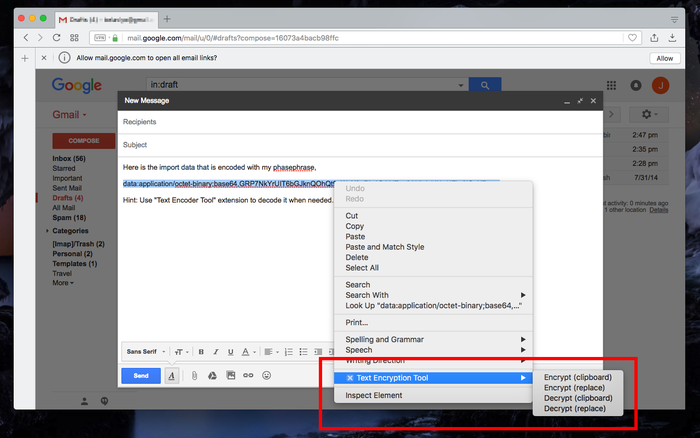
This extension adds a few items to the right-click context menu over text selections. You can:
- Encrypt selected text to the clipboard
- Encrypt selected text and store it in the synced storage
- Encrypt selected text and replace the original content
- Decrypt an encrypted text and save it to the clipboard
- Decrypt an encrypted text and replace the original content
Notes:
1. The extension uses your passphrase as a newly generated SHA-256 private key and a random public key to encrypt or decrypt the textual content.
2. There is no way to decrypt the encrypted text if the passphrase is forgotten. To protect user privacy the extension does NOT store your passphrases.
3. The extension now supports encryption and decryption of binary files with the same algorithm.
Use cases:
1. Encrypt your passwords while sending an email
2. Archive some important data privately
3. Send important data such as passwords to another machine securely
Privacy:
This extension works offline. There is no data sent to any server whatsoever
Encryption Tool 是做什么的
Encryption Tool 是一款面向 Firefox 的隐私与安全类扩展,主要用来拦截追踪器、屏蔽广告、管理 Cookie、加固浏览器指纹。官方对它的介绍是:Encrypt and decrypt textual data using SHA-256 Hash algorithm在Firefox 附加组件商店(AMO)上,它当前版本 0.2.9,评分 4.43(7 人评价),约 95 名用户。
适合什么人用
从功能定位看,Encryption Tool 更适合在意上网被跟踪、希望减少广告干扰的用户。如果你平时只是偶尔遇到相关需求,用浏览器自带功能也能凑合;但如果这件事每天都发生,装一个专门处理它的扩展通常比手动操作省事得多。
怎么安装 Encryption Tool
- 打开Firefox 附加组件商店(AMO)上的官方页面;
- 点「添加到浏览器」并确认权限提示;
- 装好后在扩展列表里固定图标,方便随时开关。
本站只做索引与介绍,安装包来自官方商店。如果商店页面提示当前地区不可用,说明该扩展未在你所在区域上架。
常见问题
Encryption Tool 是免费的吗?
Encryption Tool 在Firefox 附加组件商店(AMO)免费提供下载。它是浏览器扩展,装上就能直接用,不需要注册账号。
Encryption Tool 安全吗?
它只申请了 0 项权限,范围比较克制,没有申请「读取所有网站数据」这种大权限。
Encryption Tool 支持哪些浏览器?
当前收录的版本来自Firefox 附加组件商店(AMO),适用于 Firefox。同一个扩展在其他商店可能有对应版本,但功能与版本号不一定相同。
怎么卸载 Encryption Tool?
在扩展管理页找到 Encryption Tool,点移除即可。它在本地保存的设置会一起清掉,不会残留数据。
权限清单 来自 manifest.json 原文
接口权限 5
activeTabcontextMenusnotificationsscriptingstorage
标签 点标签看同类扩展
uBlock Origin
一款高效的网络请求过滤工具,占用极低的内存和 CPU。
Firefox
 AdGuard AdBlocker
AdGuard 广告拦截器可有效的拦截所有网页上的所有类型的…
Firefox
 AdBlocker Ultimate
Completely remove ALL ads. No …
Firefox
 Malwarebytes Browser Guard
Fast and safe browsing that pr…
Firefox
 NordVPN - a VPN proxy extension for Firefox
Looking for the best VPN exten…
Firefox
 NoScript 安全套件
您在网络浏览器中得到的最安全的保护! 只允许在您信任的站点运…
Firefox
 ESET Browser Privacy & Security
通过 ESET 浏览器隐私政策和安全性(包括独特的元数据清理…
Firefox
 Web Threat Shield
通过识别和阻止危险网站,在您网上冲浪时确保您的安全。
Firefox