
Remote Switch for Pi-Hole EN
syoder · Firefox
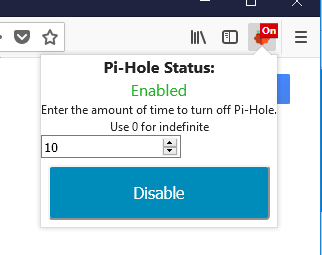
Remote Switch for Pi-Hole to enable and disable the server with the specified time provide by the user without having to open a new tab. No other installs are required
截图


简介
Select the amount of time you want to disable Pi-Hole for and press Disable. When it is disabled you are enable it by the button.
IMPORTANT: In order to make this work all you have to do is get the API key from the Pi-Hole server and enter it in the option page for the add-on. It will be in form of a QR code, use a phone and convert it to text, Or use "cat /etc/pihole/setupVars.conf | grep WEBPASSWORD=" on the server. There is no install needed on the server. If you try and Disable/enable and receive an "API Error", check the API key in the option page.
This is not an official Pi-Hole application.
Pi-hole® is a registered trademark of Pi-hole LLC” or “FTLDNS™ is a trademark of Pi-hole LLC
Remote Switch for Pi-Hole 是做什么的
Remote Switch for Pi-Hole 是一款面向 Firefox 的实用工具类扩展,主要用来解决浏览器里某类具体的小问题。官方对它的介绍是:Remote Switch for Pi-Hole to enable and disable the server with the specified time provide by the user without having to open a new tab. No other installs are required在Firefox 附加组件商店(AMO)上,它当前版本 1.1resigned1,评分 3.28(18 人评价),约 42 名用户。
适合什么人用
从功能定位看,Remote Switch for Pi-Hole 更适合想补上浏览器原生缺失功能的用户。如果你平时只是偶尔遇到相关需求,用浏览器自带功能也能凑合;但如果这件事每天都发生,装一个专门处理它的扩展通常比手动操作省事得多。
怎么安装 Remote Switch for Pi-Hole
- 打开Firefox 附加组件商店(AMO)上的官方页面;
- 点「添加到浏览器」并确认权限提示;
- 装好后在扩展列表里固定图标,方便随时开关。
本站只做索引与介绍,安装包来自官方商店。如果商店页面提示当前地区不可用,说明该扩展未在你所在区域上架。
常见问题
Remote Switch for Pi-Hole 是免费的吗?
Remote Switch for Pi-Hole 在Firefox 附加组件商店(AMO)免费提供下载。它是浏览器扩展,装上就能直接用,不需要注册账号。
Remote Switch for Pi-Hole 安全吗?
它只申请了 0 项权限,范围比较克制,没有申请「读取所有网站数据」这种大权限。
Remote Switch for Pi-Hole 支持哪些浏览器?
当前收录的版本来自Firefox 附加组件商店(AMO),适用于 Firefox。同一个扩展在其他商店可能有对应版本,但功能与版本号不一定相同。
怎么卸载 Remote Switch for Pi-Hole?
在扩展管理页找到 Remote Switch for Pi-Hole,点移除即可。它在本地保存的设置会一起清掉,不会残留数据。
权限清单 来自 manifest.json 原文
接口权限 2
storagewebRequest