
Search Site WE EN
DW-dev · Firefox
Search within the current subdomain or within the entire domain, using the toolbar button or context menu.
<all_urls>),意味着它可以读取你在任意站点的页面内容,包括已登录的页面。这是许多扩展正常工作的必要条件,但也值得你确认来源可信。
截图

简介
CHANGES
Version 4.7
• Minor change.
OVERVIEW
Search Site WE provides facilities to search within the current subdomain or within the entire domain, using a selected search engine.
Search Site WE is an alternative no-restart version of the well established Search Site add-on.
Search Site WE is implemented using the new WebExtensions API and is available for both Firefox and Chrome with identical functions and user interfaces.
OPTIONS PAGE
The Search Site WE Options page can be accessed as follows:
• Firefox - On the menu bar select Tools > Add-ons (or press Ctrl+Shift+A), select the Extensions tab, and then click on the Options button.
• Chrome - Right-click on the toolbar button, and then select Options.
TOOLBAR BUTTON AND POPUP PANEL
After installation of Search Site WE, there will be a new green 'magnifying-glass' button on the main toolbar.
If Search Site WE cannot be used with the current page, the toolbar button will be disabled (greyed-out).
To search within a site, first click on the toolbar button to show the popup panel, then type the search terms into the search box, and then click on the 'Search Subdomain' button or the 'Search Entire Domain' button (or press Enter to search within the default search domain).
Normally, the search box is filled with the text from the previous search. However, if text in the page is selected before opening the popup panel, the search box will be filled with the selected text.
When text is entered into the search box, any previous matching searches are shown below the search box and can be selected to fill the search box.
To search using a specific search engine, click on the drop-down menu and select the required search engine.
To search only for exact matches to the entered text, tick the 'Exact matches' checkbox.
To open the search results in a new tab, tick the 'Open in new tab' checkbox.
The search engine, exact matches and open in new tab settings are always initialized from the Search Defaults options.
There is an option to show or hide search suggestions below the search box.
There is an option to show more settings on an additional row in the popup panel.
There is an option to apply the settings in the popup panel to the settings in the Search Defaults options tab.
CONTEXT MENU ITEMS
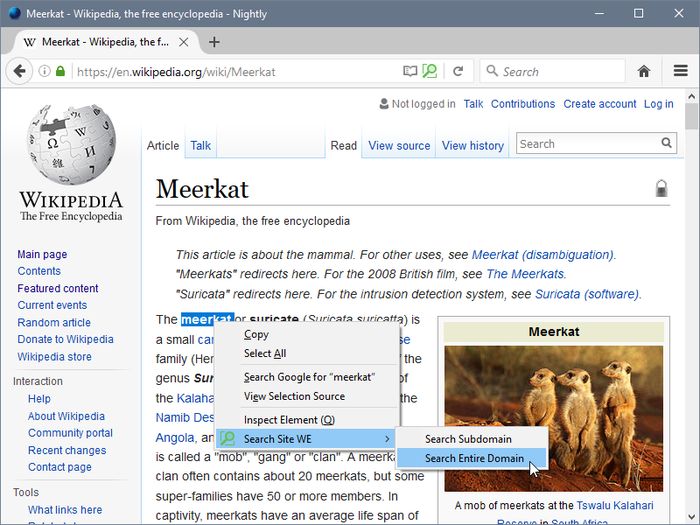
To search within a site, first select some text within the web page, then right-click on the selected text and choose the 'Search Site WE' menu item, and then choose either the 'Search Subdomain' or the 'Search Entire Domain' sub-menu item.
The search engine, exact matches and open in new tab settings are always taken from the Search Defaults options.
There is an option to show/hide the Search Site WE submenu item on the context menu.
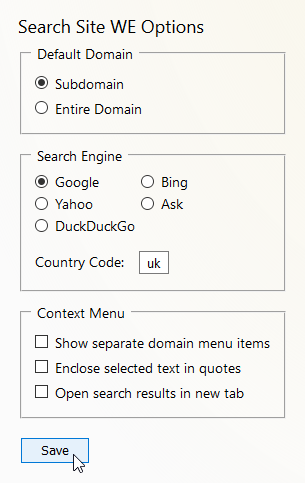
There is an option to only show the default search domain on the context menu.
KEYBOARD SHORTCUTS
To open the toolbar button popup panel, press Alt+K. This shortcut can be reconfigured in the Shortcuts tab of the Search Site WE Options page.
SEARCH DEFAULTS
In the 'Search Defaults' tab of the Search Site WE Options page, there are options to specify the default search settings.
There is an option to specify the default 'Search Domain' as either the current 'Subdomain' or the 'Entire Domain'.
There is an option to specify the default 'Search Engine' that will be used for searches within sites. The search engine can be selected from 'Google', 'Bing', 'Yahoo', 'Ask', 'Ecosia', 'Yandex', 'Baidu' or 'DuckDuckGo'. The search engine can be either 'global' or 'local' (for a specific country). If a 'local' search engine is selected, the country code must be specified.
There is an option to specify the country code (e.g. 'de', 'es', 'it', 'fr', 'uk') for 'local' search engines.
There is an option to append additional search terms to the search URL, for example, &hl=fr to specify the language as French, or &pws=0 to de-personalize the search results.
There is an option to search only for exact matches, so that the entered text is searched as a single phrase.
There is an option to open the search results in a new tab.
SUPPORT
Please e-mail: dw-dev@gmx.com
LICENSE
Distributed under the GNU General Public License version 2.
See LICENCE.txt file and http://www.gnu.org/licenses/
Search Site WE 是做什么的
Search Site WE 是一款面向 Firefox 的搜索增强类扩展,主要用来补充搜索结果、切换搜索引擎、过滤无效结果。官方对它的介绍是:Search within the current subdomain or within the entire domain, using the toolbar button or context menu.在Firefox 附加组件商店(AMO)上,它当前版本 4.7,评分 4.77(109 人评价),约 777 名用户。
适合什么人用
从功能定位看,Search Site WE 更适合每天大量搜索、希望结果更干净准确的用户。如果你平时只是偶尔遇到相关需求,用浏览器自带功能也能凑合;但如果这件事每天都发生,装一个专门处理它的扩展通常比手动操作省事得多。需要注意的是它作用于所有网站,装上后建议先观察一两天,确认不影响常用站点的正常使用。
怎么安装 Search Site WE
- 打开Firefox 附加组件商店(AMO)上的官方页面;
- 点「添加到浏览器」并确认权限提示;
- 装好后在扩展列表里固定图标,方便随时开关。
本站只做索引与介绍,安装包来自官方商店。如果商店页面提示当前地区不可用,说明该扩展未在你所在区域上架。
常见问题
Search Site WE 是免费的吗?
Search Site WE 在Firefox 附加组件商店(AMO)免费提供下载。它是浏览器扩展,装上就能直接用,不需要注册账号。
Search Site WE 安全吗?
它只申请了 0 项权限,范围比较克制,没有申请「读取所有网站数据」这种大权限。
Search Site WE 支持哪些浏览器?
当前收录的版本来自Firefox 附加组件商店(AMO),适用于 Firefox。同一个扩展在其他商店可能有对应版本,但功能与版本号不一定相同。
怎么卸载 Search Site WE?
在扩展管理页找到 Search Site WE,点移除即可。它在本地保存的设置会一起清掉,不会残留数据。
权限清单 来自 manifest.json 原文
站点访问 2
http://*/*https://*/*
接口权限 5
contextMenusnotificationsstoragetabswebNavigation