
Scratch 3 Developer Tools EN
griffpatch · Firefox
Scratch 3 Developer Tools to enhance your Scratch Editing Experience on https://scratch.mit.edu
截图

简介
Hey I'm Griffpatch from Scratch - For those who are serious about their Scratch Coding, this is the tool for you! :)
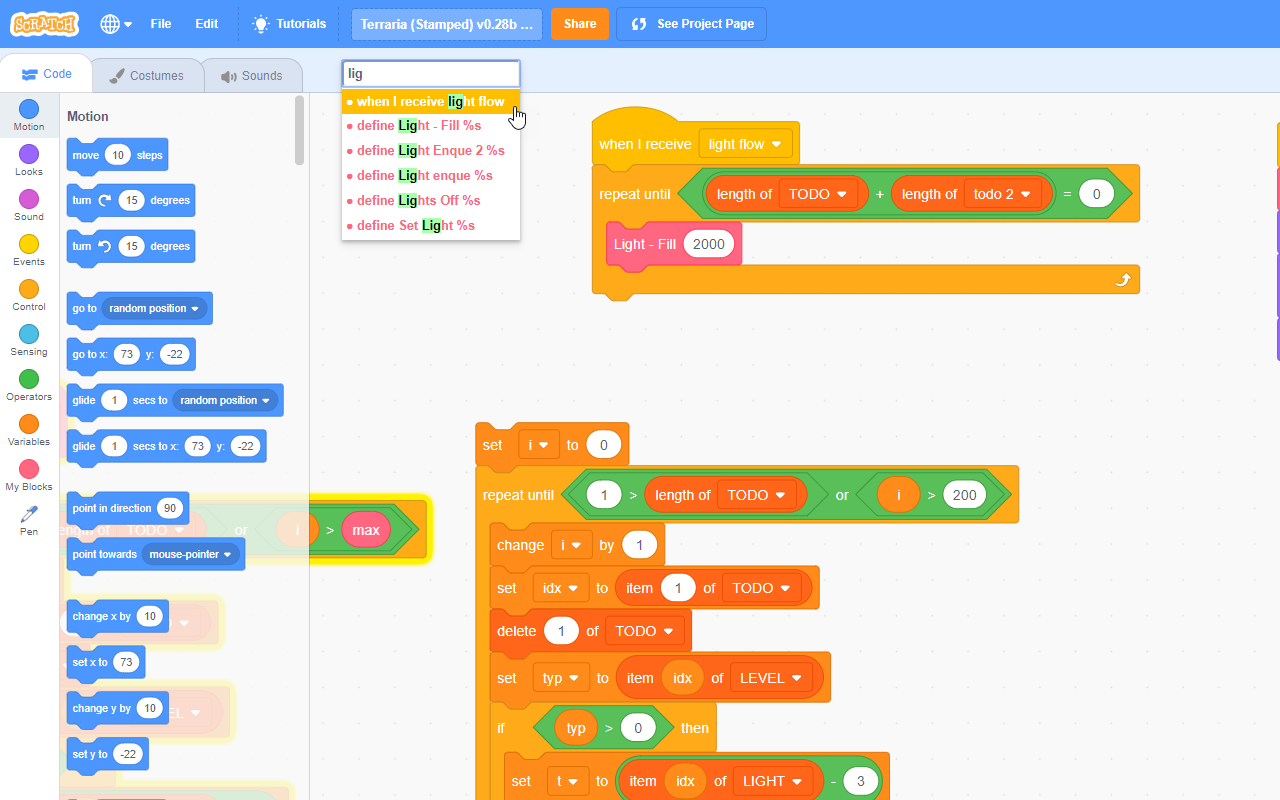
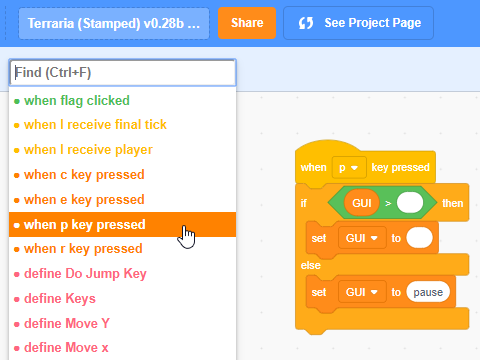
I've waited too long for an official way in Scratch 3 to jump to custom block definitions, etc... so I've begun to create my own chrome extension that allows for speedy navigation to any custom block, event receiver, or other hat blocks in your project. Now supports locating variable and list references by name and an improved script tidier.
Simply install the extension in Chrome or Firefox, and then load up a scratch project. The new Find box will appear (Ctrl + F to jump to it or mouse over it), and all the hat blocks in the current sprite are listed in order of type, name, and then where they are on the page. Click on one (or use keyboard) to jump straight to the block stack in the editor! YAY!!!
Much more to come if you like this... and the Scratch Team is willing :) - Course they are *grin* - They love the Scratch community and so do I :) - Enjoy everyone and let me know if there's any problems at: https://scratch.mit.edu/users/griffpatch/
Change Log:
Change Log:
1 July 2020 - v0.2.1
● Bug Fixes
● Made Help / Tutorials link fade out when not hovering over toolbar to make interface cleaner
30 June 2020 - v0.2.0
● Fixed find bar disappearing when going to project page and back
● Support for Mac Meta Key in place of control so that Meta + F works too.
● Keyboard navigation (ctrl + left or right arrows) to get back to where you were, or in costume editor change costumes
● Middle click a block to jump to definition
● Context menu options - clean up (+), copy, cut & Paste at mouse cursor (yay!)
● Switch all instances of variable in sprite with another variable - can be used to great effect to solve problems like where you want to use a for this sprite only vs a for all sprites variable.
● Send sprite costume to top / bottom in costume editor by right clicking a costume.
● Added help + link to tutorials on youtube
20 Sept 2019 - v0.1.0
● Added Support for searching variables & lists, plus keyboard navigation between usages (left + right arrows).
● Drop down stays open and current item selected until you click away.
● Blocks are only scrolled into view if they are 'off screen' or hidden under the drop down.
● Tidy Up Scripts button - I think this works better than the standard scratch one - it trys to keep the general order of scripts the same, but pushes things out and arranges them neatly. It also removes the orphaned blocks and places them all down the far left for easy deletion.
v0.0.1 - Initial Release
● Enjoy!
Scratch 3 Developer Tools 是做什么的
Scratch 3 Developer Tools 是一款面向 Firefox 的开发者工具类扩展,主要用来调试页面、查看样式与请求、测试接口、辅助前端开发。官方对它的介绍是:Scratch 3 Developer Tools to enhance your Scratch Editing Experience on https://scratch.mit.edu在Firefox 附加组件商店(AMO)上,它当前版本 1.24.3,评分 4.53(17 人评价),约 169 名用户。
适合什么人用
从功能定位看,Scratch 3 Developer Tools 更适合前端工程师、测试与需要经常查看页面结构的用户。如果你平时只是偶尔遇到相关需求,用浏览器自带功能也能凑合;但如果这件事每天都发生,装一个专门处理它的扩展通常比手动操作省事得多。
怎么安装 Scratch 3 Developer Tools
- 打开Firefox 附加组件商店(AMO)上的官方页面;
- 点「添加到浏览器」并确认权限提示;
- 装好后在扩展列表里固定图标,方便随时开关。
本站只做索引与介绍,安装包来自官方商店。如果商店页面提示当前地区不可用,说明该扩展未在你所在区域上架。
常见问题
Scratch 3 Developer Tools 是免费的吗?
Scratch 3 Developer Tools 在Firefox 附加组件商店(AMO)免费提供下载。它是浏览器扩展,装上就能直接用,不需要注册账号。
Scratch 3 Developer Tools 安全吗?
它只申请了 0 项权限,范围比较克制,没有申请「读取所有网站数据」这种大权限。
Scratch 3 Developer Tools 支持哪些浏览器?
当前收录的版本来自Firefox 附加组件商店(AMO),适用于 Firefox。同一个扩展在其他商店可能有对应版本,但功能与版本号不一定相同。
怎么卸载 Scratch 3 Developer Tools?
在扩展管理页找到 Scratch 3 Developer Tools,点移除即可。它在本地保存的设置会一起清掉,不会残留数据。
权限清单 来自 manifest.json 原文
未解析到权限条目。