
Kantu
Ocr.Space (Free OCR API) · Firefox
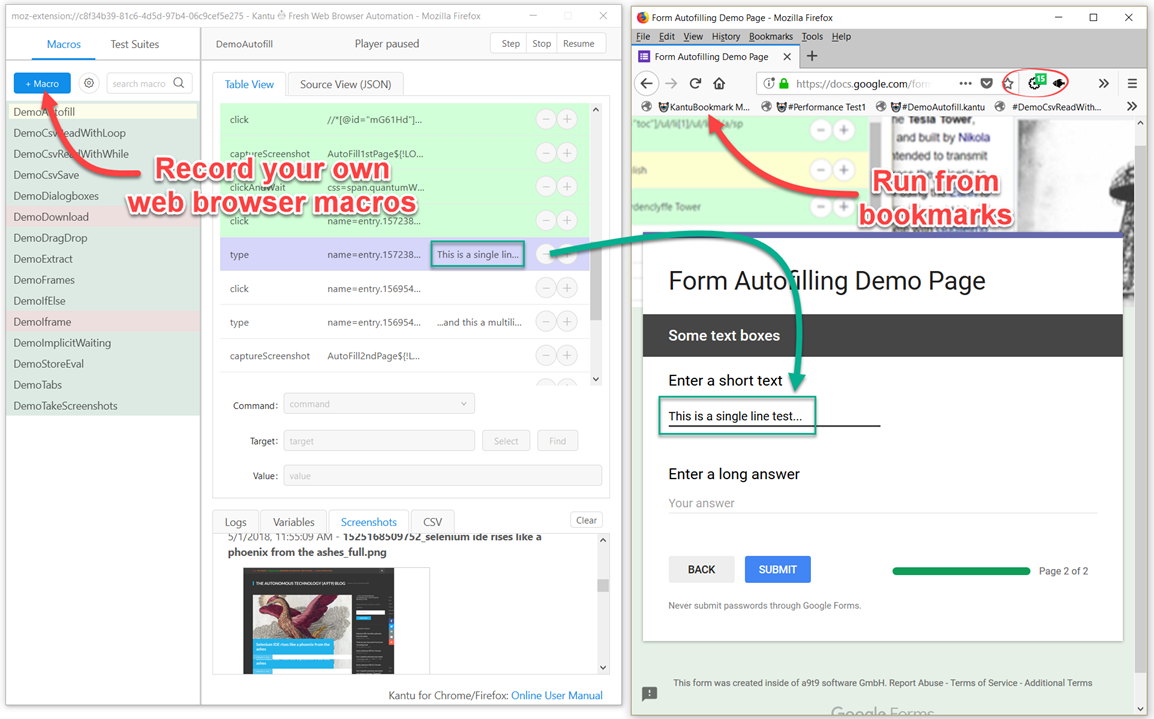
开源的 Selenium IDE, 现代的网页自动化工具 (支持行为录制和回放)。适用于网页自动化测试,表单填写以及网页内容抓取。
<all_urls>),意味着它可以读取你在任意站点的页面内容,包括已登录的页面。这是许多扩展正常工作的必要条件,但也值得你确认来源可信。
截图


简介
Open-source browser automation and RPA for Chrome: record macros, scrape data, fill forms, and automate with OCR, image recognition and AI.
Ui.Vision is a free macro recorder and web automation tool that combines classic browser automation with modern computer vision, OCR, and a built-in AI assistant. Record a macro once and replay it as often as you like - locally, deterministically, no coding required.
NEW in version 10:
★ AI Assistant: Describe what you want in plain English ("Create a macro that fills out this form") and the built-in AI builds, runs, and fixes the macro for you - it reads the page, writes the automation, tests it, and repairs what fails. Unlike an AI agent that re-thinks every run, what you get back is a normal macro: yours to keep, edit, and replay a thousand times without AI costs. A free AI tier is included - no API key or account needed. Or bring your own key (Anthropic, OpenRouter) or a local LLM.
★ JavaScript macros: Macros can now be plain modern JavaScript with a simple uiv.* API - real loops, real if/else, real error handling, breakpoints and step-through debugging. Perfect for CSV-driven work, scraping and conditional logic. Your existing command-table macros keep working exactly as before; nothing is converted.
★ Claude Code and MCP support: Ui.Vision now speaks MCP, so Claude Code and other AI coding tools can build, run and debug macros in your browser while you watch. Everything stays local.
★ Browser Vision: New commands click and type like a real user - with visual targeting by image or text (OCR) - directly inside Chrome and Edge and the browser window can stay in the background while the macro runs.
★ Faster: Script macros run 50-300x faster in loops, and the side panel starts in a fraction of the time.
(1) Browser Automation & Web Macro Recorder
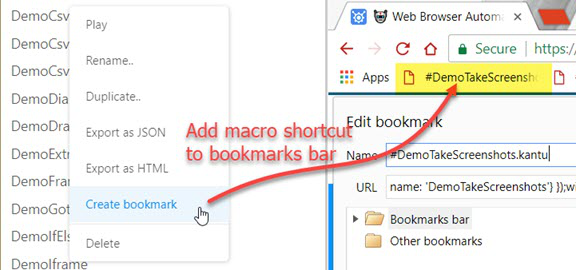
Ui.Vision's visual macro recorder and computer vision commands make automating tasks inside the web browser easy: form filling, web scraping, data extraction, UI testing, and screenshots. Record, edit and run macros right in the browser side panel, next to the page you are automating - the full IDE window is one click away. Existing Selenium IDE scripts can be imported. Conversion help for iMacros scripts is provided, too.
(2) Visual Automation with Image Recognition and OCR
Automate what you can SEE, not just what is in the HTML: click buttons by screenshot, find text on the screen with OCR, and verify page layouts visually. Image recognition and OCR now run directly inside the extension - no additional installs required.
(3) Desktop Automation for Windows, Mac, and Linux
Beyond web browser automation, Ui.Vision can interpret images and text on the desktop, executing actions like clicking, moving, dragging and dropping the mouse, and simulating keyboard inputs.
This desktop automation requires installing the free Ui.Vision XModules, available for Windows, Mac, and Linux. These modules provide Ui.Vision with the necessary capabilities for desktop interaction.
(4) AI Commands & Anthropic Claude Integration
The AI commands allow you to automate complex tasks with a single line of code that would traditionally require hundreds of lines of classic commands. For example, you can teach Ui.Vision to play TicTacToe with just one short "Play this game..." prompt. And the new AI chat assistant in the sidebar creates and repairs complete macros from a plain-language description.
(5) Command Line API
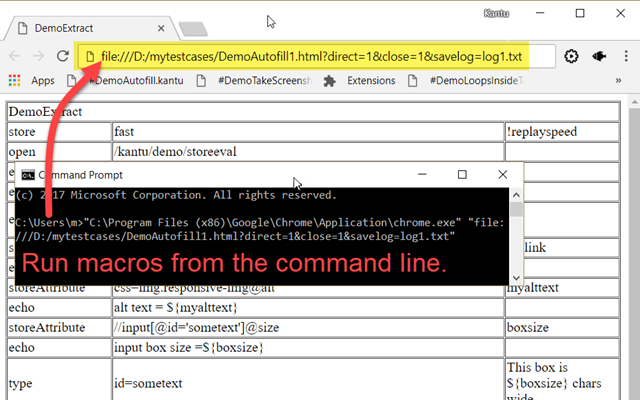
Ui.Vision can be controlled from the command line. Thus it can be used from, and combined with, any programming or scripting language, such as Windows batch files, Linux/Mac shell scripts, Python or PowerShell.
(6) Open-Source
Ui.Vision is Open-Source. The source code is available on Github.
(7) 100% Local Software - Your Data Stays With You
The software does not send any data back to us or any other place. Everything, including image recognition and OCR processing, is done locally on your machine.
The only exception to the "all data is processed locally" rule is if you use the optional AI features. All cloud features are disabled by default - and even for AI you can stay fully local by connecting Ui.Vision to a local LLM. The default computer vision (image recognition and OCR) always runs 100% locally on the machine.
Whether you call it RPA, macro recorder, task automation, web scraping, screen scraping, form filler, or UI testing - if it is repetitive, Ui.Vision can automate it.
Happy Automating!
For questions and suggestions, please visit the Ui.Vision community forum at https://forum.ui.vision.
Kantu 是做什么的
Kantu 是一款面向 Firefox 的开发者工具类扩展,主要用来调试页面、查看样式与请求、测试接口、辅助前端开发。官方对它的介绍是:开源的 Selenium IDE, 现代的网页自动化工具 (支持行为录制和回放)。适用于网页自动化测试,表单填写以及网页内容抓取。在Firefox 附加组件商店(AMO)上,它当前版本 10.0.303,评分 4.26(54 人评价),约 6,655 名用户。
适合什么人用
从功能定位看,Kantu 更适合前端工程师、测试与需要经常查看页面结构的用户。如果你平时只是偶尔遇到相关需求,用浏览器自带功能也能凑合;但如果这件事每天都发生,装一个专门处理它的扩展通常比手动操作省事得多。需要注意的是它作用于所有网站,装上后建议先观察一两天,确认不影响常用站点的正常使用。
怎么安装 Kantu
- 打开Firefox 附加组件商店(AMO)上的官方页面;
- 点「添加到浏览器」并确认权限提示;
- 装好后在扩展列表里固定图标,方便随时开关。
本站只做索引与介绍,安装包来自官方商店。如果商店页面提示当前地区不可用,说明该扩展未在你所在区域上架。
常见问题
Kantu 是免费的吗?
Kantu 在Firefox 附加组件商店(AMO)免费提供下载。它是浏览器扩展,装上就能直接用,不需要注册账号。
Kantu 安全吗?
它只申请了 0 项权限,范围比较克制,没有申请「读取所有网站数据」这种大权限。
Kantu 支持哪些浏览器?
当前收录的版本来自Firefox 附加组件商店(AMO),适用于 Firefox。同一个扩展在其他商店可能有对应版本,但功能与版本号不一定相同。
怎么卸载 Kantu?
在扩展管理页找到 Kantu,点移除即可。它在本地保存的设置会一起清掉,不会残留数据。
权限清单 来自 manifest.json 原文
站点访问 1
<all_urls>
接口权限 15
activeTabbookmarksclipboardReadclipboardWritecontextMenuscookiesdownloadsnativeMessagingnotificationsproxyscriptingstoragetabswebRequestwebRequestAuthProvider