
Roam-highlighter EN
GitMurf · Firefox
Highlight text on page to copy to Roam
截图
简介
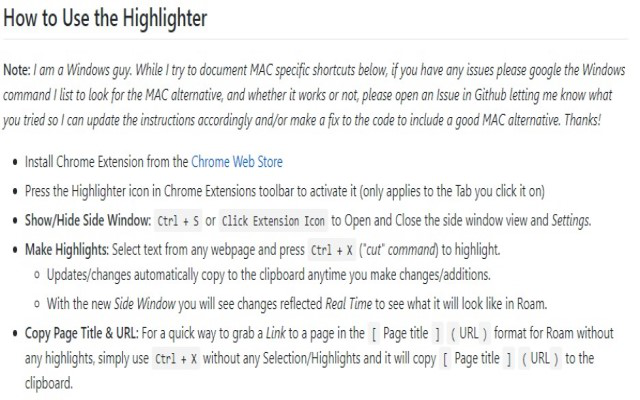
- Show/Hide Side Window:
- Ctrl + S or Click Extension Icon to Open and Close the side window view and Settings.
- Make Highlights: Select text from any webpage and press Ctrl + X ("cut" command) to highlight.
- Updates/changes automatically copy to the clipboard anytime you make changes/additions.
- With the new Side Window you will see changes reflected Real Time to see what it will look like in Roam.
- Copy Page Title & URL: For a quick way to grab a Link to a page in the [Page title](URL) format for Roam without any highlights, simply use Ctrl + X without any Selection/Highlights and it will copy [Page title ](URL) to the clipboard.
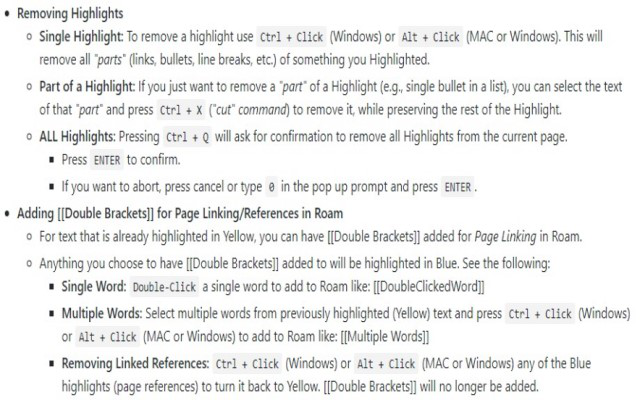
- Removing Highlights
- Single Highlight: To remove a highlight use Ctrl + Click (Windows) or Alt + Click (MAC or Windows). This will remove all "parts" (links, bullets, line breaks, etc.) of something you Highlighted.
- Part of a Highlight: If you just want to remove a "part" of a Highlight (e.g., single bullet in a list), you can select the text of that "part" and press Ctrl + X ("cut" command) to remove it, while preserving the rest of the Highlight.
- ALL Highlights: Pressing Ctrl + Q will ask for confirmation to remove all Highlights from the current page.
- Press ENTER to confirm.
- If you want to abort, press cancel or type 0 in the pop up prompt and press ENTER.
- Adding [[Double Brackets]]for Page Linking/References in Roam
- For text that is already highlighted in Yellow, you can have [[Double Brackets]]added for Page Linking in Roam.
- Anything you choose to have [[Double Brackets]]added to will be highlighted in Blue. See the following:
- Single Word: Double-Click a single word to add to Roam like: [[DoubleClickedWord]]
- Multiple Words: Select multiple words from previously highlighted (Yellow) text and press Ctrl + Click (Windows) or Alt + Click (MAC or Windows) to add to Roam like: [[Multiple Words]]
- Removing Linked References: Ctrl + Click (Windows) or Alt + Click (MAC or Windows) any of the Blue highlights (page references) to turn it back to Yellow. [[Double Brackets]]will no longer be added.
Roam-highlighter 是做什么的
Roam-highlighter 是一款面向 Firefox 的资讯订阅类扩展,主要用来订阅 RSS、聚合新闻、跟踪博客更新。官方对它的介绍是:Highlight text on page to copy to Roam在Firefox 附加组件商店(AMO)上,它当前版本 1.9.7.2,评分 3.93(15 人评价),约 106 名用户。
适合什么人用
从功能定位看,Roam-highlighter 更适合想摆脱算法推荐、自己掌控信息源的用户。如果你平时只是偶尔遇到相关需求,用浏览器自带功能也能凑合;但如果这件事每天都发生,装一个专门处理它的扩展通常比手动操作省事得多。
怎么安装 Roam-highlighter
- 打开Firefox 附加组件商店(AMO)上的官方页面;
- 点「添加到浏览器」并确认权限提示;
- 装好后在扩展列表里固定图标,方便随时开关。
本站只做索引与介绍,安装包来自官方商店。如果商店页面提示当前地区不可用,说明该扩展未在你所在区域上架。
常见问题
Roam-highlighter 是免费的吗?
Roam-highlighter 在Firefox 附加组件商店(AMO)免费提供下载。它是浏览器扩展,装上就能直接用,不需要注册账号。
Roam-highlighter 安全吗?
它只申请了 0 项权限,范围比较克制,没有申请「读取所有网站数据」这种大权限。
Roam-highlighter 支持哪些浏览器?
当前收录的版本来自Firefox 附加组件商店(AMO),适用于 Firefox。同一个扩展在其他商店可能有对应版本,但功能与版本号不一定相同。
怎么卸载 Roam-highlighter?
在扩展管理页找到 Roam-highlighter,点移除即可。它在本地保存的设置会一起清掉,不会残留数据。
权限清单 来自 manifest.json 原文
接口权限 2
activeTabstorage