
reStyle EN
NiklasG · Firefox
A user style manager which can load local files and apply UI styles even in Firefox 57+
<all_urls>),意味着它可以读取你在任意站点的页面内容,包括已登录的页面。这是许多扩展正常工作的必要条件,但也值得你确认来源可信。
截图
简介
This user style manager supports the usual installation of styles from URL and polling those URLs for updates.
In addition to that, you can load local styles and apply styles to the browser UI.
Installing styles
Styles can be installed from userstyles.org, GitHub or any other website that offers appropriate styles for download.
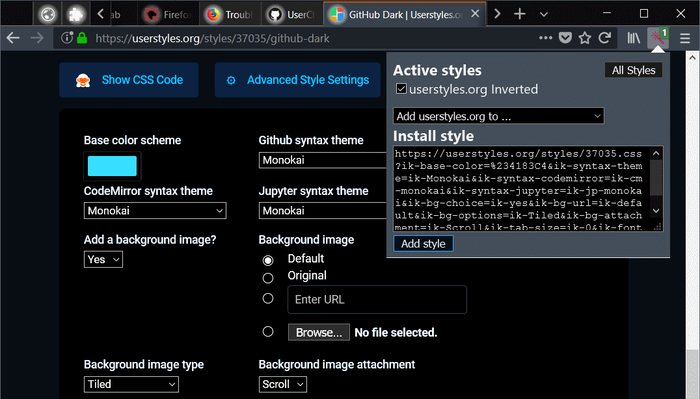
On userstyles.org, open the styles detail page, choose your settings if the style offers any, then click the reStyle icon in the browsers toolbar and "Add style" in the popup.
On other pages, you need to open the .css file before clicking the reStyle icon.
UI styles
Starting with Firefox 57, it is no longer possible for Add-ons to directly apply user styles to anything else than normal websites.
As a workaround, reStyle recognizes styles that will no longer work and writes them to the
userCrome.css (e.g. for the UI) and userContent.css (e.g. for about:-pages).The only major drawback of this compared to how Stylish for Firefox used to apply styles is that the browser must be restarted for changes to those files to be applied.
Many UI styles will still be broken in Firefox 57+ due to the actual changes in the browser UI, but at least it will be possible to fix that and distribute the styles in a reasonably simple manner.
Development Mode
You can load styles from a local folder on your computer as user styles.
Styles matching normal content pages should be re-applied immediately when the files are saved.
NativeExt
In order to do the things described above, NativeExt must be installed on the system.
The add-on contains instructions on how to do that easily.
Permissions used
- "Access your data for all websites": To apply styles to any website you choose.
- "Access browser tabs": Apply styles to existing tabs (when installed/enabled/started).
- "Access browser activity during navigation": Apply styles to new tabs/pages.
- "Exchange messages with programs other than Firefox": Use NativeExt if installed. Useless otherwise.
- "Display notifications to you": Success messages after user actions, error messages. Status changes.
- "Access recently closed tabs": Under some rare conditions, reStyle needs to open temporary popups. This is used to remove them from the history after they are closed.
Implementation status
Reading styles locally, re-applying them on changes and applying UI styles works as intended (there is no way around the restart requirement).
Applying normal content styles works, bit is still somewhat expensive. Improvements here require patches to Firefox.
Automatic updates of remote styles (those installed from the internet) can not be disabled per style.
The initial setup UI of this add-on itself still needs some work.
Meta comments
reStyle supports meta comment blocks similar to those used in user scripts. They start with ==UserStyle== and can, besides the non-functional properties @name, @author, @license and @description, contain @include rules, which allow authors to wirte styles that can be included on domains chosen by the user via reStyles UI.
reStyle 是做什么的
reStyle 是一款面向 Firefox 的开发者工具类扩展,主要用来调试页面、查看样式与请求、测试接口、辅助前端开发。官方对它的介绍是:A user style manager which can load local files and apply UI styles even in Firefox 57+在Firefox 附加组件商店(AMO)上,它当前版本 0.4.2resigned1,评分 3.09(11 人评价),约 26 名用户。
适合什么人用
从功能定位看,reStyle 更适合前端工程师、测试与需要经常查看页面结构的用户。如果你平时只是偶尔遇到相关需求,用浏览器自带功能也能凑合;但如果这件事每天都发生,装一个专门处理它的扩展通常比手动操作省事得多。需要注意的是它作用于所有网站,装上后建议先观察一两天,确认不影响常用站点的正常使用。
怎么安装 reStyle
- 打开Firefox 附加组件商店(AMO)上的官方页面;
- 点「添加到浏览器」并确认权限提示;
- 装好后在扩展列表里固定图标,方便随时开关。
本站只做索引与介绍,安装包来自官方商店。如果商店页面提示当前地区不可用,说明该扩展未在你所在区域上架。
常见问题
reStyle 是免费的吗?
reStyle 在Firefox 附加组件商店(AMO)免费提供下载。它是浏览器扩展,装上就能直接用,不需要注册账号。
reStyle 安全吗?
它只申请了 0 项权限,范围比较克制,没有申请「读取所有网站数据」这种大权限。
reStyle 支持哪些浏览器?
当前收录的版本来自Firefox 附加组件商店(AMO),适用于 Firefox。同一个扩展在其他商店可能有对应版本,但功能与版本号不一定相同。
怎么卸载 reStyle?
在扩展管理页找到 reStyle,点移除即可。它在本地保存的设置会一起清掉,不会残留数据。
权限清单 来自 manifest.json 原文
站点访问 1
<all_urls>
接口权限 6
nativeMessagingnotificationssessionsstoragetabswebNavigation
接口权限(可选) 1
bookmarks