
Quick Tabs Ported EN
Kevin Jones · Firefox
Ported version from the Chrome extension Quick Tabs, with a few small tweaks. Their description reads: A keyboard centric most recently used (MRU) ordered tab list plugin with search and switch functionality inspired by IntelliJ IDEA
截图

简介
A user who switched from Chrome to Firefox said this addon was the thing they missed the most about Chrome. I checked it out and as it had very good reviews, I decided to port it to Firefox. I made a few tweaks to make the shortcuts customizeable in Firefox in the Options page. Note that for the time being, I have disabled the previous/next tab in history shortcut implementation, because it seemed buggy, until I can figure out what the problem is.
Features (taken from the Chrome Web Store edition)
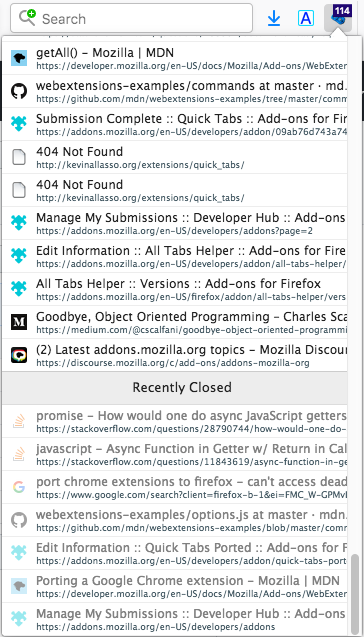
* Lists all the open tabs in Chrome across all of your open windows
* Tabs are listed in most recently used (MRU) order and excludes the current tab (since you're switching tabs)
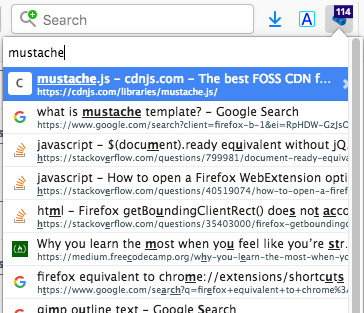
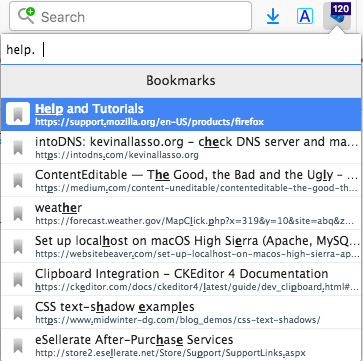
* Fuzzy search your bookmarks:
* Bookmarks are automatically searched when only a few tabs match your search string
* Add a space at the start or end of your search string to search bookmarks along with tabs
* Add two spaces at the start or end of your search string to search only bookmarks
* Fuzzy search your browser history:
* Add three spaces at the start or end of your search string to search browser history
* Find noisy tabs by searching for '<))' (then close them all with shift+ctrl+d ;-))
* Chrome keyboard shortcuts (configured using the keyboard shortcuts dialog at the bottom of the Chrome Extensions page):
* Shortcut key to launch popup window from most tabs (default ctrl+e, cmd+e on Mac, ctrl+q on Linux).
* Select previous tab without loading the popup window (unmapped by default)
* Select next tab without loading the popup window (unmapped by default)
* IMPORTANT the 'next tab' shortcut is only available for a second or so (while the badge text is orange) before the current tab is moved to the top of the MRU list.
* Tab list popup shortcut keys:
* Select previous tab (same as Chrome keyboard shortcut or up arrow)
* Select next tab (same as Chrome keyboard shortcut or down arrow)
* Switch to selected Item (enter)
* To close selected tab (default ctrl+d, see extension options)
* To close ALL displayed tabs in the tab list, honors search filtering (default shift+ctrl+d, see extension options)
* Displays the number of tabs you currently have open in all your Chrome windows
* Quickly search and select tabs by typing letters in the page title or url
* Track recently closed tabs and allow them to be searched and restored
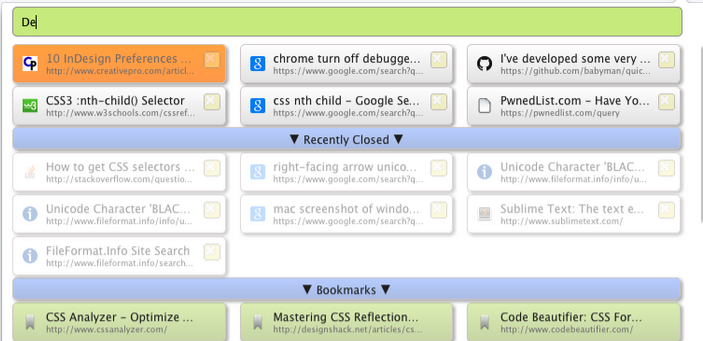
* Popup customization using css
Quick Tabs Ported 是做什么的
Quick Tabs Ported 是一款面向 Firefox 的搜索增强类扩展,主要用来补充搜索结果、切换搜索引擎、过滤无效结果。官方对它的介绍是:Ported version from the Chrome extension Quick Tabs, with a few small tweaks. Their description reads: A keyboard centric most recently used (MRU) ordered tab list plugin with search and switch functionality inspired by IntelliJ IDEA在Firefox 附加组件商店(AMO)上,它当前版本 1.0.6,评分 4.38(29 人评价),约 169 名用户。
适合什么人用
从功能定位看,Quick Tabs Ported 更适合每天大量搜索、希望结果更干净准确的用户。如果你平时只是偶尔遇到相关需求,用浏览器自带功能也能凑合;但如果这件事每天都发生,装一个专门处理它的扩展通常比手动操作省事得多。
怎么安装 Quick Tabs Ported
- 打开Firefox 附加组件商店(AMO)上的官方页面;
- 点「添加到浏览器」并确认权限提示;
- 装好后在扩展列表里固定图标,方便随时开关。
本站只做索引与介绍,安装包来自官方商店。如果商店页面提示当前地区不可用,说明该扩展未在你所在区域上架。
常见问题
Quick Tabs Ported 是免费的吗?
Quick Tabs Ported 在Firefox 附加组件商店(AMO)免费提供下载。它是浏览器扩展,装上就能直接用,不需要注册账号。
Quick Tabs Ported 安全吗?
它只申请了 0 项权限,范围比较克制,没有申请「读取所有网站数据」这种大权限。
Quick Tabs Ported 支持哪些浏览器?
当前收录的版本来自Firefox 附加组件商店(AMO),适用于 Firefox。同一个扩展在其他商店可能有对应版本,但功能与版本号不一定相同。
怎么卸载 Quick Tabs Ported?
在扩展管理页找到 Quick Tabs Ported,点移除即可。它在本地保存的设置会一起清掉,不会残留数据。
权限清单 来自 manifest.json 原文
接口权限 3
bookmarkshistorytabs