 Search by Image
A powerful reverse image searc…
Firefox

Panel for Pinterest™ EN
Glin · Firefox
an easy way to check your Pinterest while you browse.
3.3/5
11 人评分
245用户
v0.1.3resigned1当前版本
权限提示
该扩展申请访问所有网站(
<all_urls>),意味着它可以读取你在任意站点的页面内容,包括已登录的页面。这是许多扩展正常工作的必要条件,但也值得你确认来源可信。
截图
简介
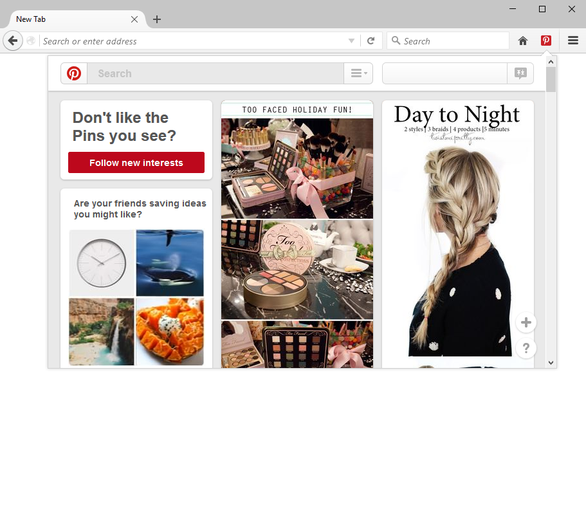
<a href="http://mybrowseraddon.com/pinterest-panel.html">Panel for Pinterest™</a> is an easy way to browse your pinterest wall from Firefox's toolbar panel just by one click.
- A complete pinterest popup window right in your browser toolbar.
- Simply click on the toolbar-button to open the panel.
- Once the panel is hidden, it will be reloaded on a pre-defined interval basis (adjustable through Options page).
- Panel width and height is adjustable to your choice (see addons Options page).
<b>Note 1</b>: Pinterest™ Panel has been reviewed in <a href="http://www.ilovefreesoftware.com/28/windows/internet/plugins/use-pinterest-pop-firefox.html">ilovefreesoftware</a>. If you want to get an idea of how to use Pinterest™ Panel, please take a look at this review.
<b>Note 2</b>: in order to report Bugs, please visit Addon's <a href="http://mybrowseraddon.com/pinterest-panel.html">Homepage</a> and fill the bug report form.
Panel for Pinterest™ 是做什么的
Panel for Pinterest™ 是一款面向 Firefox 的资讯订阅类扩展,主要用来订阅 RSS、聚合新闻、跟踪博客更新。官方对它的介绍是:an easy way to check your Pinterest while you browse.在Firefox 附加组件商店(AMO)上,它当前版本 0.1.3resigned1,评分 3.27(11 人评价),约 245 名用户。
适合什么人用
从功能定位看,Panel for Pinterest™ 更适合想摆脱算法推荐、自己掌控信息源的用户。如果你平时只是偶尔遇到相关需求,用浏览器自带功能也能凑合;但如果这件事每天都发生,装一个专门处理它的扩展通常比手动操作省事得多。需要注意的是它作用于所有网站,装上后建议先观察一两天,确认不影响常用站点的正常使用。
怎么安装 Panel for Pinterest™
- 打开Firefox 附加组件商店(AMO)上的官方页面;
- 点「添加到浏览器」并确认权限提示;
- 装好后在扩展列表里固定图标,方便随时开关。
本站只做索引与介绍,安装包来自官方商店。如果商店页面提示当前地区不可用,说明该扩展未在你所在区域上架。
常见问题
Panel for Pinterest™ 是免费的吗?
Panel for Pinterest™ 在Firefox 附加组件商店(AMO)免费提供下载。它是浏览器扩展,装上就能直接用,不需要注册账号。
Panel for Pinterest™ 安全吗?
它只申请了 0 项权限,范围比较克制,没有申请「读取所有网站数据」这种大权限。
Panel for Pinterest™ 支持哪些浏览器?
当前收录的版本来自Firefox 附加组件商店(AMO),适用于 Firefox。同一个扩展在其他商店可能有对应版本,但功能与版本号不一定相同。
怎么卸载 Panel for Pinterest™?
在扩展管理页找到 Panel for Pinterest™,点移除即可。它在本地保存的设置会一起清掉,不会残留数据。
权限清单 来自 manifest.json 原文
站点访问 1
<all_urls>
接口权限 4
storagetabswebRequestwebRequestBlocking
标签 点标签看同类扩展
Search by Image
A powerful reverse image searc…
Firefox
 整页截图工具 — FireShot
FireShot 可捕获整页截图、可见区域以及超出屏幕范围的…
Firefox
 Pinterest 儲存按鈕
儲存你在網路上看到的內容。
Firefox
 Raindrop.io
All-in-one bookmark manager
Firefox
 Emoji
It permits just with a single …
Firefox
 Pinterest - LIGHT & DARK THEME
Apply a different themes to Pi…
Firefox
 Full Screen for Firefox
Go full screen with one click …
Firefox
 图片下载器
快速找到并批量下载网页上的图像
Firefox