
PassLok for Email EN
F. Ruiz · Firefox
High security email encryption for Gmail, Yahoo, and Outlook online. PassLok is in no way associated with those services. Easy to use, powerful extension, which includes message hiding, forward secrecy and attachments, and runs also on Chrome.
截图




简介
TAKE PRIVACY INTO YOUR OWN HANDS
Easy, end-to-end secure encryption for email, plus real-time chat, that does not rely on servers and is therefore immune to hacking or government intervention. Right now PassLok for Email supports Gmail, Yahoo, and Outlook online.
--PassLok for Email is incredibly easy to use--
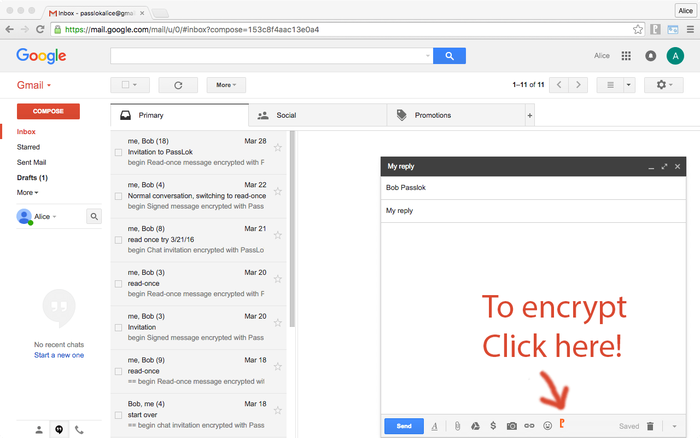
To encrypt a message or file, just click the PassLok icon at the bottom of the Compose or Reply box. A popup will take your private message and encrypt it with the click of a button. Then you can send it out like any other message, or as an attachment.
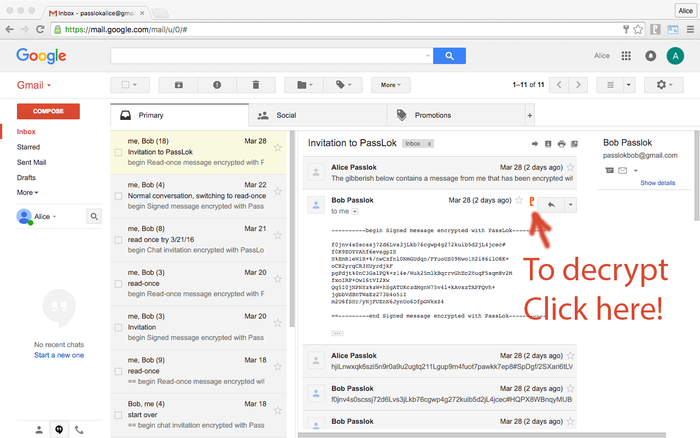
To decrypt it, click the PassLok icon at the top of the encrypted message. A popup will show the decrypted message or file immediately, or will tell you if there is any problem.
PassLok asks you for your Password only once. It can be anything you want, so you can actually remember it. PassLok will evaluate its strength and compensate for its weakness by lengthening the computations. It won't be stored or sent anywhere, and PassLok will forget it after five minutes of inactivity.
If you want to change your Password, go ahead and start using a new one when PassLok asks you for it. You may be asked for the old Password if PassLok can't decrypt something, but otherwise that's all you'll have to do.
--Lots of power in a slender package--
You can use either of these two encryption modes, by just clicking a button:
1. Signed mode: encrypted messages can be decrypted again, so long as the recipients supply their authentic passwords. Recipients are also assured that the message was encrypted by the sender.
2. Read-once mode: after a few encrypted messages have been exchanged they can no longer be decrypted by anyone, even if they supply the correct passwords.
In addition, you can make encrypted chat invitations which, when decrypted by the recipients, open a webRTC real-time chat session where participants are directly connected to one another. The chat session includes text, files, audio, and even video.
PassLok for Email allows you to encrypt files and images as well. Just load them with a toolbar button. You can also encrypt them separately and load them as regular attachments.
You can also communicate with users of services not supported by PassLok for Email. They can use PassLok Privacy (also in the Chrome store), which has a special mode fully compatible with PassLok for Email.
For the very paranoid (and who isn't these days?), PassLok for Email includes four special features:
1. Encrypt to image: the message is encrypted into an image you supply and then attach to your email, so the presence of a hidden message cannot be detected even by computer analysis.
2. Concealed mode: the encrypted message does not look encrypted, but actually looks like normal text. PassLok still detects it and decrypts it normally, though.
3. Invisible mode: the encrypted material cannot be seen at all. It is hidden in the space between the lines of an otherwise normal message.
4. Hidden msg: there is a hidden message in addition to the regular message, and it is encrypted by a separate key. The hidden message is completely undetectable to those who don't know it exists. Images also can contain hidden messages.
--State-of-the art security--
PassLok is based on the NaCl encryption engine, which uses 255-bit standard elliptic curves vetted against weaknesses by experts. On top of that, it uses the 256-bit XSalsa20 symmetric cipher, a high-performance, open source algorithm, which has been scrutinized by experts for nearly a decade without any practical weaknesses being found.
The image-encryption part of PassLok, developed in-house but open-source, has recently been shown to be much harder to detect than F5, the champion steganography tool until now.
PassLok does not use servers that might eventually compromise your private data. All encryption is done client-side. All data sent to the email server is encrypted, and they don't have the password that decrypts it.
With PassLok, you can actually SEE that that your messages have been encrypted. You can also see the code. PassLok hides nothing from you.
PassLok for Email is now in public beta testing. To report any bugs or suggest improvements, please submit them as "Issues" at this GitHub page:
PassLok for Email 是做什么的
PassLok for Email 是一款面向 Firefox 的隐私与安全类扩展,主要用来拦截追踪器、屏蔽广告、管理 Cookie、加固浏览器指纹。官方对它的介绍是:High security email encryption for Gmail, Yahoo, and Outlook online. PassLok is in no way associated with those services. Easy to use, powerful extension, which includes message hiding, forward secrecy and attachments, and runs also on Chrome.在Firefox 附加组件商店(AMO)上,它当前版本 1.0,评分 4.67(3 人评价),约 43 名用户。
适合什么人用
从功能定位看,PassLok for Email 更适合在意上网被跟踪、希望减少广告干扰的用户。如果你平时只是偶尔遇到相关需求,用浏览器自带功能也能凑合;但如果这件事每天都发生,装一个专门处理它的扩展通常比手动操作省事得多。
怎么安装 PassLok for Email
- 打开Firefox 附加组件商店(AMO)上的官方页面;
- 点「添加到浏览器」并确认权限提示;
- 装好后在扩展列表里固定图标,方便随时开关。
本站只做索引与介绍,安装包来自官方商店。如果商店页面提示当前地区不可用,说明该扩展未在你所在区域上架。
常见问题
PassLok for Email 是免费的吗?
PassLok for Email 在Firefox 附加组件商店(AMO)免费提供下载。它是浏览器扩展,装上就能直接用,不需要注册账号。
PassLok for Email 安全吗?
它只申请了 0 项权限,范围比较克制,没有申请「读取所有网站数据」这种大权限。
PassLok for Email 支持哪些浏览器?
当前收录的版本来自Firefox 附加组件商店(AMO),适用于 Firefox。同一个扩展在其他商店可能有对应版本,但功能与版本号不一定相同。
怎么卸载 PassLok for Email?
在扩展管理页找到 PassLok for Email,点移除即可。它在本地保存的设置会一起清掉,不会残留数据。
权限清单 来自 manifest.json 原文
接口权限 2
alarmsstorage