

 DuckDuckGo Privacy Essentials
⚡保护您的数据。支持可选 AI 的私密搜索、私密浏览和广告拦…
Firefox

PageProbe - Automatic Page Monitor EN
Nodetics · Firefox
Create automatic monitors for detecting and scanning changes on web pages, evaluate content based on conditions you define and trigger actions such as notifications, sounds, emails etc.
4.6/5
65 人评分
1千用户
v1.38.1当前版本
权限提示
该扩展申请访问所有网站(
<all_urls>),意味着它可以读取你在任意站点的页面内容,包括已登录的页面。这是许多扩展正常工作的必要条件,但也值得你确认来源可信。
截图
简介
Why PageProbe?
We believe that people want to save both time and money.
We believe there are several things people want to follow on regular basis such as:
- availability of some item you want to purchase (e.g. GeForce RTX video card, PS5 etc)
- the current price of an expensive item (such as a television) that you would like to purchase so that you can find the lowest price and the best discount to save money
- the current price of a company X stock in the stock market to find out when it is time to buy or sell in order to optimize your profits
- the current price of an item in an online auction in order to bid at the last minute "just enough"
- the number of followers you have in your social media accounts
- the number of likes your social media post has received
- the status of your web application or related software builds
- the latest new post on forum Y
- the latest top article with a specific Twitter search
We believe that people are evaluating the things they monitor based on certain conditions and when those conditions are met, they will take action. For example, the price of the television that you want will drop below certain price.
We believe that when this kind of tracking of many things happens manually every day, it is a huge waste of time and you can easily miss good discounts, buying or selling opportunities and as a result can also lose money.
Therefore most of content monitoring should be easily automated so that an application will monitor the things you have defined, evaluates the results based on the conditions you have defined and then notifies you when those conditions are met so that you can take action.
What is PageProbe?
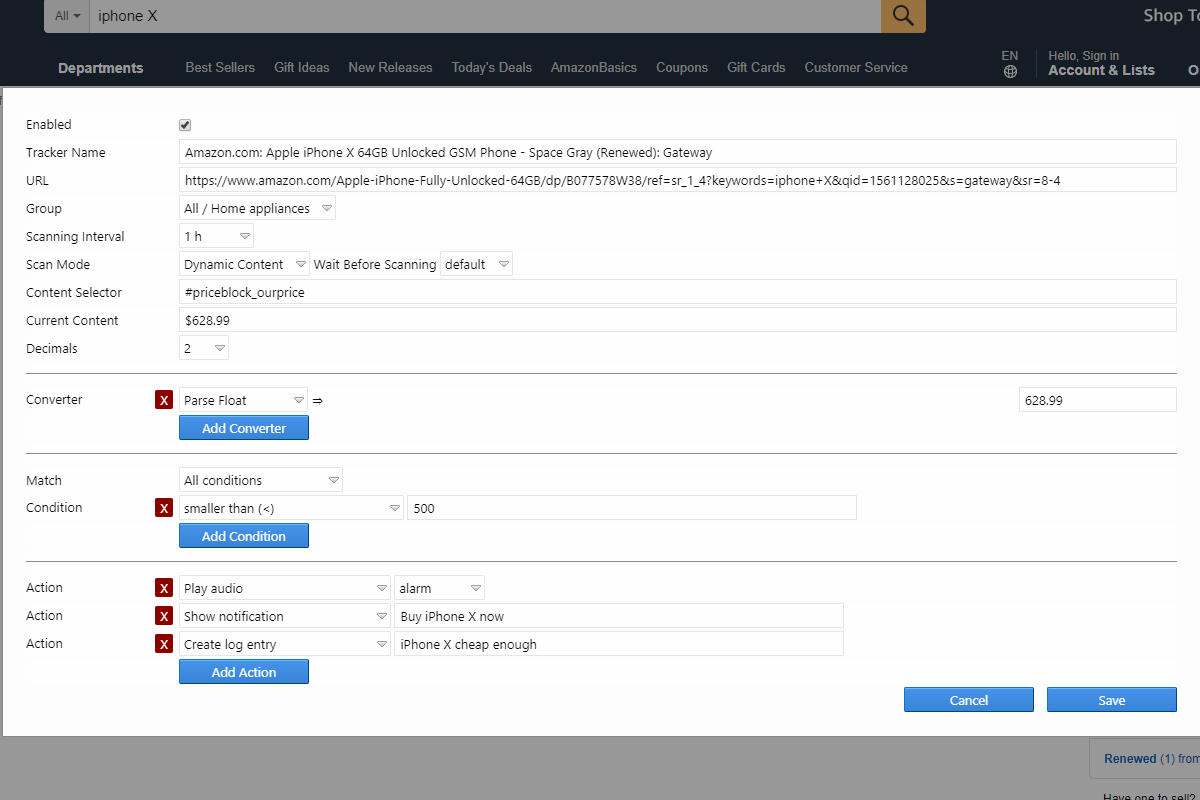
PageProbe WebExtension can monitor any web pages you can access on the Internet or in your company intranet. By simply right-clicking the content you see on a page, you can quickly create a tracker with optional conditions and actions and then view the status of those trackers in a simple monitoring view.
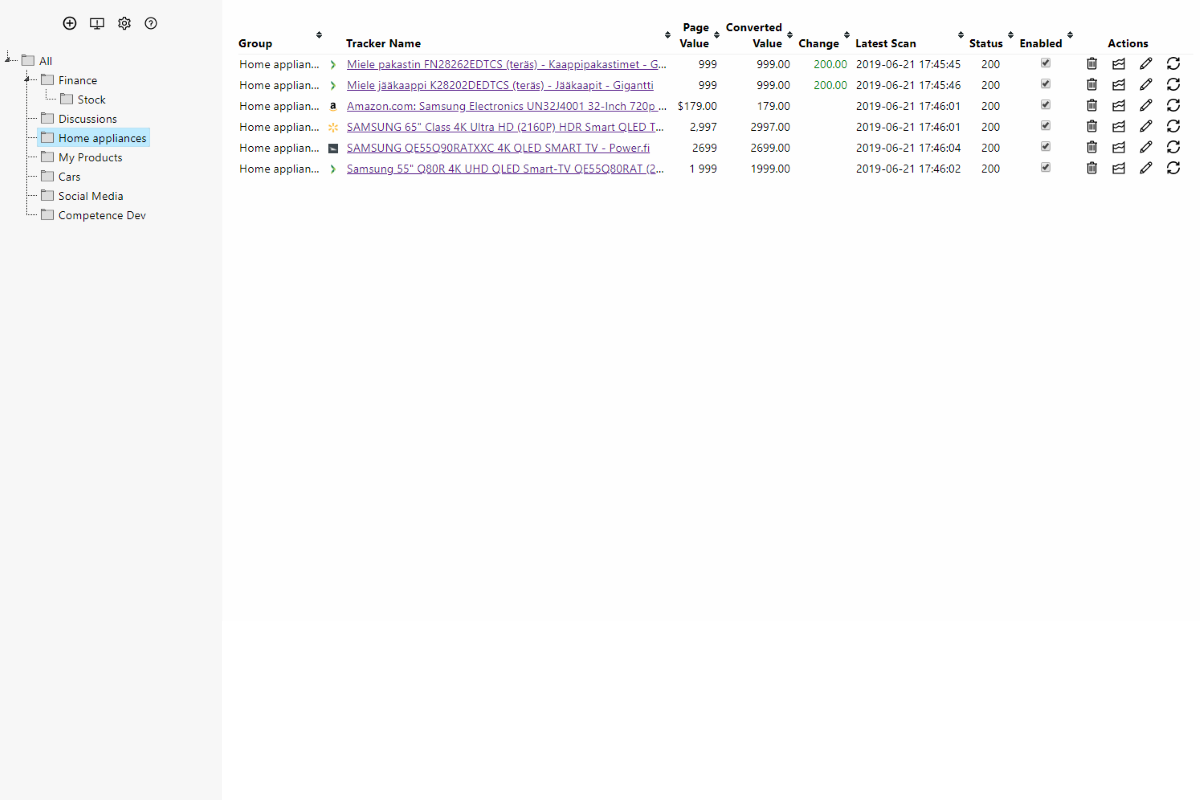
By clicking the extension icon you can see a nice overview of all your trackers and the data retrieved. Trackers can be easily organized into groups.
Feature highlights:
- Unlimited number of trackers that can monitor any accessible page on the Internet or intranet
- Fully local solution - does not require an account
- Trackers can be organized into a tree based hierarchy of groups
- Converters allow you to easily transform strings to numbers and perform simple arithmetic on them
- Advanced conditions for trackers: contains text, doesn't contain text, contains all words, doesn't contain words, contains any words, contains any words that start with, matches regexp, is, is not, begins with text, ends with text, smaller than, smaller than or equal, greater than, greater than or equal, is going up, is going down, has changed
- Case sensitive and case-insensitive matching
- Boolean logic matching: combine any conditions, for example: (a | b) & c
- Advanced actions: show desktop notification, play audio (local or URL), set color/CSS for monitor column/row, HTTP POST, IFTTT, data history logging, event log entry
- Data history logging will allow you to see with a simple chart how the value of some item has changed over time
- Export tracker table as Excel
- cron / crontab style advanced scheduling also supported!
- Live Content Scan Mode which allows monitoring changing page values in real-time!
- Discord support (post tracker results directly to Discord channel)
- Slack support (post tracker results directly to Slack channel)
- Telegram support (1.28.0+)
- Mattermost support
- JSON content monitoring support
- XPath support (in addition to CSS Selector support)
- JSONPath support
Support:
- Bug reports to nodetics AT gmail.com please
PageProbe - Automatic Page Monitor 是做什么的
PageProbe - Automatic Page Monitor 是一款面向 Firefox 的实用工具类扩展,主要用来解决浏览器里某类具体的小问题。官方对它的介绍是:Create automatic monitors for detecting and scanning changes on web pages, evaluate content based on conditions you define and trigger actions such as notifications, sounds, emails etc.在Firefox 附加组件商店(AMO)上,它当前版本 1.38.1,评分 4.6(65 人评价),约 1,026 名用户。
适合什么人用
从功能定位看,PageProbe - Automatic Page Monitor 更适合想补上浏览器原生缺失功能的用户。如果你平时只是偶尔遇到相关需求,用浏览器自带功能也能凑合;但如果这件事每天都发生,装一个专门处理它的扩展通常比手动操作省事得多。需要注意的是它作用于所有网站,装上后建议先观察一两天,确认不影响常用站点的正常使用。
怎么安装 PageProbe - Automatic Page Monitor
- 打开Firefox 附加组件商店(AMO)上的官方页面;
- 点「添加到浏览器」并确认权限提示;
- 装好后在扩展列表里固定图标,方便随时开关。
本站只做索引与介绍,安装包来自官方商店。如果商店页面提示当前地区不可用,说明该扩展未在你所在区域上架。
常见问题
PageProbe - Automatic Page Monitor 是免费的吗?
PageProbe - Automatic Page Monitor 在Firefox 附加组件商店(AMO)免费提供下载。它是浏览器扩展,装上就能直接用,不需要注册账号。
PageProbe - Automatic Page Monitor 安全吗?
它只申请了 0 项权限,范围比较克制,没有申请「读取所有网站数据」这种大权限。
PageProbe - Automatic Page Monitor 支持哪些浏览器?
当前收录的版本来自Firefox 附加组件商店(AMO),适用于 Firefox。同一个扩展在其他商店可能有对应版本,但功能与版本号不一定相同。
怎么卸载 PageProbe - Automatic Page Monitor?
在扩展管理页找到 PageProbe - Automatic Page Monitor,点移除即可。它在本地保存的设置会一起清掉,不会残留数据。
权限清单 来自 manifest.json 原文
站点访问 2
http://*/*https://*/*
接口权限 5
contextMenusnotificationsstoragetabsunlimitedStorage
标签 点标签看同类扩展
DuckDuckGo Privacy Essentials
⚡保护您的数据。支持可选 AI 的私密搜索、私密浏览和广告拦…
Firefox
 Search by Image
A powerful reverse image searc…
Firefox
 SteamDB
在 Steam 商店和社区页面中添加 SteamDB 链接和…
Firefox
 Qwant - Search engine
With this extension, Qwant bec…
Firefox
 Popup Blocker (strict)
Strictly block all popup reque…
Firefox
 Indie Wiki Buddy
Helping you discover quality, …
Firefox
 Tabliss - New Tab
A beautiful New Tab page with …
Firefox
 Block Site
A customizable, password-prote…
Firefox