
Page Structure EN
Nicholas Hoyt · Firefox
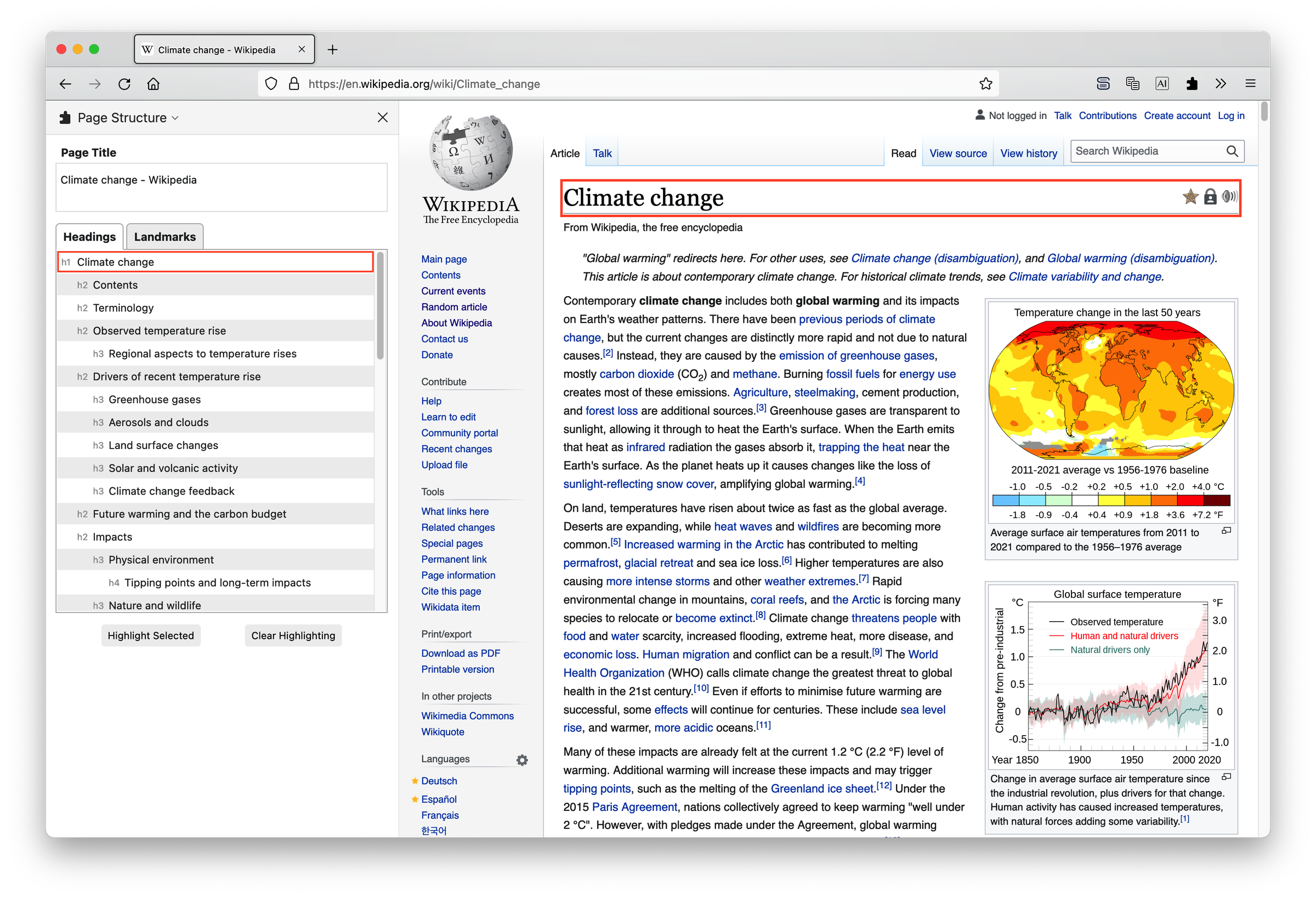
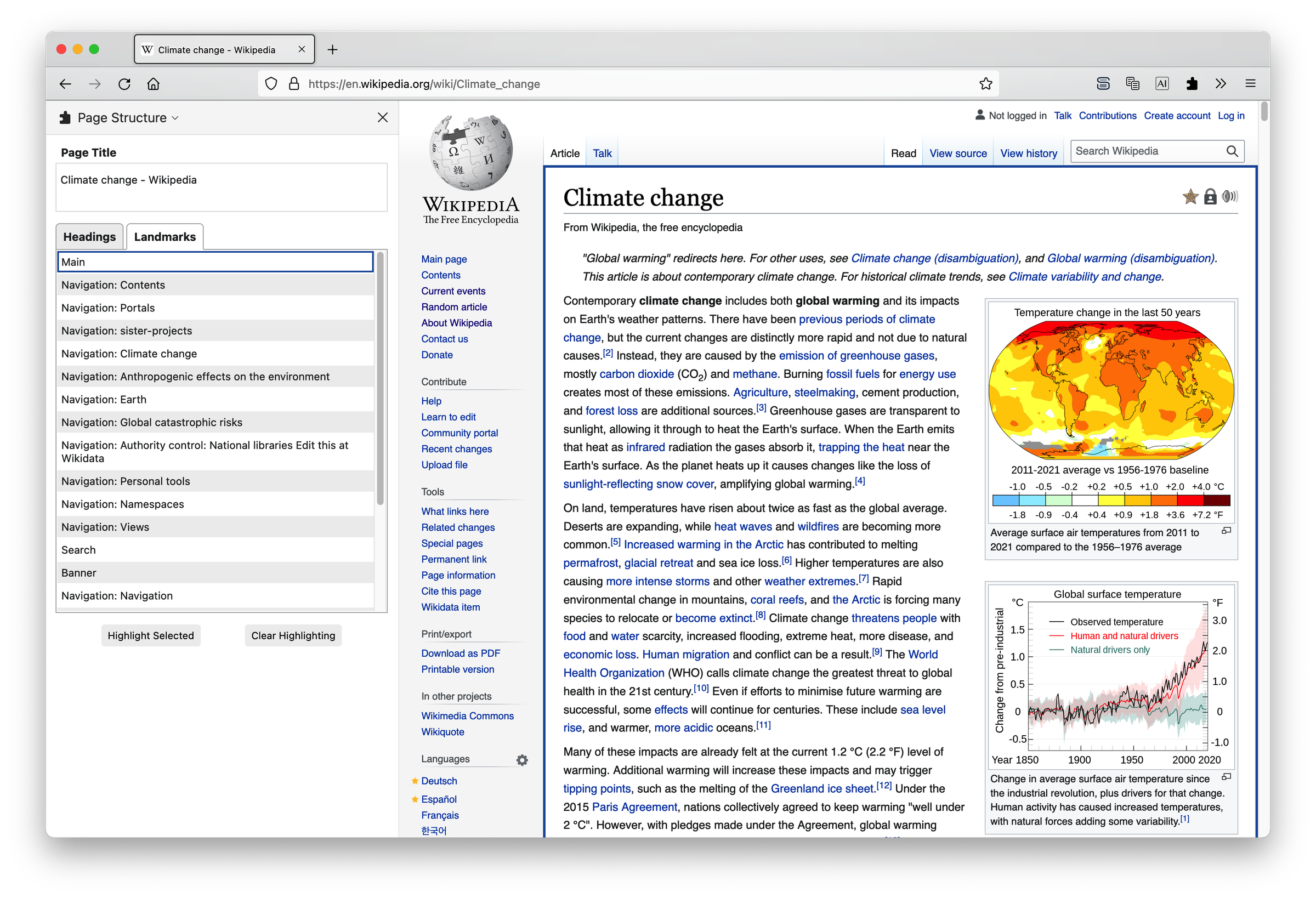
Utilize the Firefox Sidebar to display the structural labels on a web page, including its page title, headings, and landmarks, for web accessibility evaluation.
<all_urls>),意味着它可以读取你在任意站点的页面内容,包括已登录的页面。这是许多扩展正常工作的必要条件,但也值得你确认来源可信。
截图
简介
The Page Structure add-on can help you determine whether a web page meets the accessibility requirements for Page Structure, as defined in the Web Content Accessibility Guidelines (WCAG) 2.1 and Accessible Rich Internet Applications (WAI-ARIA) 1.2 specifications. It provides the information you need to answer the following accessibility-related questions:
- Page Title: Does the title adequately describe the purpose or main content of the page?
- Headings: Are HTML headings used (h1 ... h6) to break down the content into sections and subsections? Do they properly indicate the hierarchical structure of the content? Does each heading accurately describe the section or subsection that follows?
- Landmarks: Are ARIA landmarks used to indicate functional regions on the page such as main, navigation, banner (header), contentinfo (footer) and complementary (aside)? When there are multiple occurrences of the same type of landmark region, does each one have a unique descriptive label?
Why use the Page Structure add-on?
Users of screen reader software, such as people who are blind or with low vision, rely on the heading and landmark navigation it provides to (a) get an overview of how the content on the page is structured, and (b) quickly and efficiently move to one of these headings or landmark regions.
For example, at the user's request, screen reader software will sequentially read through a list of headings, indicating the heading level of each, and enable the user to select one of these to navigate to. Likewise with landmarks, the software will list all of the available landmark regions on the page, from which the user may choose.
What makes Page Structure useful? By collecting all of the headings and landmarks available on a page into their respective lists and displaying these in the sidebar, you are provided a perspective that is much closer to what a screen reader user will have.
This allows you, the developer or author of the page, to fine tune and scrutinize the wording and labeling choices of headings and landmarks to ensure that when they are extracted from the page and presented as a list to a screen reader user, they make sense in that context.
When you select a heading or landmark in the sidebar, Page Structure can highlight and scroll into view the selected item on the page. Headings are highlighted with an orange outline, and landmarks use a dark blue outline.
Page Structure 是做什么的
Page Structure 是一款面向 Firefox 的开发者工具类扩展,主要用来调试页面、查看样式与请求、测试接口、辅助前端开发。官方对它的介绍是:Utilize the Firefox Sidebar to display the structural labels on a web page, including its page title, headings, and landmarks, for web accessibility evaluation.在Firefox 附加组件商店(AMO)上,它当前版本 0.12.1,评分 5(1 人评价),约 124 名用户。
适合什么人用
从功能定位看,Page Structure 更适合前端工程师、测试与需要经常查看页面结构的用户。如果你平时只是偶尔遇到相关需求,用浏览器自带功能也能凑合;但如果这件事每天都发生,装一个专门处理它的扩展通常比手动操作省事得多。需要注意的是它作用于所有网站,装上后建议先观察一两天,确认不影响常用站点的正常使用。
怎么安装 Page Structure
- 打开Firefox 附加组件商店(AMO)上的官方页面;
- 点「添加到浏览器」并确认权限提示;
- 装好后在扩展列表里固定图标,方便随时开关。
本站只做索引与介绍,安装包来自官方商店。如果商店页面提示当前地区不可用,说明该扩展未在你所在区域上架。
常见问题
Page Structure 是免费的吗?
Page Structure 在Firefox 附加组件商店(AMO)免费提供下载。它是浏览器扩展,装上就能直接用,不需要注册账号。
Page Structure 安全吗?
它只申请了 0 项权限,范围比较克制,没有申请「读取所有网站数据」这种大权限。
Page Structure 支持哪些浏览器?
当前收录的版本来自Firefox 附加组件商店(AMO),适用于 Firefox。同一个扩展在其他商店可能有对应版本,但功能与版本号不一定相同。
怎么卸载 Page Structure?
在扩展管理页找到 Page Structure,点移除即可。它在本地保存的设置会一起清掉,不会残留数据。
权限清单 来自 manifest.json 原文
站点访问 1
<all_urls>
接口权限 3
findstoragetabs