 uBlock Origin
一款高效的网络请求过滤工具,占用极低的内存和 CPU。
Firefox

Single Window (open links in active window) EN
emano waldeck · Firefox
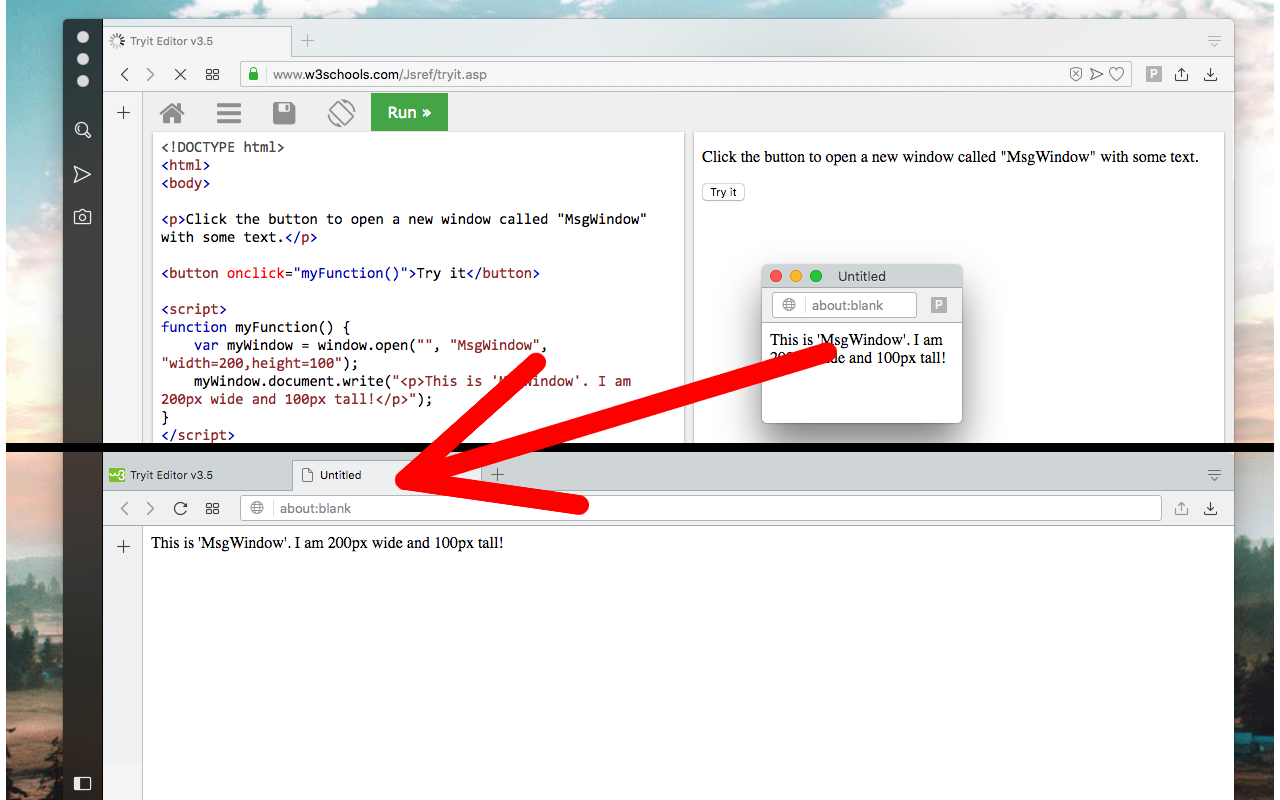
Do not allow popup windows. Open all links in the current window
3.0/5
7 人评分
163用户
v0.2.7当前版本
截图
简介
This extension prevents web pages from opening popup windows. All windows will get opened in the same window (in the currently active window). You can toggle the extension on and off from the toolbar button. When the extension is enabled, all windows are opened in the same active window. So if a website issues a popup window, instead the extension moves the newly created popup window into the active window and then focuses this newly created window (same as dragging a tab from one window to another window). When the extension is disabled, popup window opening is allowed. Note that this extension is not preventing other extensions from opening local popup windows.
Single Window (open links in active window) 是做什么的
Single Window (open links in active window) 是一款面向 Firefox 的外观主题类扩展,主要用来更换浏览器配色、给网页加深色模式、调整界面观感。官方对它的介绍是:Do not allow popup windows. Open all links in the current window在Firefox 附加组件商店(AMO)上,它当前版本 0.2.7,评分 3(7 人评价),约 163 名用户。
适合什么人用
从功能定位看,Single Window (open links in active window) 更适合长时间对着屏幕、希望降低眼睛负担的用户。如果你平时只是偶尔遇到相关需求,用浏览器自带功能也能凑合;但如果这件事每天都发生,装一个专门处理它的扩展通常比手动操作省事得多。
怎么安装 Single Window (open links in active window)
- 打开Firefox 附加组件商店(AMO)上的官方页面;
- 点「添加到浏览器」并确认权限提示;
- 装好后在扩展列表里固定图标,方便随时开关。
本站只做索引与介绍,安装包来自官方商店。如果商店页面提示当前地区不可用,说明该扩展未在你所在区域上架。
常见问题
Single Window (open links in active window) 是免费的吗?
Single Window (open links in active window) 在Firefox 附加组件商店(AMO)免费提供下载。它是浏览器扩展,装上就能直接用,不需要注册账号。
Single Window (open links in active window) 安全吗?
它只申请了 0 项权限,范围比较克制,没有申请「读取所有网站数据」这种大权限。
Single Window (open links in active window) 支持哪些浏览器?
当前收录的版本来自Firefox 附加组件商店(AMO),适用于 Firefox。同一个扩展在其他商店可能有对应版本,但功能与版本号不一定相同。
怎么卸载 Single Window (open links in active window)?
在扩展管理页找到 Single Window (open links in active window),点移除即可。它在本地保存的设置会一起清掉,不会残留数据。
权限清单 来自 manifest.json 原文
接口权限 2
storagetabs
标签 点标签看同类扩展
uBlock Origin
一款高效的网络请求过滤工具,占用极低的内存和 CPU。
Firefox
 AdGuard AdBlocker
AdGuard 广告拦截器可有效的拦截所有网页上的所有类型的…
Firefox
 AdBlocker Ultimate
Completely remove ALL ads. No …
Firefox
 Bitwarden – 免费密码管理器
安全免费的跨平台密码管理器
Firefox
 Malwarebytes Browser Guard
Fast and safe browsing that pr…
Firefox
 Firefox Multi-Account Containers
Firefox Multi-Account Containe…
Firefox
 LastPass Password Manager
LastPass是一款让您的上网浏览更便捷更安全的免费在线密…
Firefox
 1Password: Password Manager
The best way to experience 1Pa…
Firefox