
 DuckDuckGo Privacy Essentials
⚡保护您的数据。支持可选 AI 的私密搜索、私密浏览和广告拦…
Firefox

Omni - Manage Tabs, Bookmarks, History... EN
Alyssa X · Firefox
Supercharge Firefox with commands, shortcuts, and more
3.9/5
20 人评分
123用户
v1.4.5当前版本
权限提示
该扩展申请访问所有网站(
<all_urls>),意味着它可以读取你在任意站点的页面内容,包括已登录的页面。这是许多扩展正常工作的必要条件,但也值得你确认来源可信。
截图
简介
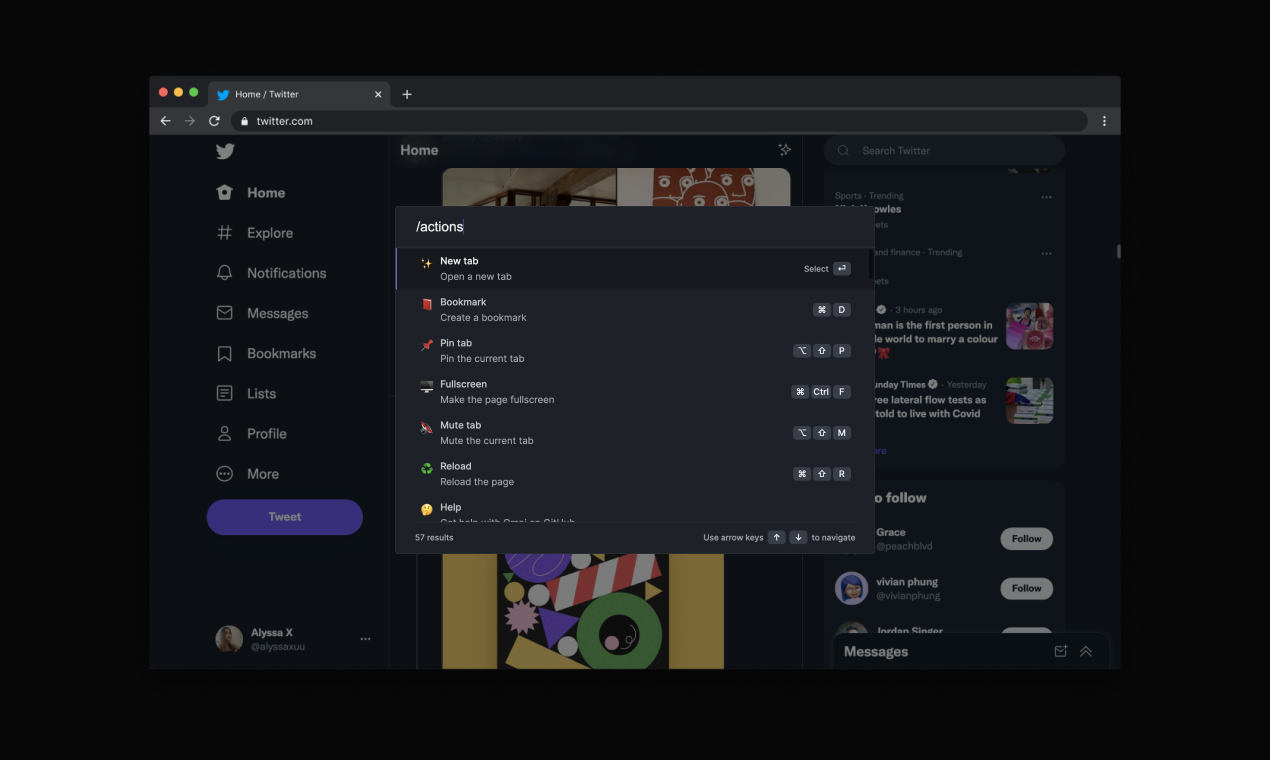
With Omni you can use Firefox like a pro. Manage tabs, bookmarks, your browser history, perform all sorts of actions and more with a simple command interface.
FEATURES
🗄 Switch, open, close, and search your tabs
📚 Browse and manage your bookmarks
🔍 Search your browsing history
⚡️ 50+ actions to improve your productivity
🔮 Special commands to filter and perform more actions
🧩 Integrations with Notion, Figma, Docs, Asana...
⌨️ Shortcuts for actions such as muting, pinning, bookmarking...
⚙️ Advanced settings to help troubleshoot browsing issues
🌙 Dark mode
...and much more - all for free & no sign in needed!
Want to self-host, add new features to Omni, or even make your own omnisearch extension? Feel free to check out the code on GitHub! 👉 https://github.com/alyssaxuu/omni
Omni is built and maintained by Alyssa X (https://alyssax.com)
Omni - Manage Tabs, Bookmarks, History... 是做什么的
Omni - Manage Tabs, Bookmarks, History... 是一款面向 Firefox 的书签管理类扩展,主要用来整理书签、查重、批量导入导出。官方对它的介绍是:Supercharge Firefox with commands, shortcuts, and more在Firefox 附加组件商店(AMO)上,它当前版本 1.4.5,评分 3.85(20 人评价),约 123 名用户。
适合什么人用
从功能定位看,Omni - Manage Tabs, Bookmarks, History... 更适合收藏了大量网页、需要定期整理的用户。如果你平时只是偶尔遇到相关需求,用浏览器自带功能也能凑合;但如果这件事每天都发生,装一个专门处理它的扩展通常比手动操作省事得多。需要注意的是它作用于所有网站,装上后建议先观察一两天,确认不影响常用站点的正常使用。
怎么安装 Omni - Manage Tabs, Bookmarks, History...
- 打开Firefox 附加组件商店(AMO)上的官方页面;
- 点「添加到浏览器」并确认权限提示;
- 装好后在扩展列表里固定图标,方便随时开关。
本站只做索引与介绍,安装包来自官方商店。如果商店页面提示当前地区不可用,说明该扩展未在你所在区域上架。
常见问题
Omni - Manage Tabs, Bookmarks, History... 是免费的吗?
Omni - Manage Tabs, Bookmarks, History... 在Firefox 附加组件商店(AMO)免费提供下载。它是浏览器扩展,装上就能直接用,不需要注册账号。
Omni - Manage Tabs, Bookmarks, History... 安全吗?
它只申请了 0 项权限,范围比较克制,没有申请「读取所有网站数据」这种大权限。
Omni - Manage Tabs, Bookmarks, History... 支持哪些浏览器?
当前收录的版本来自Firefox 附加组件商店(AMO),适用于 Firefox。同一个扩展在其他商店可能有对应版本,但功能与版本号不一定相同。
怎么卸载 Omni - Manage Tabs, Bookmarks, History...?
在扩展管理页找到 Omni - Manage Tabs, Bookmarks, History...,点移除即可。它在本地保存的设置会一起清掉,不会残留数据。
权限清单 来自 manifest.json 原文
站点访问 1
<all_urls>
接口权限 6
activeTabbookmarksbrowsingDatahistorysearchtabs
标签 点标签看同类扩展
DuckDuckGo Privacy Essentials
⚡保护您的数据。支持可选 AI 的私密搜索、私密浏览和广告拦…
Firefox
 Search by Image
A powerful reverse image searc…
Firefox
 SteamDB
在 Steam 商店和社区页面中添加 SteamDB 链接和…
Firefox
 Qwant - Search engine
With this extension, Qwant bec…
Firefox
 Popup Blocker (strict)
Strictly block all popup reque…
Firefox
 Indie Wiki Buddy
Helping you discover quality, …
Firefox
 Tabliss - New Tab
A beautiful New Tab page with …
Firefox
 Block Site
A customizable, password-prote…
Firefox