
Old School GitHub EN
Dean Attali · Firefox
Revert GitHub's UI back to its classic look (before the June 23, 2020 update that has a flat, rounded and more whitespaced design).
截图


简介
Code available on GitHub
Features
=========
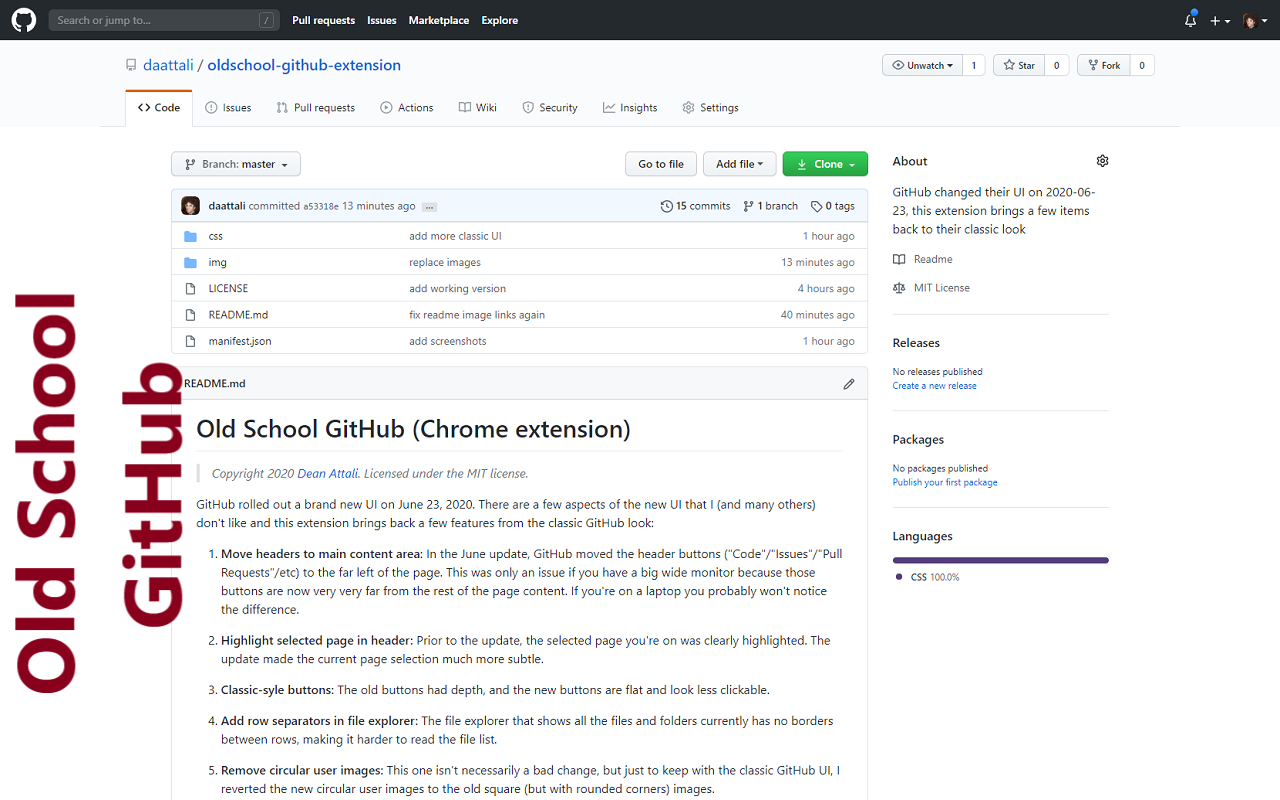
1. Move header tabs to main content area: In the June update, GitHub moved the header buttons ("Code"/"Issues"/"Pull Requests"/etc) to the far left of the page. This became an issue if you have a big wide monitor because those buttons are now very very far from the rest of the page content. If you're on a laptop you probably won't notice the difference.
2. Highlight selected page in header: Prior to the update, the selected page you're on was clearly highlighted. The update made the current page selection much more subtle.
3. Classic-syle buttons and labels: The old buttons had depth and bold font, and the new buttons are flat and look less clickable.
4. Add row separators in file explorer: The file explorer that shows all the files and folders currently has no borders between rows, making it harder to read the file list.
5. Remove circular user images and rounded corners everywhere: The new circular user photos result in unwanted rounding near the corners, cropping significant features from photos that are intended to be square for some users. Many other items were also made very round.
And many other UI fixes such as fix the text width of issue counters and issue label, fix the whitespace of issues, add a slight background to README title, and more.
Limitations
=========
This extension can change the look of existing items on the page, but it cannot change the layout of the page by moving things around.
For example, a common question is whether the repository sidebar can be moved to be above the main code section, like it was previously. Unfortunately that is not possible (or extremely difficult).
The reason is because of the strange way GitHub handles internal links: some pages are actual page reloads, but some pages are fully loaded with AJAX. This makes it impossible to use JavaScript to fix any UI issues, and only CSS can be used. If you're on the Code tab and you click on Pull Requests then you don't actually refresh the page, but if you click on Issues then it is a new page. What that means is that after moving from Code to Pull Requests, any JavaScript changes are reverted because large portions of the page body were re-written. Technically it's possible to find hacky ways around that, using event listeners or mutator observers or any other technique and try to force a re-initialization of the JavaScript when a new page is AJAX-loaded, but that would be extremely difficult to work correctly and would be non performant. So unfortunately only CSS is used.
Old School GitHub 是做什么的
Old School GitHub 是一款面向 Firefox 的开发者工具类扩展,主要用来调试页面、查看样式与请求、测试接口、辅助前端开发。官方对它的介绍是:Revert GitHub's UI back to its classic look (before the June 23, 2020 update that has a flat, rounded and more whitespaced design).在Firefox 附加组件商店(AMO)上,它当前版本 1.9.0,评分 4.7(10 人评价),约 69 名用户。
适合什么人用
从功能定位看,Old School GitHub 更适合前端工程师、测试与需要经常查看页面结构的用户。如果你平时只是偶尔遇到相关需求,用浏览器自带功能也能凑合;但如果这件事每天都发生,装一个专门处理它的扩展通常比手动操作省事得多。
怎么安装 Old School GitHub
- 打开Firefox 附加组件商店(AMO)上的官方页面;
- 点「添加到浏览器」并确认权限提示;
- 装好后在扩展列表里固定图标,方便随时开关。
本站只做索引与介绍,安装包来自官方商店。如果商店页面提示当前地区不可用,说明该扩展未在你所在区域上架。
常见问题
Old School GitHub 是免费的吗?
Old School GitHub 在Firefox 附加组件商店(AMO)免费提供下载。它是浏览器扩展,装上就能直接用,不需要注册账号。
Old School GitHub 安全吗?
它只申请了 0 项权限,范围比较克制,没有申请「读取所有网站数据」这种大权限。
Old School GitHub 支持哪些浏览器?
当前收录的版本来自Firefox 附加组件商店(AMO),适用于 Firefox。同一个扩展在其他商店可能有对应版本,但功能与版本号不一定相同。
怎么卸载 Old School GitHub?
在扩展管理页找到 Old School GitHub,点移除即可。它在本地保存的设置会一起清掉,不会残留数据。
权限清单 来自 manifest.json 原文
未解析到权限条目。