
Neo Diggler EN
Neil Bird · Firefox
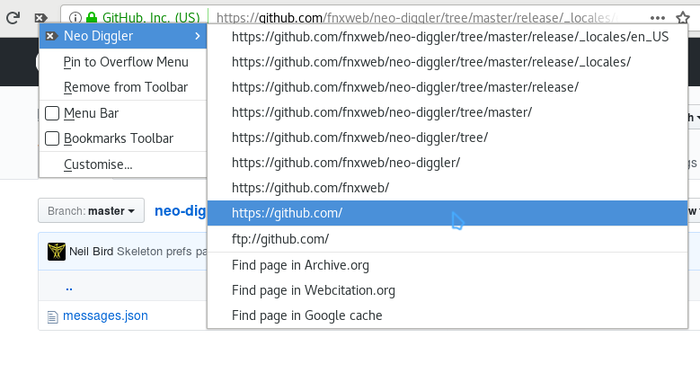
Neo Diggler is a small but powerful add-on for Firefox. It adds a customisable menu button next to the address bar with navigation and modification actions relevant to the current URL.
截图



简介
The button's menu allows you navigate up through the current URL's parents, to visit the equivalent ftp URL, or to visit the site in archive.org. A click on the menu button also provides a clear the location bar (something like the one in Konqueror) - useful for keyboard free browsing.
It also has the ability to add custom URL conversions/manipulations.
<b>Explanation of required permissions</b>
<ul>
<li><i>Input data to the clipboard</i> — copies file:/// URLs to the clipboard for pasting (in lieu of automatic access).
<li><i>Access browser tabs</i> — change the URL of the current tab.
</ul>
Neo Diggler is an adopted re-write of the original Diggler (https://addons.mozilla.org/firefox/118/) by Adam Lock, which although popular (it has spawned a number of Firefox-1.5 patches and clones) has sadly been neglected and, as of its last official release (0.9) only worked up to Firefox 1.0.*.
It has now been re-written as a WebExtension. See the installed ChangeLog that shows up on update for the differences it now has in the way it works.
Here's an example for those tempted to try the custom tool-action feature: open the preferences, create a new action, then enter "Visit 'http' site" for the name, "^https:.*" for the expression, tick the "use as menu label" item, and finally "http://$h" in the action field. This will create a new entry when on <b>https</b> sites that will take you to the <b>http</b> version of the site. Try adding another that goes to the <b>https</b> from the <b>http</b>.
If you have any problems, please contact me directly (don't use the comments form as a poor man's forum), although I can't promise immediate results as I'm not [yet] that familiar with the code.
Neo Diggler 是做什么的
Neo Diggler 是一款面向 Firefox 的实用工具类扩展,主要用来解决浏览器里某类具体的小问题。官方对它的介绍是:Neo Diggler is a small but powerful add-on for Firefox. It adds a customisable menu button next to the address bar with navigation and modification actions relevant to the current URL.在Firefox 附加组件商店(AMO)上,它当前版本 2.1.2resigned1,评分 5(4 人评价),约 74 名用户。
适合什么人用
从功能定位看,Neo Diggler 更适合想补上浏览器原生缺失功能的用户。如果你平时只是偶尔遇到相关需求,用浏览器自带功能也能凑合;但如果这件事每天都发生,装一个专门处理它的扩展通常比手动操作省事得多。
怎么安装 Neo Diggler
- 打开Firefox 附加组件商店(AMO)上的官方页面;
- 点「添加到浏览器」并确认权限提示;
- 装好后在扩展列表里固定图标,方便随时开关。
本站只做索引与介绍,安装包来自官方商店。如果商店页面提示当前地区不可用,说明该扩展未在你所在区域上架。
常见问题
Neo Diggler 是免费的吗?
Neo Diggler 在Firefox 附加组件商店(AMO)免费提供下载。它是浏览器扩展,装上就能直接用,不需要注册账号。
Neo Diggler 安全吗?
它只申请了 0 项权限,范围比较克制,没有申请「读取所有网站数据」这种大权限。
Neo Diggler 支持哪些浏览器?
当前收录的版本来自Firefox 附加组件商店(AMO),适用于 Firefox。同一个扩展在其他商店可能有对应版本,但功能与版本号不一定相同。
怎么卸载 Neo Diggler?
在扩展管理页找到 Neo Diggler,点移除即可。它在本地保存的设置会一起清掉,不会残留数据。
权限清单 来自 manifest.json 原文
接口权限 5
activeTabclipboardWritemenusstoragetabs